

MindWoods is made and published by wu zhaodong. AppBrain is an independent app data site and isn't affiliated with wu zhaodong. The app name, icon, screenshots and description belong to wu zhaodong and are shown as published on the App Store.
AppBrain's verdict
- Rating on App Store
- 2.00
- 1 ratings
- Last updated
- October 21, 2026
- Size
- 18.3 MB
It doesn't have enough ratings yet to judge what users think.
User feedback
Ratings and reviews on the App StoreComments on MindWoods for iOS
We don't have enough comments to show example comments. Please check back later.
Store listing
By wu zhaodong, from the App Store


Description by wu zhaodong Written by the developer, not by AppBrain. Click to read.
WRITE, READ, AND CONNECT
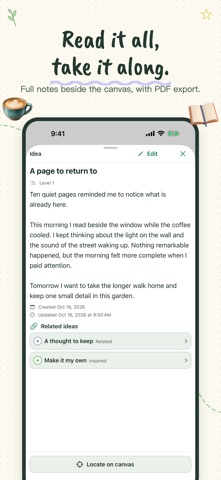
Start with a title, then add notes and images. Arrange idea cards on the canvas, connect them with named relationships, and return to the full text when you want to read or edit. Batch entry helps you capture several ideas at once.
MAKE THE CANVAS YOURS
Combine notes with photo and hand-drawn stickers. Reuse creations from your personal sticker library, pair stickers with ideas, group objects, and organize their stacking order. Choose a theme and customize the toolbar around the tools you use most. Style each idea with classic or handwritten fonts, bold, italic, card colors and three levels, then let Auto Layout tidy up or arrange the garden by level.
KEEP ORGANIZING
Search your ideas, start from a template, and use garden history and the recycle bin to revisit earlier versions or recover content.
EXPORT YOUR WORK
Share a canvas as PNG, export a PDF with a canvas overview and complete notes, or use Markdown and JSON exports to take your work with you.
START FREE, ADD PRO WHEN YOU NEED IT
Free creation includes one garden with up to 10 ideas and selected templates. All themes, export formats, and basic iCloud features are included. MindWoods Pro is a one-time in-app purchase, with no subscription. It adds unlimited gardens and ideas, all templates, unlimited drawing (3 drawings are free), Markdown import, and on-device model summaries on supported devices.
No MindWoods account is required. iCloud features require signing in to iCloud and enabling iCloud Drive in system settings. Model summaries also depend on the system version, device, region, language, and Apple Intelligence availability.
Safety and technology
Found in the app by AppBrain- Price
- Free
- App size
- 18.3 MB
- Content rating
- Everyone
Technologies used by MindWoods
Releases
Updates seen on the App Store- Version
- 1.2.1
- Launched
- February 2026
No changelog data
Alternatives
Similar apps and more from wu zhaodongAlternatives to MindWoods


More from wu zhaodong


Rankings
App Store top chartsApp Store Rankings for MindWoods
About the app and developer
About MindWoods
MindWoods is a productivity app developed by wu zhaodong.
User Ratings
MindWoods is rated 2.00 out of 5 stars. The rating is based on one rating ratings.
App Information
MindWoods is freely available from the App Store. The app size is 18.26 MB. The latest version available is 1.2.1. The last update was on October 21, 2026.
Technical Requirements
The app has a content rating of Everyone. The app has been available on the App Store since February 2026.
Developer information for wu zhaodong
Address:
Frequently asked questions about MindWoods
Is MindWoods free?
Yes. MindWoods is free on the App Store.
Is MindWoods still available?
Yes. MindWoods is on the App Store, and the last update we saw was on October 21, 2026.
How large is MindWoods?
MindWoods is 18.26 MB.
Is MindWoods suitable for children?
App Store rates the content of MindWoods as suitable for everyone.
How do people rate MindWoods?
MindWoods has one rating of 2.00 stars on the App Store.
Who made MindWoods?
MindWoods was developed by wu zhaodong. It is listed in the productivity category on the App Store.
What are the best alternatives to MindWoods?
People looking at MindWoods also look at these productivity apps: 持った?, ToSche - AI Planner & Calendar, MonoMemo - 階層型メモ帳&ToDoリスト, Kounters, Wasurena: Reminder & To-Do.