

minical — Minimal Calendar
minical — Minimal Calendar is made and published by Lim Sangjin. AppBrain is an independent app data site and isn't affiliated with Lim Sangjin. The app name, icon, screenshots and description belong to Lim Sangjin and are shown as published on the App Store.
AppBrain's verdict
- Rating on App Store
- 5.00
- 1 ratings
- Last updated
- October 15, 2026
- Size
- 13.9 MB
It doesn't have enough ratings yet to judge what users think.
User feedback
Ratings and reviews on the App StoreComments on minical — Minimal Calendar for iOS
We don't have enough comments to show example comments. Please check back later.
Store listing
By Lim Sangjin, from the App Store



Description by Lim Sangjin Written by the developer, not by AppBrain. Click to read.
linked calendar, iCloud / iOS system calendars, and minical's own events — wherever they're created, they all land on one screen, color-coded. What's on today, how the rest of the month flows, all visible without scrolling.
■ At a glance
• Today screen — next-event countdown, ongoing, what's left, what's done
• Month view — the entire month in one grid, color patterns visible at a glance
• Widgets — today + tomorrow without leaving the home/lock screen
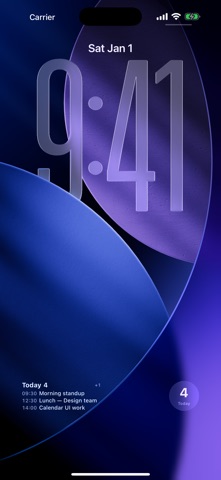
• Shortcuts — your lock screen wallpaper becomes today's schedule
• Apple Watch — at a glance from your wrist
■ Core
• iOS 26 native Tab Bar — Today / Calendar / Agenda / Search / Settings
• Month · Week · Day views — Month uses vertical paging with magnetic snap. Tap the year/month title to jump anywhere
• Two-way linked calendar sync — add / edit / delete writes back to linked calendar immediately. Multi-account
• Recurring events — daily / weekly / monthly / yearly with end conditions. Editing a series instance asks: this event only or the whole series
• Natural-language quick add — "tomorrow 3 PM meeting 1 hour"
• linked calendar's 11-color palette + brightness tones — long-press for shade variants
• Read-only iOS system calendars (iCloud / Exchange) blended in
• Multi-alarm (10 presets, stack as many as you want)
■ Full widget lineup
Home screen
• Up Next (Small / Medium) — bold when one event, compact rows when many. Long-press to filter calendars
• Today List (Medium / Large) — today first; tomorrow only when today has room to spare
• Month grid (Large)
Lock screen
• Inline (one line above the clock — timed events first)
• Inline Long (multiple events compressed)
• Rectangular (single event large, multi-event compact)
• Circular (today's count)
Apple Watch
• Native Watch app — quick view + quick add
• Four complications (Inline / Rectangular / Circular / Corner)
■ Auto-refreshing wallpaper via Shortcuts
• "Generate Today Wallpaper" Shortcut — chain it with the system "Set Wallpaper" action and a daily 7 AM automation, and your lock screen refreshes itself with today's plan
• "Save Today Wallpaper to Photos" — single-action variant
• Three styles: Gradient / Minimal / Dark
■ Promises
• No ads. No account required (linked calendar sync is optional). No tracking. No IAP.
• All data stays on-device. calendar account tokens live only in Keychain. No analytics or ad SDKs.
Scattered events on one screen — today at a glance.
Safety and technology
Found in the app by AppBrain- Price
- Free
- App size
- 13.9 MB
- Content rating
- Everyone
Technologies used by minical — Minimal Calendar
Releases
Updates seen on the App Store- Version
- 1.12.4
- Launched
- May 2026
No changelog data
Alternatives
Similar apps and more from Lim SangjinAlternatives to minical — Minimal Calendar


More from Lim Sangjin


Rankings
App Store top chartsApp Store Rankings for minical — Minimal Calendar
About the app and developer
About minical — Minimal Calendar
minical — Minimal Calendar is a productivity app developed by Lim Sangjin.
User Ratings
minical — Minimal Calendar is rated 5.00 out of 5 stars. The rating is based on one rating ratings.
App Information
minical — Minimal Calendar is freely available from the App Store. The app size is 13.90 MB. The latest version available is 1.12.4. The last update was on October 15, 2026.
Technical Requirements
The app has a content rating of Everyone. The app has been available on the App Store since May 2026.
Developer information for Lim Sangjin
Address:
Frequently asked questions about minical — Minimal Calendar
Is minical — Minimal Calendar free?
Yes. minical — Minimal Calendar is free on the App Store.
Is minical — Minimal Calendar still available?
Yes. minical — Minimal Calendar is on the App Store, and the last update we saw was on October 15, 2026.
How large is minical — Minimal Calendar?
minical — Minimal Calendar is 13.90 MB.
Is minical — Minimal Calendar suitable for children?
App Store rates the content of minical — Minimal Calendar as suitable for everyone.
How do people rate minical — Minimal Calendar?
minical — Minimal Calendar has one rating of 5.00 stars on the App Store.
Who made minical — Minimal Calendar?
minical — Minimal Calendar was developed by Lim Sangjin. It is listed in the productivity category on the App Store.
What are the best alternatives to minical — Minimal Calendar?
People looking at minical — Minimal Calendar also look at these productivity apps: DayKit: Personal Logbook, Notis: Screenshot to Calendar, Pulse Calendar: Daily Planner, Clastly — Personal Database, Screenshot Search: CaptureMind.