

minimalphone
minimalphone is made and published by Daniel Skelley. AppBrain is an independent app data site and isn't affiliated with Daniel Skelley. The app name, icon, screenshots and description belong to Daniel Skelley and are shown as published on the App Store.
AppBrain's verdict
- Last updated
- August 13, 2025
Rankings
App Store top chartsApp Store Rankings for minimalphone
Competitors
Similar apps and more from Daniel SkelleyAlternatives to minimalphone


More from Daniel Skelley

Releases
Updates seen on the App Store- Version
- 1.0
- Launched
- August 2025
No changelog data
User feedback
Ratings and reviews on the App StoreComments on minimalphone for iOS
We don't have enough comments to show example comments. Please check back later.
Technology
Found in the app by AppBrain- Price
- Free
- App size
- 2.96 MB
- Content rating
- Everyone
Technologies used by minimalphone
About the app and developer
About minimalphone
minimalphone is a health & fitness app developed by Daniel Skelley.
What is the rating of minimalphone?
minimalphone has no ratings yet.
Is minimalphone free?
minimalphone is free. The app size is 2.96 MB. The latest version available is 1.0. The last update was on August 13, 2025.
What are the requirements for minimalphone?
The app has a content rating of Everyone. The app has been available on the App Store since August 2025.
Developer information for Daniel Skelley
Address:
Store listing
By Daniel Skelley, from the App Store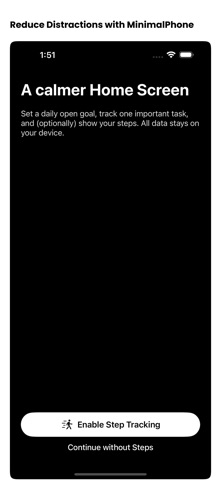



Description by Daniel Skelley Written by the developer, not by AppBrain. Click to read.
You want a calmer day.
You need a simple plan.
This is it.
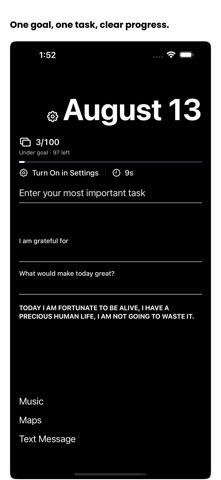
Set a daily open goal.
Watch a clear bar show progress.
See how close you are. Close the app.
Capture one most important task.
Save it fast. Complete it. Move on.
See a gentle timer since your last open.
Add steps if you want with Motion and Fitness.
You choose when to enable it.
Keep a light journal for gratitude and what would make today great.
Use simple shortcuts for calls, texts, maps, and music only when needed.
Made to stay out of your way.
Left-hand option. Light or dark. Minimal text if you like.
Everything is on your device.
No accounts. No analytics. No ads. No tracking.
First launch is simple.
Tap Enable Step Tracking to see steps.
Or continue without steps.
Either way the app is useful from the start.
A calmer Home Screen.
A clear goal and one next action.
That is the plan.