AppBrain
AppBrain
  • Apps
  • Apps being viewed right now Trending apps today Most popular apps All-time most installed apps Top rated apps iPhone and iPad apps
  • Intelligence ▾
    Intelligence overview → Track any Android app or your whole market
    Track & analyze
    Keyword Tracker & OptimizerTrack & improve Play rankings App Performance ReportOne-off PDF for any app StatisticsFree Android & Play market stats
    Promote your app
    Featured Apps App Links
  • Intelligence
  • Pricing
  • Dashboard
  • Sign up
  • Log in
App Store Apps > Photo & Video > Minimo Studio: Compress & Trim
Minimo Studio: Compress & Trim icon

Minimo Studio: Compress & Trim

2.0.1
ONUR YAVUZ
0.00
0 reviews
Free

Minimo Studio: Compress & Trim Screenshot 1 of 6
Minimo Studio: Compress & Trim Screenshot 2 of 6
Minimo Studio: Compress & Trim Screenshot 3 of 6
Minimo Studio: Compress & Trim Screenshot 4 of 6
Minimo Studio: Compress & Trim Screenshot 5 of 6
Minimo Studio: Compress & Trim Screenshot 6 of 6
Screenshots by ONUR YAVUZ, from the the App Store listing
View on the App Store

AppBrain's verdict

Last updated
September 10, 2026
Size
7.24 MB
Official page on the App Store

Share Minimo Studio: Compress & Trim

User feedback

Ratings and reviews on the App Store

Comments on Minimo Studio: Compress & Trim for iOS

We don't have enough comments to show example comments. Please check back later.

Store listing

By ONUR YAVUZ, from the App Store
Description by ONUR YAVUZ Written by the developer, not by AppBrain. Click to read.
Minimo Studio is a small video workshop that lives on your iPhone. Pick a tool, pick a video, get a clean result in seconds — no watermark, no subscription, nothing uploaded.

FOUR TOOLS, ONE APP
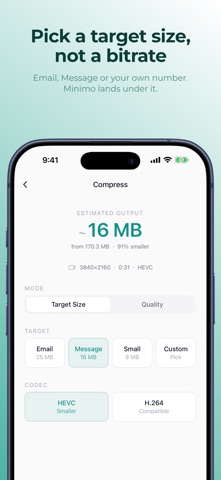
• Compress — hit an exact size (Email 25 MB, Message 16 MB, Small 8 MB, or your own target) or just pick a quality. HDR color stays intact with HEVC.
• Convert — move between MP4 and MOV, HEVC and H.264, pull the audio out as M4A, or turn a clip into a shareable GIF.
• Trim — cut to the part you need. Trimming is lossless: nothing is re-encoded, and the cut lands on a real keyframe so your clip plays the same everywhere.
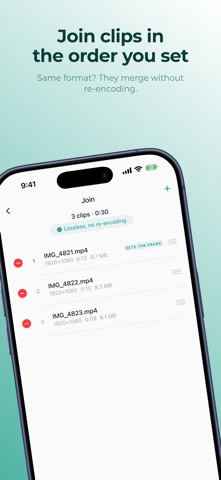
• Join — stitch several clips into one, in the order you choose.

PRIVATE BY DESIGN
Every tool runs on your iPhone using Apple's own hardware encoders. Your videos are never uploaded, and there is no account to create.

FREE EVERY DAY
Use up to 3 files a day free, across any tool. A one-time Minimo Pro purchase removes the daily limit and turns off ads — one payment, never a subscription.

Safety and technology

Found in the app by AppBrain
Price
Free
App size
7.24 MB
Content rating
Everyone

Technologies used by Minimo Studio: Compress & Trim

Releases

Updates seen on the App Store
Version
2.0.1
Launched
June 2026

No changelog data

Alternatives

Similar apps and more from ONUR YAVUZ

Alternatives to Minimo Studio: Compress & Trim

ShrinkReel: Video Compressor icon ShrinkReel: Video Compressor
丽佳 施
0.0
Free
SimpleCut - シンプルな動画編集・カバー画像作成 icon SimpleCut - シンプルな動画編集・カバー画像作成
Takaho Hayashi
0.0
Free
Merge & Tidy Videos icon Merge & Tidy Videos
knowledge commons LLC
0.0
Free
ReelClip: Video Clip Editor icon ReelClip: Video Clip Editor
JUDE OMONUWA EVBAKHAVBOKUN
0.0
Free
Pulse: Auto Highlight Reel icon Pulse: Auto Highlight Reel
Golazo Services
0.0
Free
VideoConcatenation icon VideoConcatenation
E-ONLINESERVICE
0.0
Free
JoinCut: Video Merger & Joiner icon JoinCut: Video Merger & Joiner
mongdaewon
4.8
Free
5 ratings
Useful Video Editor icon Useful Video Editor
katapu.net
0.0
Free

More from ONUR YAVUZ

LensTime: Contact Lens Tracker icon LensTime: Contact Lens Tracker
ONUR YAVUZ
5.0
Free
1 ratings
Rundle: ADHD Routine & Timer icon Rundle: ADHD Routine & Timer
ONUR YAVUZ
0.0
Free
Warranty Tracker: Receipts icon Warranty Tracker: Receipts
ONUR YAVUZ
0.0
Free

Rankings

App Store top charts

App Store Rankings for Minimo Studio: Compress & Trim

This app is not ranked

About the app and developer

About Minimo Studio: Compress & Trim

Minimo Studio: Compress & Trim is a photo & video app developed by ONUR YAVUZ.

User Ratings

The app has no ratings yet.

App Information

Minimo Studio: Compress & Trim is freely available from the App Store. The app size is 7.24 MB. The latest version available is 2.0.1. The last update was on September 10, 2026.

Technical Requirements

The app has a content rating of Everyone. The app has been available on the App Store since June 2026.

Minimo Studio: Compress & Trim is made and published by ONUR YAVUZ. AppBrain is an independent app data site and isn't affiliated with ONUR YAVUZ. The app name, icon, screenshots and description belong to ONUR YAVUZ and are shown as published on the App Store.

Developer information for ONUR YAVUZ

ONUR YAVUZ

Address:

Frequently asked questions about Minimo Studio: Compress & Trim

Is Minimo Studio: Compress & Trim free?

Yes. Minimo Studio: Compress & Trim is free on the App Store.

Is Minimo Studio: Compress & Trim still available?

Yes. Minimo Studio: Compress & Trim is on the App Store, and the last update we saw was on September 10, 2026.

How large is Minimo Studio: Compress & Trim?

Minimo Studio: Compress & Trim is 7.24 MB.

Is Minimo Studio: Compress & Trim suitable for children?

App Store rates the content of Minimo Studio: Compress & Trim as suitable for everyone.

Who made Minimo Studio: Compress & Trim?

Minimo Studio: Compress & Trim was developed by ONUR YAVUZ. It is listed in the photo & video category on the App Store.

What are the best alternatives to Minimo Studio: Compress & Trim?

People looking at Minimo Studio: Compress & Trim also look at these photo & video apps: ShrinkReel: Video Compressor, SimpleCut - シンプルな動画編集・カバー画像作成, Merge & Tidy Videos, ReelClip: Video Clip Editor, Pulse: Auto Highlight Reel.

Popular Photo & Video Apps Top new apps Price drops on Google Play Apps other people are watching Today's trending apps
ShrinkReel: Video Compressor icon ShrinkReel: Video Compressor
SimpleCut - シンプルな動画編集・カバー画像作成 icon SimpleCut - シンプルな動画編集・カバー画像作成
Merge & Tidy Videos icon Merge & Tidy Videos
ReelClip: Video Clip Editor icon ReelClip: Video Clip Editor
Pulse: Auto Highlight Reel icon Pulse: Auto Highlight Reel
VideoConcatenation icon VideoConcatenation
JoinCut: Video Merger & Joiner icon JoinCut: Video Merger & Joiner
Useful Video Editor icon Useful Video Editor
Overview Alternatives Reviews Rankings Technology
AppBrain Intelligence premium content

Subscribe now to get full and unlimited access to AppBrain Intelligence. You'll have access to:

  • App Intelligence dashboard (performance timeline, competitor comparison, country rankings, insight cards)
  • Detailed ranking data per app
  • Full timeline per developer
  • Device market shares data per country
  • Unlimited keyword tracking
  • AI assistant access via MCP (Claude, Cursor or any MCP client)
1 Month

$75/mo
(billed every month)

SAVE 0%
Subscribe
3 Months

$65/mo
($195 billed every 3 months)

SAVE 13%
Subscribe
1 Year

$57.50/mo
($690 billed every year)

SAVE 23%
Subscribe
Each subscription will automatically renew 3 days before the expiration date for the same time period. Subscriptions can be cancelled at any time before the renewal.

AppBrain is an app data site, we track rankings, ratings, installs for all apps and games on Google Play and the App Store. AppBrain doesn't host app files or APKs, all install links go directly to the official store. All trademarks are owned by their respective owners.

More apps

  • Top Android apps being viewed
  • View msgview: MSG & EML Viewer
  • Moto IoT Service
  • View Joysak

App statistics

  • Android statistics
  • Google Play Developer stats
  • Trending Android Apps
  • Trending iOS apps
  • Top popular Apps
  • Buy the best Android phone
  • Buy & sell app businesses

About AppBrain

  • Contact
  • Privacy
  • Documentation
  • DMCA takedowns
  • Blog
  • Android App Marketing: Learn how to better market your Android app
© 2010-2026 - AppBrain