

MintMonitor: Budget Planner
MintMonitor: Budget Planner is made and published by MintMeter LLC. AppBrain is an independent app data site and isn't affiliated with MintMeter LLC. The app name, icon, screenshots and description belong to MintMeter LLC and are shown as published on the App Store.
AppBrain's verdict
New- Rating on App Store
- 5.00
- 1 ratings
- Last updated
- September 22, 2026
MintMonitor: Budget Planner came out 45 days ago. It doesn't have enough ratings yet to judge what users think.
Rankings
App Store top chartsApp Store Rankings for MintMonitor: Budget Planner
Competitors
Similar apps and more from MintMeter LLCAlternatives to MintMonitor: Budget Planner


Releases
Updates seen on the App Store- Version
- 1.0.3
- Launched
- September 2026
No changelog data
User feedback
Ratings and reviews on the App StoreComments on MintMonitor: Budget Planner for iOS
We don't have enough comments to show example comments. Please check back later.
Technology
Found in the app by AppBrain- Price
- Free
- App size
- 40.0 MB
- Content rating
- Everyone
Technologies used by MintMonitor: Budget Planner
About the app and developer
About MintMonitor: Budget Planner
MintMonitor: Budget Planner is a finance app developed by MintMeter LLC.
What is the rating of MintMonitor: Budget Planner?
MintMonitor: Budget Planner is rated 5.00 out of 5 stars, based on one rating ratings.
Is MintMonitor: Budget Planner free?
MintMonitor: Budget Planner is free. The app size is 39.98 MB. The latest version available is 1.0.3. The last update was on September 22, 2026.
What are the requirements for MintMonitor: Budget Planner?
The app has a content rating of Everyone. The app has been available on the App Store since September 2026.
Developer information for MintMeter LLC
Address:
Store listing
By MintMeter LLC, from the App Store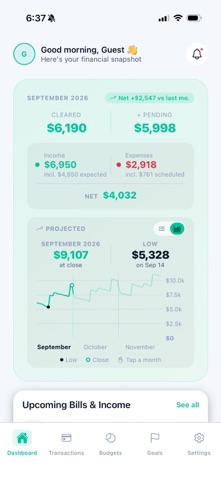




Description by MintMeter LLC Written by the developer, not by AppBrain. Click to read.
Most budgeting apps are good at telling you where the money went. MintMonitor tells you where it's going: bills and paychecks land on their real dates instead of being smoothed into a monthly average, so you can see the day your balance dips while there's still time to do something about it.
YOUR BALANCE, THREE MONTHS AHEAD
• Every day between today and three months out, with the balance at the close of each one
• Read it as three figures or as a balance chart, drawn from the same day-by-day walk
• The low point in each cycle, dated — a tight week is visible before you reach it
• Cleared and pending kept apart, so you know what's actually in the account
A PROJECTED CALENDAR YOU CAN READ TWO WAYS
• A month grid showing each day's net movement and the balance after it
• Or a table: one row per day, with income, expenses and the projected balance in their own columns
• Tap any day to see what it's made of — every bill, paycheck and budgeted amount behind the figure
• Pick the one the dashboard opens in, and switch whenever you like
BILLS AND PAYCHECKS ON THEIR REAL DATES
• Bills weekly, every two weeks, monthly, quarterly or annual
• Paychecks weekly, every two weeks, twice a month or monthly
• Add a bill as paid, or drop one from the month when it isn't happening
• Reminders ahead of a due date, and a follow-up if one goes past due
BUDGETS THAT MATCH HOW YOU'RE PAID
• A budget per category, by week, two weeks, half-month or month
• Dated bills come out of their budget rather than on top of it
• Alerts when a category is near its limit or over it — you pick the point
• Start your budget cycle on the day you're actually paid, not the 1st
• Choose which day your weeks begin, separately from that cycle
WHERE THE MONEY IS GOING
• Spending broken down by category over 30, 60 or 90 days, or six months
• Income against expenses, month by month
• Savings goals with a target amount and a target date, editable as plans change
• Reserve a goal's contribution as a budget, on the day the money actually moves
SET UP IN ONE SITTING
• A guided walkthrough for your starting balance, income and budgets
• Suggested budgets to start from, rather than a blank page
• Set up mid-month and the first cycle scales to the days that are left
• A tour of the app whenever you want it again
YOUR TRANSACTIONS, AND YOUR WAY OUT
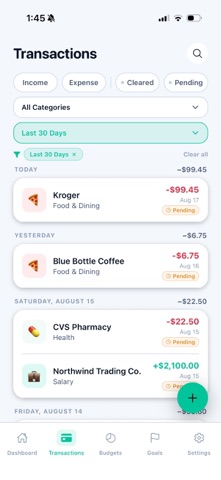
• Filter by date, type, cleared status or category, and save the view you use most
• Export your full history to CSV whenever you want it
BACKED UP AND IN STEP
• Cloud backup after changes, restored on any device you sign in to
• Sign in with Apple, and delete your account and its data from inside the app
BUILT TO BE PLAIN
• Every figure traceable to what produced it — no unexplained numbers
• Dark and light themes
• Eight currencies
• A glossary of every term the app uses
NO BANK CONNECTION
MintMonitor never asks for your bank login. You enter what you earn and what you owe, and every projection is built from that.
SUBSCRIPTION
MintMonitor Access unlocks the whole app — no limited tier, no upsells inside. Choose monthly or annual, starting with a free trial. Payment is charged to your Apple ID at confirmation of purchase, and renews automatically unless cancelled at least 24 hours before the end of the current period. Manage or cancel anytime in your Apple ID settings.
MintMonitor is a budgeting tool. It doesn't give financial advice.
Terms of Use (EULA): https://www.apple.com/legal/internet-services/itunes/dev/stdeula/