

Mintofu: Notes Tasks PDF
Mintofu: Notes Tasks PDF is made and published by Mintofu AI Inc. AppBrain is an independent app data site and isn't affiliated with Mintofu AI Inc. The app name, icon, screenshots and description belong to Mintofu AI Inc. and are shown as published on the App Store.
AppBrain's verdict
- Last updated
- October 4, 2026
Rankings
App Store top chartsApp Store Rankings for Mintofu: Notes Tasks PDF
Competitors
Similar apps and more from Mintofu AI Inc.Alternatives to Mintofu: Notes Tasks PDF


Releases
Updates seen on the App Store- Version
- 1.1.9
- Launched
- June 2026
No changelog data
User feedback
Ratings and reviews on the App StoreComments on Mintofu: Notes Tasks PDF for iOS
We don't have enough comments to show example comments. Please check back later.
Technology
Found in the app by AppBrain- Price
- Free
- App size
- 167.4 MB
- Content rating
- Everyone
Technologies used by Mintofu: Notes Tasks PDF
About the app and developer
About Mintofu: Notes Tasks PDF
Mintofu: Notes Tasks PDF is a productivity app developed by Mintofu AI Inc.
User Ratings
The app has no ratings yet.
App Information
Mintofu: Notes Tasks PDF is freely available from the App Store. The app size is 167.37 MB. The latest version available is 1.1.9. The last update was on October 4, 2026.
Technical Requirements
The app has a content rating of Everyone. The app has been available on the App Store since June 2026.
Developer information for Mintofu AI Inc.
Address:
Frequently asked questions about Mintofu: Notes Tasks PDF
Is Mintofu: Notes Tasks PDF free?
Yes. Mintofu: Notes Tasks PDF is free on the App Store.
Is Mintofu: Notes Tasks PDF still available?
Yes. Mintofu: Notes Tasks PDF is on the App Store, and the last update we saw was on October 4, 2026.
How large is Mintofu: Notes Tasks PDF?
Mintofu: Notes Tasks PDF is 167.37 MB.
Is Mintofu: Notes Tasks PDF suitable for children?
App Store rates the content of Mintofu: Notes Tasks PDF as suitable for everyone.
Who made Mintofu: Notes Tasks PDF?
Mintofu: Notes Tasks PDF was developed by Mintofu AI Inc. It is listed in the productivity category on the App Store.
What are the best alternatives to Mintofu: Notes Tasks PDF?
People looking at Mintofu: Notes Tasks PDF also look at these productivity apps: Project Planner: Morning Press, Storage Cleaner_ Phone Cleanup, Simple Habit Tracker - Pebble, michi - Next Gen Notes App, Scenova: Pomodoro Focus Timer.
Store listing
By Mintofu AI Inc., from the App Store




Description by Mintofu AI Inc. Written by the developer, not by AppBrain. Click to read.
Mintofu brings your notes, tasks, PDFs, mind maps, and calendar together in one beautifully designed app for iPhone, iPad, and Mac. Capture a thought, mark up a PDF, manage your to-dos, plan your day, map out a project, and stay focused with a built-in timer — all in one calm, private place, with no clutter and no account required.
Start free today and bring your whole world into one app.
WHY MINTOFU
Your thinking doesn't stay in neat boxes — but most apps do. You end up juggling a notes app, a to-do app, a PDF reader, a mind-mapping tool, and a calendar, copying between them and losing context at every hop.
Mintofu was built the other way around. Everything lives in one place, and every piece of content can become any other. Your tools finally move at the speed of your thinking.
PRIVATE AI, BUILT IN
Apple Intelligence works right inside your notes, tasks, mind maps, and calendar — draft and brainstorm, proofread, rewrite, and summarize, or translate in a tap — and it powers the conversions between them. Everything runs on your device, so your ideas never leave your hardware.
FREE FEATURES
- Notebooks to organize your notes, ideas and plans by project or topic
- Rich-text notes with live Markdown, custom fonts, highlights, drawing, and attachments
- One-tap translation for any note or selection
- Audio Notes — record voice memos, keep typing while you record, and transcribe them to text
- PDF Documents — read and mark up PDFs in any notebook: highlight, write with Apple Pencil, or fill in forms; scans become searchable
- Full calendar — month, week, day, and timeline views, plus a productivity heatmap
- Public holidays for your region, shown across every calendar view
- Live sync with your device calendars; export events as .ics
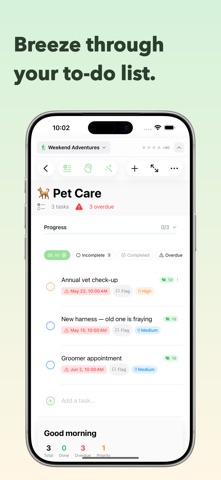
- Tasks with priorities, due dates, subtasks, tags, time tracking, and reminders
- Natural-language dates like "next Friday at 3pm"
- Smart Lists, Eisenhower Matrix, Focus Queue, and burndown charts to stay on track
- Built-in Focus timer and achievement badges
- Mind maps on an infinite canvas — import Markdown, convert to notes or tasks in a tap
- Kanban boards and dashboards (Overview, Kanban, and Post Board)
- Widgets for Quick Capture, Notes, Mind Maps, Calendar, Tasks, and Dashboards
- Version History — Mintofu keeps earlier versions of your notes, mind maps, tasks, and events, private on your device
- Private, on-device AI throughout, via Apple Intelligence
- iCloud sync across iPhone, iPad, and Mac — fully offline-first
- Export to PDF, Markdown, and PNG, or share anywhere
- Available in 40 languages, with right-to-left support, VoiceOver, and keyboard shortcuts
MINTOFU+
Everything above is free. Upgrade only if you want more:
- Unlimited notebooks, mind maps, and audio notes
- Unlimited AI generations and translations
- Public holidays for multiple regions
- Compare and restore any earlier version
- Unlimited PDF documents
- Monthly, annual, or one-time lifetime
PERFECT FOR
- Students capturing lectures and planning study sessions
- Professionals juggling projects, meetings, and deadlines
- Writers and researchers organizing notes, ideas, and drafts
- Visual thinkers who brainstorm and plan with mind maps
- Anyone building a daily-planning and focus routine that sticks
- Privacy-conscious people who want no account and no tracking
- Apple users who want one beautiful app across iPhone, iPad, and Mac
Bring every idea, task, and plan into one place.
Privacy Policy: https://www.mintofu.ai/privacy
Terms of Use: https://www.mintofu.ai/terms