

Mission Alarm Clock: Tasks
Mission Alarm Clock: Tasks is made and published by Linh Phan Nhat Khanh. AppBrain is an independent app data site and isn't affiliated with Linh Phan Nhat Khanh. The app name, icon, screenshots and description belong to Linh Phan Nhat Khanh and are shown as published on the App Store.
AppBrain's verdict
- Last updated
- September 17, 2026
- Size
- 9.92 MB
User feedback
Ratings and reviews on the App StoreComments on Mission Alarm Clock: Tasks for iOS
We don't have enough comments to show example comments. Please check back later.
Store listing
By Linh Phan Nhat Khanh, from the App Store


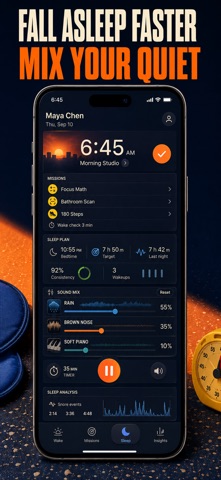
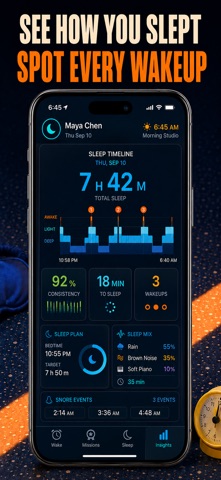


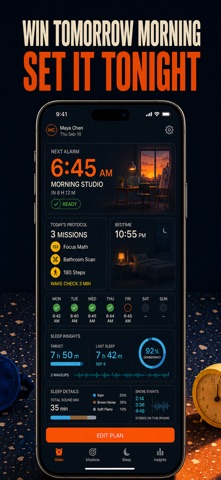
Description by Linh Phan Nhat Khanh Written by the developer, not by AppBrain. Click to read.
Most alarm apps only make noise. WakeSure makes you prove you are awake. Attach a mission to any alarm: solve math, shake the phone, do squats, match memory cards, type a quote, scan the barcode on your toothpaste, or photograph the kitchen sink. Stack up to three missions and the alarm will not stop until every one is done. When bedtime comes, mix rain, ocean, thunder, brown noise or a piano lullaby on a sleep timer, and let the tracker log your night and catch your snoring.
WHAT YOU GET
• Get out of bed on time, because dismissing the alarm requires a real task
• Beat the strongest snooze habit with up to three chained missions and adjustable difficulty
• Fall asleep faster with ten layered sleep sounds and an auto-stop timer
• See how long you really slept and how often you snored, with playback clips
• Repeat alarms your way: daily, weekdays, weekends or custom days, each with its own volume and tone
• Trust it to ring even when the app is closed, with scheduled system notifications and progressive volume
PERFECT FOR
• Heavy sleepers who can silence any ordinary alarm without waking up
• Students and shift workers whose mornings cannot afford a missed start
• Light sleepers who need steady white noise to drift off
• Anyone who suspects they snore and wants proof, not guesses
WHY NOT JUST USE THE BUILT-IN CLOCK?
The stock alarm has a snooze button the size of your thumb and no way to check whether you actually stood up. WakeSure removes the escape hatch: no snooze by default, a mission that needs your brain or your body, and a sleep side that the stock clock simply does not have.
PRIVATE BY DEFAULT
Your alarms, sleep sessions, snore recordings and reference photos are stored on your iPhone. The camera is used only for the Photo and Barcode missions you set up, the microphone only while sleep tracking runs, and motion only during Shake and Squat missions. Each permission can be revoked in Settings at any time. No account is required.
FULL ACCESS
WakeSure is a paid app. Choose a weekly plan, a yearly plan, or a one-time lifetime purchase. Every plan unlocks all seven missions, mission stacking, the complete sound library, snore detection and unlimited alarms. Subscriptions renew automatically unless cancelled at least 24 hours before the end of the current period, and can be managed in your App Store account settings.
Set tomorrow's alarm tonight, add one mission, and see how different the morning feels.
Terms of Service: https://pnkl26.web.app/terms-of-service
Privacy Policy: https://pnkl26.web.app/privacy-policy
Support: pnkhanhlinh0206@gmail.com
Safety and technology
Found in the app by AppBrain- Price
- Free
- App size
- 9.92 MB
- Content rating
- Everyone
Technologies used by Mission Alarm Clock: Tasks
Releases
Updates seen on the App Store- Version
- 1.1
- Launched
- June 2026
No changelog data
Alternatives
Similar apps and more from Linh Phan Nhat KhanhAlternatives to Mission Alarm Clock: Tasks


More from Linh Phan Nhat Khanh


Rankings
App Store top chartsApp Store Rankings for Mission Alarm Clock: Tasks
About the app and developer
About Mission Alarm Clock: Tasks
Mission Alarm Clock: Tasks is an utilities app developed by Linh Phan Nhat Khanh.
User Ratings
The app has no ratings yet.
App Information
Mission Alarm Clock: Tasks is freely available from the App Store. The app size is 9.92 MB. The latest version available is 1.1. The last update was on September 17, 2026.
Technical Requirements
The app has a content rating of Everyone. The app has been available on the App Store since June 2026.
Developer information for Linh Phan Nhat Khanh
Address:
Frequently asked questions about Mission Alarm Clock: Tasks
Is Mission Alarm Clock: Tasks free?
Yes. Mission Alarm Clock: Tasks is free on the App Store.
Is Mission Alarm Clock: Tasks still available?
Yes. Mission Alarm Clock: Tasks is on the App Store, and the last update we saw was on September 17, 2026.
How large is Mission Alarm Clock: Tasks?
Mission Alarm Clock: Tasks is 9.92 MB.
Is Mission Alarm Clock: Tasks suitable for children?
App Store rates the content of Mission Alarm Clock: Tasks as suitable for everyone.
Who made Mission Alarm Clock: Tasks?
Mission Alarm Clock: Tasks was developed by Linh Phan Nhat Khanh. It is listed in the utilities category on the App Store.
What are the best alternatives to Mission Alarm Clock: Tasks?
People looking at Mission Alarm Clock: Tasks also look at these utilities apps: Blinko : Alarm Clock, Unza Alarm, SmileClock, AlarmX - Anti Snooze Clock, DanXing: Wake Mission Alarm.