AppBrain
AppBrain
  • Apps
  • Apps being viewed right now Trending apps today Most popular apps All-time most installed apps Top rated apps iPhone and iPad apps
  • Intelligence ▾
    Intelligence overview → Track any Android app or your whole market
    Track & analyze
    Keyword Tracker & OptimizerTrack & improve Play rankings App Performance ReportOne-off PDF for any app StatisticsFree Android & Play market stats
    Promote your app
    Featured Apps App Links
  • Intelligence
  • Pricing
  • Dashboard
  • Sign up
  • Log in
App Store Apps > Utilities > Mittari: Tally Counter
Mittari: Tally Counter icon

Mittari: Tally Counter

1.2
Diogo Resende Rainho
0.00
0 reviews
$0.99

Mittari: Tally Counter Screenshot 1 of 6
Mittari: Tally Counter Screenshot 2 of 6
Mittari: Tally Counter Screenshot 3 of 6
Mittari: Tally Counter Screenshot 4 of 6
Mittari: Tally Counter Screenshot 5 of 6
Mittari: Tally Counter Screenshot 6 of 6
Screenshots by Diogo Resende Rainho, from the the App Store listing
View on the App Store

AppBrain's verdict

Last updated
September 15, 2026
Size
2.19 MB
Official page on the App Store

User feedback

Ratings and reviews on the App Store

Comments on Mittari: Tally Counter for iOS

We don't have enough comments to show example comments. Please check back later.

Store listing

By Diogo Resende Rainho, from the App Store
Description by Diogo Resende Rainho Written by the developer, not by AppBrain. Click to read.
Mittari is a counter the way it should feel: open it, tap anywhere on the screen, and count. Every tap gives a crisp haptic click while the digits spin like a mechanical tally counter.

No accounts. No ads. No clutter. Just counting.

COUNT ANYTHING, FOUR WAYS

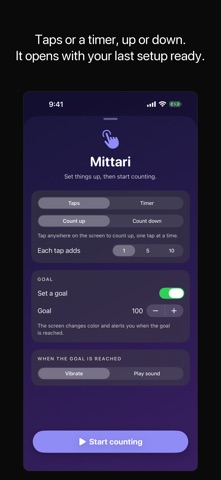
- Tap counter: count up, one tap at a time, with an optional goal
- Tap countdown: start from any number and count down to zero
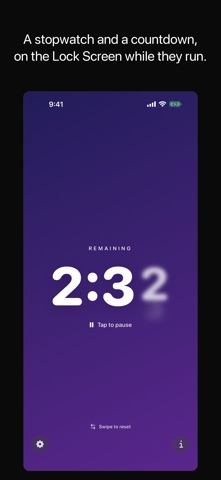
- Stopwatch: a timed counter you start and pause with a tap
- Countdown timer: set minutes and seconds, tap to start

FEELS AMAZING

- The whole screen is the button, so you never miss
- Crisp haptic feedback on every tap, with a stronger pulse every ten
- Digits roll up and down like a physical clicker
- Ripples follow your fingertip

REACH YOUR GOAL

When a countdown hits zero or your goal is reached, the whole screen changes color and Mittari vibrates or plays a sound. Your choice.

MADE FOR FLOW

- Swipe up to reset, like flicking to the next video
- Swipe right for settings, swipe left for about
- Your mode, values and current count are always remembered
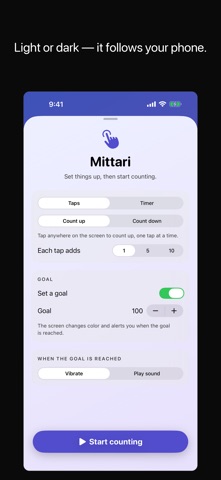
- Beautiful in light and dark mode

ON YOUR WRIST

Mittari comes with an Apple Watch app. Raise your wrist, tap the screen, and count with crisp watch haptics — no iPhone needed, it works standalone.
Perfect for counting laps, reps, rows of knitting, people at the door, inventory, habits, days without incident, or anything else you can tap.

Safety and technology

Found in the app by AppBrain
Price
$0.99
App size
2.19 MB
Content rating
Everyone

Technologies used by Mittari: Tally Counter

Releases

Updates seen on the App Store
Version
1.2
Launched
August 2026

No changelog data

Alternatives

Similar apps and more from Diogo Resende Rainho

More from Diogo Resende Rainho

Kirjo: Color Sort Puzzle icon Kirjo: Color Sort Puzzle
Diogo Resende Rainho
0.0
Free
Cruzadas: Portuguese Crossword icon Cruzadas: Portuguese Crossword
Diogo Resende Rainho
0.0
Free

Rankings

App Store top charts
Highest rank
#69
Chart
Top Paid
Utilities
Country
Canada

App Store Rankings for Mittari: Tally Counter

Top rankings

Rank Country Category List
69 Canada Utilities Top Paid

Ranking history in Canada

About the app and developer

About Mittari: Tally Counter

Mittari: Tally Counter is an utilities app developed by Diogo Resende Rainho.

User Ratings

The app has no ratings yet.

App Information

Mittari: Tally Counter costs $0.99. The app size is 2.19 MB. The latest version available is 1.2. The last update was on September 15, 2026.

Technical Requirements

The app has a content rating of Everyone. The app has been available on the App Store since August 2026.

Mittari: Tally Counter is made and published by Diogo Resende Rainho. AppBrain is an independent app data site and isn't affiliated with Diogo Resende Rainho. The app name, icon, screenshots and description belong to Diogo Resende Rainho and are shown as published on the App Store.

Developer information for Diogo Resende Rainho

Diogo Resende Rainho

Address:

Share Mittari: Tally Counter

Price drops on Google Play Popular Utilities Apps Today's trending apps Top new apps Apps other people are watching
More hot apps 🔥
Overview Reviews Rankings Technology
AppBrain Intelligence premium content

Subscribe now to get full and unlimited access to AppBrain Intelligence. You'll have access to:

  • App Intelligence dashboard (performance timeline, competitor comparison, country rankings, insight cards)
  • Detailed ranking data per app
  • Full timeline per developer
  • Device market shares data per country
  • Unlimited keyword tracking
  • AI assistant access via MCP (Claude, Cursor or any MCP client)
1 Month

$75/mo
(billed every month)

SAVE 0%
Subscribe
3 Months

$65/mo
($195 billed every 3 months)

SAVE 13%
Subscribe
1 Year

$57.50/mo
($690 billed every year)

SAVE 23%
Subscribe
Each subscription will automatically renew 3 days before the expiration date for the same time period. Subscriptions can be cancelled at any time before the renewal.

AppBrain is an app data site, we track rankings, ratings, installs for all apps and games on Google Play and the App Store. AppBrain doesn't host app files or APKs, all install links go directly to the official store. All trademarks are owned by their respective owners.

More apps

  • Top Android apps being viewed
  • Concealed Carry Gun Tools stats
  • My Love: Relationship Counter
  • Turbo Driving Racing 3D

App statistics

  • Android statistics
  • Google Play Developer stats
  • Trending Android Apps
  • Trending iOS apps
  • Top popular Apps
  • Buy the best Android phone
  • Buy & sell app businesses

About AppBrain

  • Contact
  • Privacy
  • Documentation
  • DMCA takedowns
  • Blog
  • How to improve the earnings of your ad units
© 2010-2026 - AppBrain