AppBrain
AppBrain
  • Apps
  • Apps being viewed right now Trending apps today Most popular apps All-time most installed apps Top rated apps iPhone and iPad apps
  • Intelligence ▾
    Intelligence overview → Track any Android app or your whole market
    Track & analyze
    Keyword Tracker & OptimizerTrack & improve Play rankings App Performance ReportOne-off PDF for any app StatisticsFree Android & Play market stats
    Promote your app
    Featured Apps App Links
  • Intelligence
  • Pricing
  • Dashboard
  • Sign up
  • Log in
App Store Apps > Photo & Video > MixLens: Dual Camera Recorder
MixLens: Dual Camera Recorder icon

MixLens: Dual Camera Recorder

by Prasad Kirpekar · Photo & Video · Free
On the App Store since January 2026 · Data updated 2026-11-01

MixLens: Dual Camera Recorder is made and published by Prasad Kirpekar. AppBrain is an independent app data site and isn't affiliated with Prasad Kirpekar. The app name, icon, screenshots and description belong to Prasad Kirpekar and are shown as published on the App Store.

AppBrain's verdict

Last updated
January 26, 2026
Size
24.2 MB
Official page on the App Store

User feedback

Ratings and reviews on the App Store

Comments on MixLens: Dual Camera Recorder for iOS

We don't have enough comments to show example comments. Please check back later.

Store listing

By Prasad Kirpekar, from the App Store
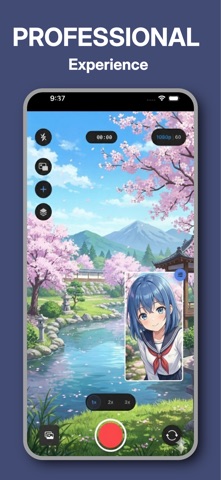
MixLens: Dual Camera Recorder Screenshot 1 of 6
MixLens: Dual Camera Recorder Screenshot 2 of 6
MixLens: Dual Camera Recorder Screenshot 3 of 6
MixLens: Dual Camera Recorder Screenshot 4 of 6
MixLens: Dual Camera Recorder Screenshot 5 of 6
MixLens: Dual Camera Recorder Screenshot 6 of 6
Screenshots by Prasad Kirpekar, from the the App Store listing
Description by Prasad Kirpekar Written by the developer, not by AppBrain. Click to read.
Unlock the full potential of your iPhone with MixLens.

Why tell only half the story? MixLens turns your iPhone into a professional multi-camera production studio. Powered by native iOS MultiCam technology, MixLens allows you to record from the front and back cameras simultaneously, capturing your reaction and the action in real-time.

Whether you are a YouTuber, a fitness instructor, a journalist, or just capturing family memories, MixLens provides the professional tools you need to create engaging, dual-perspective content instantly.

MixLens has Picture-in-Picture (PiP) mode perfect for reaction videos and gaming. Move the PiP window anywhere, resize it, and add drop shadows or borders.

STUDIO-QUALITY CUSTOMIZATION

Total Control: Adjust the corner radius, border width, and shadow intensity of your frames.

Preset Management: Save your favorite layouts (e.g., "Reaction Mode" vs. "Interview Mode") and switch between them instantly.

Professional Quality: Record in crisp 1080p HD at up to 60fps for buttery smooth motion.

ADVANCED WORKFLOW FOR CREATORS

Dual Stream Recording: Choose your workflow. Record a single combined video file (WYSIWYG) for instant sharing, or save two separate video files to edit them individually later.

Smart Gallery: Manage, preview, and share your multi-cam creations directly from the app.

Pro Assets: Access a library of overlays and templates to make your videos stand out.

IDEAL FOR:

Reaction Videos: Capture your genuine facial expressions while watching content.

Vlogging: Show the scenery and your narration simultaneously.

Interviews: Film the interviewer and the interviewee in a single take.

Tutorials & Demos: Show a product in your hand while maintaining eye contact with the audience.

Musicians: Capture your hands on the instrument and your face while singing.

DEVICE COMPATIBILITY MixLens requires the A12 Bionic chip or newer to handle simultaneous video streams.

Supported Devices: iPhone XS, XR, 11, 12, 13, 14, 15, 16, and SE (2nd Gen) or newer.

Requirement: iOS 15.0 or later.

Don't just record the moment—capture the experience. Download MixLens today and start creating content that sees everything.

END USER LICENSE AGREEMENT: https://www.apple.com/legal/internet-services/itunes/dev/stdeula/
Official page on the App Store

Safety and technology

Found in the app by AppBrain
Price
Free
App size
24.2 MB
Content rating
Everyone

Technologies used by MixLens: Dual Camera Recorder

Releases

Updates seen on the App Store
Version
1.6
Launched
January 2026

No changelog data

Alternatives

Similar apps and more from Prasad Kirpekar

Alternatives to MixLens: Dual Camera Recorder

MX Video Player – All in One icon MX Video Player – All in One
Vipul Sakariya
0.0
Free
Both Cameras icon Both Cameras
Sam Nguyen
3.7
Free
3 ratings
PhotoRiver icon PhotoRiver
Naihe Hu
5.0
Free
3 ratings
DORA · AI Video Generator icon DORA · AI Video Generator
Saga Ltd.
4.3
Free
16 ratings
Timestamp Camera - Timemark icon Timestamp Camera - Timemark
MEETFIRE LIMITED
4.7
Free
88 ratings
DualCapture: Dual Camera Video icon DualCapture: Dual Camera Video
Block Browser
4.5
Free
57 ratings
Colorize: Restore Old Photos icon Colorize: Restore Old Photos
通 张
4.6
Free
994 ratings
Photo Stitch! icon Photo Stitch!
Thanh Hai Le
4.8
Free
80 ratings

More from Prasad Kirpekar

Daily Bing Wallpaper icon Daily Bing Wallpaper
Prasad Kirpekar
2.8
Free
20 ratings

Rankings

App Store top charts

App Store Rankings for MixLens: Dual Camera Recorder

This app is not ranked

About the app and developer

About MixLens: Dual Camera Recorder

MixLens: Dual Camera Recorder is a photo & video app developed by Prasad Kirpekar.

User Ratings

The app has no ratings yet.

App Information

MixLens: Dual Camera Recorder is freely available from the App Store. The app size is 24.18 MB. The latest version available is 1.6. The last update was on January 26, 2026.

Technical Requirements

The app has a content rating of Everyone. The app has been available on the App Store since January 2026.

Developer information for Prasad Kirpekar

Prasad Kirpekar

Address:

Share MixLens: Dual Camera Recorder

Popular Photo & Video Apps Today's trending apps Price drops on Google Play Apps other people are watching Top new apps
MX Video Player – All in One icon MX Video Player – All in One
Both Cameras icon Both Cameras
PhotoRiver icon PhotoRiver
DORA · AI Video Generator icon DORA · AI Video Generator
Timestamp Camera - Timemark icon Timestamp Camera - Timemark
DualCapture: Dual Camera Video icon DualCapture: Dual Camera Video
Colorize: Restore Old Photos icon Colorize: Restore Old Photos
Photo Stitch! icon Photo Stitch!
Overview Alternatives Reviews Rankings Technology
AppBrain Intelligence premium content

Subscribe now to get full and unlimited access to AppBrain Intelligence. You'll have access to:

  • App Intelligence dashboard (performance timeline, competitor comparison, country rankings, insight cards)
  • Detailed ranking data per app
  • Full timeline per developer
  • Device market shares data per country
  • Unlimited keyword tracking
1 Month

$75/mo
(billed every month)

SAVE 0%
Subscribe
3 Months

$65/mo
($195 billed every 3 months)

SAVE 13%
Subscribe
1 Year

$57.50/mo
($690 billed every year)

SAVE 23%
Subscribe
Each subscription will automatically renew 3 days before the expiration date for the same time period. Subscriptions can be cancelled at any time before the renewal.

AppBrain is an app data site, we track rankings, ratings, installs for all apps and games on Google Play and the App Store. AppBrain doesn't host app files or APKs, all install links go directly to the official store. All trademarks are owned by their respective owners.

More apps

  • Top Android apps being viewed
  • Skype for Business for Android
  • Movie Box LLC stats
  • One 9.5 Widgets

App statistics

  • Android statistics
  • Google Play Developer stats
  • Trending Android Apps
  • Trending iOS apps
  • Top popular Apps
  • Buy the best Android phone
  • Buy & sell app businesses

About AppBrain

  • Contact
  • Privacy
  • Documentation
  • DMCA takedowns
  • Blog
  • Monetization tips: Understanding your eCPM
© 2010-2026 - AppBrain