Download Android Apps and Games
AppBrain
  • Apps
  • Apps being viewed right now Trending apps today Most popular apps All-time most downloaded apps Top rated apps
  • Intelligence ▾
    Intelligence overview → Track any Android app or your whole market
    Track & analyze
    Keyword Tracker & OptimizerTrack & improve Play rankings App Performance ReportOne-off PDF for any app StatisticsFree Android & Play market stats
    Promote your app
    Featured Apps App Links
  • Intelligence
  • Pricing
  • Dashboard
  • Sign up
  • Log in
Last updated on: 2026-06-13
App Store Apps > Business > MobileQMS
MobileQMS icon

MobileQMS

1.2.24
Mew Sang Lim
5.00
1 reviews
$2.99

MobileQMS Screenshot 1 of 6
MobileQMS Screenshot 2 of 6
MobileQMS Screenshot 3 of 6
MobileQMS Screenshot 4 of 6
MobileQMS Screenshot 5 of 6
MobileQMS Screenshot 6 of 6
Download from the App Store Android version

About MobileQMS

MobileQMS is an overall app developed by Mew Sang Lim.

Download Statistics

User Ratings

MobileQMS is rated 5.00 out of 5 stars. The rating is based on one rating ratings.

App Information

MobileQMS costs $2.99 to download. The APK download size is 26.10 MB. The latest version available is 1.2.24. The last update was on May 7, 2025.

Technical Requirements

The app has a content rating of Everyone. The app has been available on Google Play February 2020.

Description
You just need a router, Smart phone, Bluetooth Thermal Printer and a web browser.

No need Internet connection.

Smart Phone will be the server host for creating the queue number.

Queue Number can be printed by bluetooth thermal printer.

The Queue Number status is from WAIT to QUEUE and then COMPLETED.

You can RESET the Queue Number.

You should start the web server on mobile before show the running Queue Number on Web Browser.

This APP is good for simple queue system.

For example, single queue line.

Enjoy and have fun.

Do you know that MobileQMS app solution has resolved the old style Queue Management Solution?

=======
Scenario
=======
MobileQMS App (Offline) is designed for simple single queue line.
It can print the token number with bluetooth thermal printer and also show the
running token number on iPad within the same WIFI network. Once the token is created or printed, you can choice the desired token number for calling in case for flexibility. Meanwhile, you can recall the token number through the menu options. Recall is good for the people who is missing attendance of the queue.

MobileQMS App
- Only Support single mobile device
- Able to issue, call, recall and complete the tokens
- Without Internet (Offline)
- Connect to MobileQMS Board Pad App (Same WIFI network)

Dispensing Machine
- Must be a bluetooth thermal printer
- Able to print token number to visitor
- Portable

WIFI Router
- Connect to the mobile phone and the web browser or iPad

Web Browser
- Only support same WIFI network with the MobileQMS App
- Able to show the running token number
- Able to search the token number

BoardPad App with iPad
- Only support same WIFI network with the MobileQMS App
- Able to show the running token number
- Able to call the token number with vocal sound

===============
HOWTO STARTUP
===============
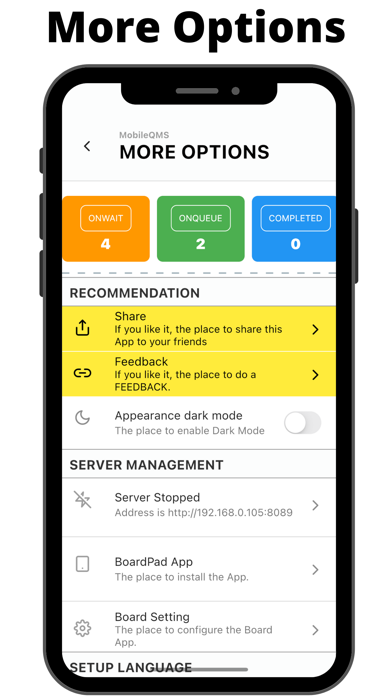
1. Create "Window" and "Service" on More Options menu
2. Issue Token on Main screen menu
3. Call Token on Main Screen menu
4. Mark the Token as COMPLETED on Main Screen menu
5. Connect to WIFI on your mobile phone (Optional)
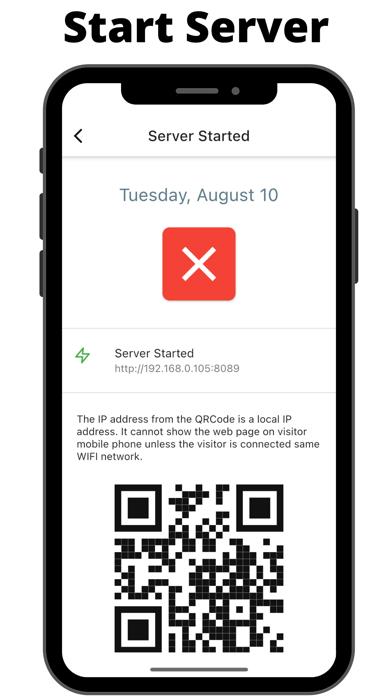
6. Start Server on the More Screen menu (Optional)
7. Scan the QR code on other mobile phone to watch the running number on web browser (Optional)

8. Open BoardPad App from iPad (Optional)
9. Setup Bluetooth Printer (Optional)

=================
TROUBLESHOOTING
=================
Q: I cannot create Token Number after I have created a “Window”. Why?
A: I think you should create a couple of “Service” under the “Window” List screen.

Q. I cannot find my bluetooth printer on setup printer. Why?
A: I think you should enable the bluetooth signal on the Mobile Phone. So that, a list of bluetooth devices will be visible on the Mobile QMS App.

Q. The printer is not functioning. Why?
A: I think you should have a ESC Command bluetooth printer.

Q: I cannot view the web page on web browser from the QRCode. Why?
A: I think you should start the server on the “More” screen. The web address should be same WIFI between mobile phone and web browser.

Q: Is it the App always connect with Board App?
A: Yes. The App will keep the WIFI connection as long as the screen is on. The App has implemented the screen is always on.

====
IPAD
====
STEP 1:
To display the Token Number on iPad, you should online and install the APP below:-
https://apps.apple.com/us/app/mobileqms/id1497657270?ls=1

STEP 2:
Open Board Pad APP on the iPad

STEP 3:
Enter the Mobile QMS server IP address
Show more Show less

More data about MobileQMS

Price $2.99
Rating 5.00 based on a single rating
Ranking Not ranked
Version 1.2.24
App download size 26.1 MB
Suitable for Everyone

Alternative downloads for the MobileQMS app

EntryToken icon EntryToken
VersionX
0.0
Free
q-number icon q-number
Q-channel
0.0
Free
ChopeQueues icon ChopeQueues
Chope
0.0
Free
q-number premium icon q-number premium
Q-channel
1.0
Free
1 ratings
Serialna icon Serialna
NIPPON STEEL Hitachi Systems Solutions, Inc.
3.5
Free
2 ratings
ElIoT Pro icon ElIoT Pro
Cyberus Labs
0.0
Free
Live Token Business icon Live Token Business
Greenitco Technologies Private limited
0.0
Free
PRIVUS SecurVid icon PRIVUS SecurVid
Bit Armor AG
0.0
Free

More from Mew Sang Lim

Mobile Web Server icon Mobile Web Server
Mew Sang Lim
4.7
$2.99
6 ratings
Simple TTS icon Simple TTS
Mew Sang Lim
3.5
$4.99
4 ratings
Formatter icon Formatter
Mew Sang Lim
5.0
Free
2 ratings
MobileQMSPro icon MobileQMSPro
Mew Sang Lim
0.0
Free
MobileQMS Board Pad icon MobileQMS Board Pad
Mew Sang Lim
0.0
$4.99

Changelog of MobileQMS

No changelog data

Developer information for Mew Sang Lim

Mew Sang Lim

Address:

Share MobileQMS

Comments on MobileQMS for iOS

We don't have enough comments to show example comments. Please check back later.

App Store Rankings for MobileQMS

This app is not ranked

Technologies used by MobileQMS

EntryToken icon EntryToken
q-number icon q-number
ChopeQueues icon ChopeQueues
q-number premium icon q-number premium
Serialna icon Serialna
ElIoT Pro icon ElIoT Pro
Live Token Business icon Live Token Business
PRIVUS SecurVid icon PRIVUS SecurVid

Back to top
AppBrain Intelligence premium content

Subscribe now to get full and unlimited access to AppBrain Intelligence. You'll have access to:

  • App Intelligence dashboard (performance timeline, competitor comparison, country rankings, insight cards)
  • Detailed ranking data per app
  • Full timeline per developer
  • Device market shares data per country
1 Month

$75/mo
(billed every month)

SAVE 0%
Subscribe
3 Months

$65/mo
($195 billed every 3 months)

SAVE 13%
Subscribe
1 Year

$57.50/mo
($690 billed every year)

SAVE 23%
Subscribe
Each subscription will automatically renew 3 days before the expiration date for the same time period. Subscriptions can be cancelled at any time before the renewal.

AppBrain is a directory focused on discovering great apps and games. We give statistics, rankings and search options that Google Play and the App Store don't have. All trademarks are owned by their respective owners. AppBrain doesn't offer APKs or binaries, and always lets users install the official version from Google Play or the App Store.

More apps

  • Top Android apps being viewed
  • GlowPix -Photo Editor & Effect
  • Trion - Workouts improved stats
  • Sandbox - Pixel Art Coloring

Android Statistics

  • Android statistics
  • Google Play Developer stats
  • Trending Android Apps
  • Top popular Apps
  • Buy the best Android phone

About AppBrain

  • Contact
  • Privacy
  • Documentation
  • DMCA takedowns
  • Articles
  • Blog
  • Android app Install tracking and attribution options for the AppBrain ad network
© 2010-2026 - AppBrain