

MobiScan: OCR Scanner・Scan PDF
MobiScan: OCR Scanner・Scan PDF is made and published by MobiSystems, Inc. AppBrain is an independent app data site and isn't affiliated with MobiSystems, Inc. The app name, icon, screenshots and description belong to MobiSystems, Inc. and are shown as published on the App Store.
AppBrain's verdict
- Rating on App Store
- 4.66
- 35 ratings
- Last updated
- September 9, 2025
It doesn't have enough ratings yet to judge what users think.
Rankings
App Store top chartsApp Store Rankings for MobiScan: OCR Scanner・Scan PDF
Competitors
Similar apps and more from MobiSystems, Inc.Alternatives to MobiScan: OCR Scanner・Scan PDF





More from MobiSystems, Inc.




Releases
Updates seen on the App Store- Version
- 1.8
- Launched
- November 2024
No changelog data
User feedback
Ratings and reviews on the App StoreComments on MobiScan: OCR Scanner・Scan PDF for iOS
We don't have enough comments to show example comments. Please check back later.
Technology
Found in the app by AppBrain- Price
- Free
- App size
- 123.3 MB
- Content rating
- Everyone
Technologies used by MobiScan: OCR Scanner・Scan PDF
About the app and developer
About MobiScan: OCR Scanner・Scan PDF
MobiScan: OCR Scanner・Scan PDF is a productivity app developed by MobiSystems, Inc.
User Ratings
MobiScan: OCR Scanner・Scan PDF is rated 4.66 out of 5 stars. The rating is based on 35 ratings.
App Information
MobiScan: OCR Scanner・Scan PDF is freely available from the App Store. The app size is 123.28 MB. The latest version available is 1.8. The last update was on September 9, 2025.
Technical Requirements
The app has a content rating of Everyone. The app has been available on the App Store since November 2024.
Developer information for MobiSystems, Inc.
Address:
Frequently asked questions about MobiScan: OCR Scanner・Scan PDF
Is MobiScan: OCR Scanner・Scan PDF free?
Yes. MobiScan: OCR Scanner・Scan PDF is free on the App Store.
Is MobiScan: OCR Scanner・Scan PDF still available?
Yes. MobiScan: OCR Scanner・Scan PDF is on the App Store, and the last update we saw was on September 9, 2025.
How large is MobiScan: OCR Scanner・Scan PDF?
MobiScan: OCR Scanner・Scan PDF is 123.28 MB.
Is MobiScan: OCR Scanner・Scan PDF suitable for children?
App Store rates the content of MobiScan: OCR Scanner・Scan PDF as suitable for everyone.
How do people rate MobiScan: OCR Scanner・Scan PDF?
MobiScan: OCR Scanner・Scan PDF scores 4.66 out of 5 stars, from 35 ratings on the App Store.
Who made MobiScan: OCR Scanner・Scan PDF?
MobiScan: OCR Scanner・Scan PDF was developed by MobiSystems, Inc. It is listed in the productivity category on the App Store.
What are the best alternatives to MobiScan: OCR Scanner・Scan PDF?
People looking at MobiScan: OCR Scanner・Scan PDF also look at these productivity apps: PDF Scanner - Photos to PDF, PDF Scanner File Converter, Photo To PDF - PDF Scanner, ScanElf, PDF Scanner: Document Scan App.
Store listing
By MobiSystems, Inc., from the App Store




Description by MobiSystems, Inc. Written by the developer, not by AppBrain. Click to read.
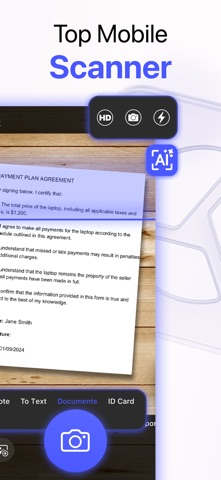
Stay organized, increase productivity, and save time anywhere with a powerful mobile scanner always in your pocket. Whether you're a busy professional, a diligent student, or simply looking to declutter your paper-filled world, MobiScan transforms your iOS device into a high-quality, portable scanner that you can use to scan contracts, receipts, business cards, ID cards, passports, or even books at a moment’s notice.
KEY MOBISCAN FEATURES
• MULTI-PURPOSE SCANNING
Scan a variety of content formats, including ID cards, passports, business cards, notes (even handwritten), and books - all in one app.
• UNLIMITED DOCUMENT SCANS – FREE
Digitize as many documents as you want with crisp clarity using our HD scanning feature. No limits, no hidden caps - just simple, reliable scanning at no cost.
• BUILT-IN EDITING TOOLS
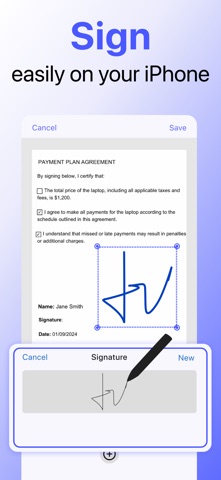
Crop, rotate, and enhance your scans in seconds. Reorder pages, apply filters for better readability, or sign documents directly inside the app.
• ADVANCED OCR TECHNOLOGY
Extract text from images instantly with smart Optical Character Recognition (OCR). Make your scans searchable, editable, and easy to share.
• SIMPLE FILE MANAGEMENT
Organize your documents effortlessly with folders, custom names, and search functionality. Switch between grid or list view for quick navigation.
• EASY EXPORT & SHARING
Export to PDF or TXT and share securely via cloud services or messaging apps. Copy and paste text in a single tap for faster collaboration.
Try MobiScan today - enjoy unlimited scanning for free and experience the power of mobile scanning at your fingertips.
Privacy Policy: https://mobisystems.com/privacy-policy/
Terms of Use: https://mobisystems.com/terms-of-use/