

MockPaper - Wallpaper Mockup
MockPaper - Wallpaper Mockup is made and published by 涛 彭. AppBrain is an independent app data site and isn't affiliated with 涛 彭. The app name, icon, screenshots and description belong to 涛 彭 and are shown as published on the App Store.
AppBrain's verdict
- Rating on App Store
- 5.00
- 1 ratings
- Last updated
- September 7, 2026
It doesn't have enough ratings yet to judge what users think.
Rankings
App Store top chartsApp Store Rankings for MockPaper - Wallpaper Mockup
Competitors
Similar apps and more from 涛 彭More from 涛 彭

Releases
Updates seen on the App Store- Version
- 1.2
- Launched
- March 2026
No changelog data
User feedback
Ratings and reviews on the App StoreComments on MockPaper - Wallpaper Mockup for iOS
We don't have enough comments to show example comments. Please check back later.
Technology
Found in the app by AppBrain- Price
- Free
- App size
- 54.7 MB
- Content rating
- Everyone
Technologies used by MockPaper - Wallpaper Mockup
About the app and developer
About MockPaper - Wallpaper Mockup
MockPaper - Wallpaper Mockup is a graphics & design app developed by 涛 彭.
User Ratings
MockPaper - Wallpaper Mockup is rated 5.00 out of 5 stars. The rating is based on one rating ratings.
App Information
MockPaper - Wallpaper Mockup is freely available from the App Store. The app size is 54.68 MB. The latest version available is 1.2. The last update was on September 7, 2026.
Technical Requirements
The app has a content rating of Everyone. The app has been available on the App Store since March 2026.
Developer information for 涛 彭
Address:
Store listing
By 涛 彭, from the App Store



Description by 涛 彭 Written by the developer, not by AppBrain. Click to read.
Quickly preview lock screen and home screen effects, or craft high-quality visual assets for social media, portfolios, and product showcases using device frames, images, videos, Live Photos, text, and custom backgrounds.
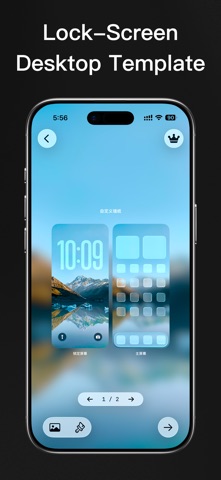
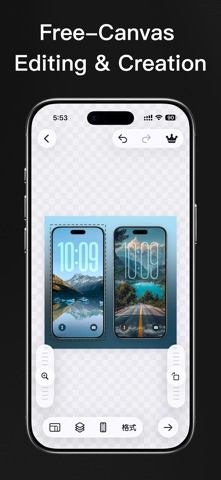
With the "Lock Screen + Home Screen" templates, you can instantly generate complete dual-screen wallpaper previews. Alternatively, jump into the freeform canvas to start from scratch—freely combining iPhone device frames, image layers, text layers, backgrounds, and lock screen time styles.
Want to check how your wallpaper actually looks before finalizing it?
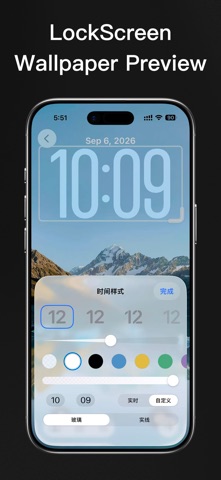
The wallpaper simulator lets you preview the lock screen clock, date, bottom controls, and depth effect, bringing your final artwork closer to how it appears on a real device.
MockPaper now supports importing images, videos, and Live Photos.
Dynamic media can be used across the wallpaper simulator, freeform canvas, and lock/home screen templates, and can be exported as videos or Live Photos—opening up more creative avenues for dynamic wallpaper displays and social media content.
Whether you are creating iPhone wallpapers, dynamic wallpapers, lock screen designs, device mockups, App promotional assets, or content for Xiaohongshu, Weibo, Instagram, and other social platforms, MockPaper helps you bring your work to life more intuitively and efficiently.
Ideal for wallpaper creators, UI designers, indie developers, digital product designers, social media creators, and anyone needing to craft App Store screenshots, wallpaper store materials, or portfolio showcases.
Subscription and Purchase Information:
Upgrading to MockPaper Pro unlocks advanced features, including batch editing and export, HD / 4K high-resolution export, watermark-free export, lossless PNG export, and Family Sharing.
MockPaper offers monthly subscriptions, annual subscriptions, and a one-time lifetime purchase option. Actual prices, currencies, and available plans are based on the information displayed on the App Store purchase page.
Payment will be charged to your Apple ID account at confirmation of purchase. Monthly and annual plans auto-renew automatically unless auto-renew is turned off at least 24 hours before the end of the current billing period. Apple will typically charge your account for renewal within 24 hours prior to the end of the current period.
After purchase, you can view, manage, or cancel your subscription by going to your Account Settings on the App Store. Deleting the App does not automatically cancel your subscription. The lifetime plan is a one-time purchase and does not auto-renew.
Read more about our terms and conditions:
Terms of Use (EULA): https://www.apple.com/legal/internet-services/itunes/dev/stdeula
Privacy Policy: https://hellocode.app/mockpaper/privacy
Supplemental Terms of Use: https://hellocode.app/mockpaper/terms
Contact Us: mockpaper@hellocode.app