

Modo: Notes, Calendar, Widget
Modo: Notes, Calendar, Widget is made and published by EUNGJIN KIM. AppBrain is an independent app data site and isn't affiliated with EUNGJIN KIM. The app name, icon, screenshots and description belong to EUNGJIN KIM and are shown as published on the App Store.
AppBrain's verdict
New- Rating on App Store
- 5.00
- 5 ratings
- Last updated
- October 28, 2026
- Size
- 88.5 MB
Modo: Notes, Calendar, Widget came out 33 days ago. It doesn't have enough ratings yet to judge what users think.
User feedback
Ratings and reviews on the App StoreComments on Modo: Notes, Calendar, Widget for iOS
We don't have enough comments to show example comments. Please check back later.
Store listing
By EUNGJIN KIM, from the App Store




Description by EUNGJIN KIM Written by the developer, not by AppBrain. Click to read.
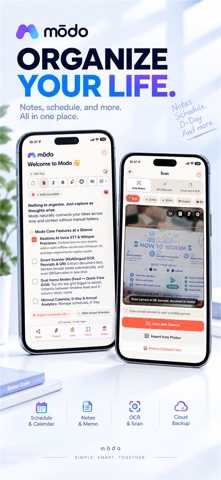
Modo is a fast, aesthetic notepad, calendar planner, and widget companion built to capture thoughts with zero delay.
No sign-ups, no tracking, zero clutter. Pure, intuitive productivity for daily elegance.
=== WHY YOU'LL LOVE MODO ===
1. Instant Quick Capture & Offline Speed
Open and write immediately. Powered by an instant offline-first engine with zero lag, Modo ensures you never lose sudden inspiration.
2. Aesthetic Sticky Notes & Memo Studio
- Beautiful sticky card views with versatile typography and customizable card frames.
- Versatile formats: Post-it notes, square memo cards, structured lists, and aesthetic styles.
- Customize background tones, opacity, borders, and font scale (70%-200%) in Memo Studio.
3. Dual Home Views: Feed vs. Quick View Grid
- Standard Feed: Clean masonry feed with greeting headers, search, and pin.
- Quick View Grid: 2-column card layout with floating Speed Dial and quick filters.
- Batch Actions: Long-press to color, pin, lock, share, or delete multiple notes.
4. Smart Camera Scanner for Books & Receipts (On-Device)
- Complete Privacy: Runs locally on-device with zero data sent to external servers.
- All-in-One Viewfinder: Capture books, documents, receipts, and book ISBN barcodes.
- Smart Formatting: Reconnects broken line wraps into smooth paragraphs.
- Scan-to-Note: Formats receipts and expenses into clean Markdown tables.
5. Crystal-Clear Voice Memos & Voice Clean
- On-Device Voice Clean: Cuts background rumble & boosts vocals for crisp speech.
- Live Equalizer Wings: Dynamic audio wave visualization dancing to your voice.
- 2-Row Wide Waveform Player: Dedicated scrubbing controls and separate timing.
- Multi-Audio Sync: Attach multiple recordings with lossless cloud streaming.
6. Google Drive Cloud Sync & Media Streaming
- Zero Lock-in: Sync directly to your private Google Drive app storage.
- Lossless Audio & Image Sync: Complete bidirectional sync for notes & media.
- Background Session Recovery: Smooth, automatic session reconnects after restarts.
- 1-Tap Device Migration: Seamlessly transfer your entire notebook to a new phone.
7. Hardware AES-256 Vault & Biometric Lock
- On-device AES-256 encryption backed by hardware KeyStore / Keychain.
- Biometric Security: Lock private notes with Fingerprint, Face ID, or PIN.
- 100% Offline: Full security with zero internet connection required.
8. Markdown Power, Caret Popover & WikiLinks
- Caret Popover (/): Type "/" to insert headings, checklists, quotes, or timestamps.
- Bi-directional WikiLinks ([[ ]]): Interlink notes to build your knowledge web.
- Smart Paste: Turns copied links into rich cards and table data into Markdown.
9. Integrated Calendar, Checklist & D-Day Milestones
- Unified Calendar: Browse notes and tasks organized neatly by date.
- Interactive Checklists: Strike through completed to-dos with a tap.
- D-Day Countdowns: Track exams, birthdays, and deadlines with widget badges.
10. Daily Inspiration & Mindful Wellness Cards
- Daily Inspiring Quote: Fresh curated wisdom delivered midnight with 1-tap save.
- Health & Mind Advice: Practical lifestyle tips to bring calm to your day.
11. 8 Curated Background Tones & True Dark Mode
- Paper White, Warm Kraft, Calming Sage, Deep Indigo, E-Ink Monochrome, etc.
- Eye-friendly True Dark Mode crafted for comfortable night reading.
=== IDEAL FOR ===
- Thinkers & writers wanting a clean, distraction-free markdown scratchpad.
- Professionals organizing meetings, daily agendas, and receipts.
- Students needing voice memos, camera scanning, and exam countdowns.
- Aesthetic enthusiasts who appreciate clean, beautifully styled minimalist apps.
- Privacy-conscious users valuing 100% offline data ownership.
Download Modo today and experience the purest, fastest way to organize your world!
Safety and technology
Found in the app by AppBrain- Price
- Free
- App size
- 88.5 MB
- Content rating
- Everyone
Technologies used by Modo: Notes, Calendar, Widget
Releases
Updates seen on the App Store- Version
- 1.2.21
- Launched
- September 2026
No changelog data
Alternatives
Similar apps and more from EUNGJIN KIMAlternatives to Modo: Notes, Calendar, Widget


Also available on Google Play

Rankings
App Store top chartsApp Store Rankings for Modo: Notes, Calendar, Widget
About the app and developer
About Modo: Notes, Calendar, Widget
Modo: Notes, Calendar, Widget is a productivity app developed by EUNGJIN KIM.
What is the rating of Modo: Notes, Calendar, Widget?
Modo: Notes, Calendar, Widget is rated 5.00 out of 5 stars, based on 5 ratings.
Is Modo: Notes, Calendar, Widget free?
Modo: Notes, Calendar, Widget is free. The app size is 88.48 MB. The latest version available is 1.2.21. The last update was on October 28, 2026.
What are the requirements for Modo: Notes, Calendar, Widget?
The app has a content rating of Everyone. The app has been available on the App Store since September 2026.
Developer information for EUNGJIN KIM
Address: