

Moment Diary Tale
Moment Diary Tale is made and published by Tomonari Sonoda. AppBrain is an independent app data site and isn't affiliated with Tomonari Sonoda. The app name, icon, screenshots and description belong to Tomonari Sonoda and are shown as published on the App Store.
AppBrain's verdict
Established- Rating on App Store
- 4.07
- 15 ratings
- Last updated
- August 21, 2026
It doesn't have enough ratings yet to judge what users think.
Rankings
App Store top chartsApp Store Rankings for Moment Diary Tale
Competitors
Similar apps and more from Tomonari SonodaAlternatives to Moment Diary Tale






More from Tomonari Sonoda

Releases
Updates seen on the App Store- Version
- 17.1
- Launched
- December 2010
No changelog data
User feedback
Ratings and reviews on the App StoreComments on Moment Diary Tale for iOS
We don't have enough comments to show example comments. Please check back later.
Technology
Found in the app by AppBrain- Price
- Free
- App size
- 12.7 MB
- Content rating
- Everyone
Technologies used by Moment Diary Tale
About the app and developer
About Moment Diary Tale
Moment Diary Tale is a lifestyle app developed by Tomonari Sonoda.
User Ratings
Moment Diary Tale is rated 4.07 out of 5 stars. The rating is based on 15 ratings.
App Information
Moment Diary Tale is freely available from the App Store. The app size is 12.67 MB. The latest version available is 17.1. The last update was on August 21, 2026.
Technical Requirements
The app has a content rating of Everyone. The app has been available on the App Store since December 2010.
Developer information for Tomonari Sonoda
Address:
Store listing
By Tomonari Sonoda, from the App Store


Description by Tomonari Sonoda Written by the developer, not by AppBrain. Click to read.
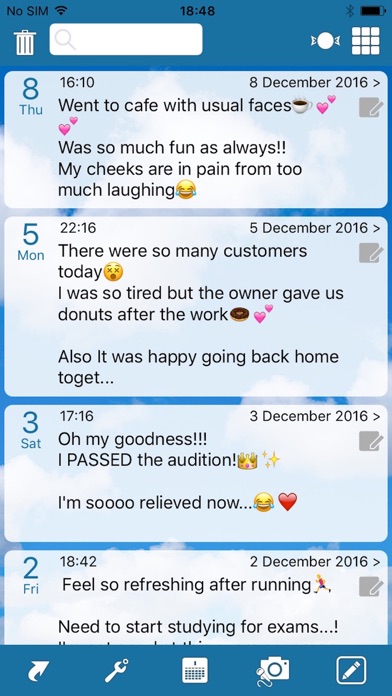
This is a private diary that makes notes with timestamps! You can take a short note and use it as a private diary, simple business note, diet record, food log, lifetime recording, cash flow record, jotting down what you watch on TV, song titles while you listen to radio...etc.
Please feel free to ask any questions on below URL. (in English please!)
http://twitter.com/momentdiary
Functions:
- You can take a note. This app adds a timestamp to it. Please remember you can not post it to online social services. This is for private use.
- Exporting your notes to your email address. You can select your intended range of span of dates.
- Backup/Restore function is available. To use this function, WiFi connection is required.
*Backup:
This shows your device's IP address and when you enter it to your web browser on Mac/PC, you can download backup data(.dat) and CSV data(.csv).
*Restore:
After you get backup data(.dat3) on your Mac/PC, you can transfer it to any of your iPhone, iPad, iPod touch. Restoring does not delete existing data. It adds or overwrites data from backup. Please make sure the latest updated entry will be protected when overwriting.
- Passcode (4-digit-numbers) lock supported as a security function. You can easily change on/off of the lock. Please do not forget your passcode. When you forget it, the only way to unlock it is to try entering the numbers until you hit it.
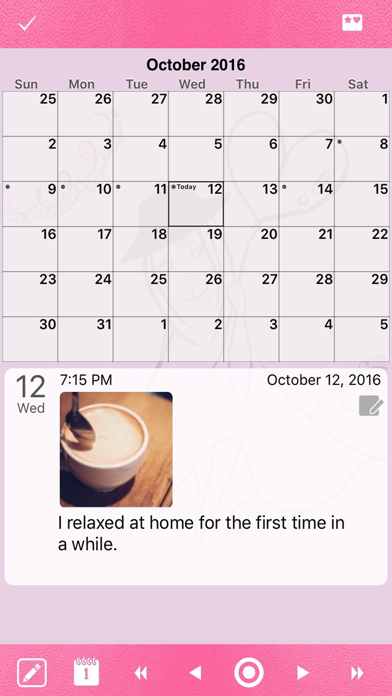
- Picture support. Please go to setting page and turn on 'Picture' switch for this function.
- You can choose three ways for exporting your picture.
1) email picture with original size,
2) email smaller picture for mobile phone,
3) add to photo library of iPhone/iPod touch.
- Changing background color.
- Button positions adjustment for Right-handed or Left-handed users.
- Function for adding photos to past notes.
- Date display option for exporting. You can choose a date display mode from 'every Moment' or 'every Day'. 'every Day' option is for bloggers.
- Time Machine Function which enable you to jump to desired date. Please go to Calendar page and tap the month and year display on the top of the page.
- Favorite icon can be used. Please go to Setting page-> Options->Sub icon, and select 'star' mark.
- Couple Diary (Data sync): It enables to sync your diary to different devices via server. It is easy. Please sync your iPhone-iPad, or share your diary with your friends. Pls. tap the arrow button on the main page (list page) and select 'Couple Diary' to start.
-
Cloud Storage (Candy free transferring).
Please read followings before you buy:
This is MONTHLY charge.
Price: Tier 2(1.99USD,1.49GBP,2.79CAD,2.49 AUD,2.99 NZD)/month
- Payment will be charged to iTunes Account at confirmation of purchase.
- Subscription automatically renews unless auto-renew is turned off at least 24-hours before the end of the current period.
- Account will be charged for renewal within 24-hours prior to the end of the current period, and identify the cost of the renewal.
- Subscriptions may be managed by the user and auto-renewal may be turned off by going to the user’s Account Settings after purchase.
- No cancellation of the current subscription is allowed during active subscription period.
Privacy policy:
http://momentdiary.com/privacypolicy.pdf
Terms of use:
http://momentdiary.com/termsofuse.pdf
-----------
URL scheme
-----------
1. for launch
momentdiary://?t=URL_encoded_string
2. for launch & write
momentdiary://?m=edit&t=URL_encoded_string
(for launch & search)
momentdiary://?m=search&t=URL_encoded_string
-- example for 'food'
momentdiary://?m=search&t=food
-- example for 'birth day'
momentdiary://?m=search&t=birth+day
(white space should be replaced by '+')
-- example for multi-bytes characters '星'
momentdiary://?m=search&t=%E6%98%9F
(percent escaped characters can be used)
---
Many thanks for your feedbacks and have fun!