

Momentap: Quick Camera
Momentap: Quick Camera is made and published by Vadym Marchenko. AppBrain is an independent app data site and isn't affiliated with Vadym Marchenko. The app name, icon, screenshots and description belong to Vadym Marchenko and are shown as published on the App Store.




AppBrain's verdict
- Last updated
- October 8, 2026
- Size
- 9.56 MB
User feedback
Ratings and reviews on the App StoreComments on Momentap: Quick Camera for iOS
We don't have enough comments to show example comments. Please check back later.
Store listing
By Vadym Marchenko, from the App StoreDescription by Vadym Marchenko Written by the developer, not by AppBrain. Click to read.
Momentap is a camera for the moments that happen before you're ready: a pet's unexpected pose, a smile across the table, or something you spot on a walk. Set it up once, then open the camera to take a photo or start recording automatically, without an extra tap on the shutter.
CAPTURE ON OPEN
Choose what happens when you launch Momentap: take a photo or begin a video. Use Instant capture once the camera is ready, or give yourself 1, 3, or 5 seconds to frame the scene. Your preferred mode, camera, and zoom are remembered for next time.
If you prefer to compose first, turn off Capture on Launch and use the shutter manually. You can also cancel a countdown before it finishes.
KEEP YOUR CAMERA WITHIN REACH
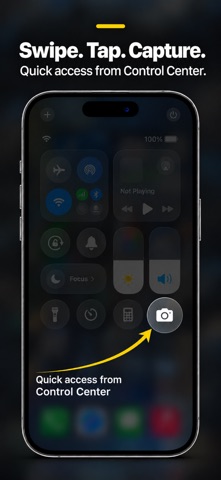
Add the camera control to your Lock Screen or Control Center to open the capture experience, including while your iPhone is locked. On an iPhone with an Action Button, assign the capture shortcut for another convenient way to launch. Shortcuts support lets you make Momentap part of your own routine.
PHOTOS AND VIDEO, YOUR WAY
Capture everyday photos or start recording a scene as it unfolds. Choose HEIF or JPEG for photos, with RAW capture available on supported cameras. Record video in 1080p at 30 fps, 4K at 30 fps, or 4K at 60 fps where supported. Use the front camera for selfies or switch to the back camera for the world around you.
SIMPLE CONTROLS WHEN YOU NEED THEM
Pinch to zoom or use the available zoom presets. Tap to focus, lock focus and exposure, and adjust brightness. Use flash for photos, an optional framing grid, and haptic feedback to make capturing feel more deliberate.
REVIEW, KEEP, OR UNDO
Preview your latest capture in the app. Enable Undo After Capture to remove an accidental shot from the main app. With Save to Photos enabled and permission granted, your photos and videos are saved to your photo library. Captures made while locked can be transferred to Photos after you unlock and open the app.
MAKE IT FIT YOUR DAY
Use Instant mode for spontaneous moments, a short countdown to steady your framing, or video mode when a still photo isn't enough. Keep automatic capture on for quick access, or switch to manual shooting whenever you want more time.
Momentap keeps the path from seeing a moment to capturing it simple.
Requires iOS 26 or later. Complete the initial setup and grant camera access before using capture shortcuts. Microphone access is used for video sound, and Photos access is needed to save to your library. Available formats, zoom options, video quality, and Action Button support depend on your device. Undo is available in the main app, not during locked capture.
SUBSCRIPTIONS
Paid features require an active subscription. Available plans, prices, and any offer terms are displayed before purchase. Subscriptions renew automatically unless canceled; manage them in your Apple account settings.
Privacy Policy: https://app-legal-pages.web.app/momentap/privacy/en/
Terms of Use (EULA): https://www.apple.com/legal/internet-services/itunes/dev/stdeula/
Safety and technology
Found in the app by AppBrain- Price
- Free
- App size
- 9.56 MB
- Content rating
- Everyone
Technologies used by Momentap: Quick Camera
Releases
Updates seen on the App Store- Version
- 1.0
- Launched
- October 2026
No changelog data
Alternatives
Similar apps and more from Vadym MarchenkoMore from Vadym Marchenko

Rankings
App Store top chartsApp Store Rankings for Momentap: Quick Camera
About the app and developer
About Momentap: Quick Camera
Momentap: Quick Camera is a photo & video app developed by Vadym Marchenko.
User Ratings
The app has no ratings yet.
App Information
Momentap: Quick Camera is freely available from the App Store. The app size is 9.56 MB. The latest version available is 1.0. The last update was on October 8, 2026.
Technical Requirements
The app has a content rating of Everyone. The app has been available on the App Store since October 2026.
Developer information for Vadym Marchenko
Address:
Frequently asked questions about Momentap: Quick Camera
Is Momentap: Quick Camera free?
Yes. Momentap: Quick Camera is free on the App Store.
Is Momentap: Quick Camera still available?
Yes. Momentap: Quick Camera is on the App Store, and the last update we saw was on October 8, 2026.
How large is Momentap: Quick Camera?
Momentap: Quick Camera is 9.56 MB.
Is Momentap: Quick Camera suitable for children?
App Store rates the content of Momentap: Quick Camera as suitable for everyone.
Who made Momentap: Quick Camera?
Momentap: Quick Camera was developed by Vadym Marchenko. It is listed in the photo & video category on the App Store.