

Money Bear: Expense Manager
Money Bear: Expense Manager is made and published by Vivorth San. AppBrain is an independent app data site and isn't affiliated with Vivorth San. The app name, icon, screenshots and description belong to Vivorth San and are shown as published on the App Store.
AppBrain's verdict
- Last updated
- June 27, 2026
- Size
- 94.3 MB
User feedback
Ratings and reviews on the App StoreComments on Money Bear: Expense Manager for iOS
We don't have enough comments to show example comments. Please check back later.
Store listing
By Vivorth San, from the App Store




Description by Vivorth San Written by the developer, not by AppBrain. Click to read.
Whether you're tracking daily coffee spend, planning a big trip, paying down debt, or just trying to save a little more each month, Money Bear gives you the tools to see exactly where your money goes and where it should go next.
KEY FEATURES
Expense and Income Tracking
- Log transactions in seconds with a built-in calculator
- Attach photos of receipts
- Add notes, labels, and tags to any transaction
- Search across your entire history with powerful filters
- Recurring transactions: daily, weekly, monthly, and more
Budgets That Actually Help
- Weekly, monthly, quarterly, or yearly budgets
- Budget by category, wallet, or both
- Real-time progress so you never overspend
- Alerts when you're close to or over your limit
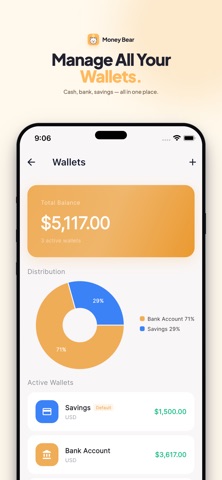
Multi-Wallet Support
- Track cash, bank accounts, credit cards, and more
- Set a different currency per wallet
- Transfer between wallets with optional fees
- Share wallets with family for joint tracking
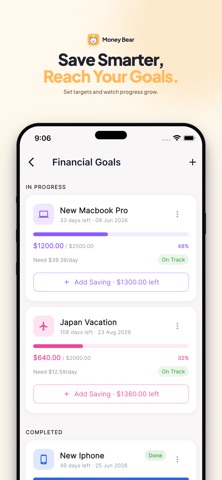
Savings Goals
- Set goals for vacations, gadgets, and emergency funds
- Track contributions and see progress clearly
- Deadline reminders to stay on pace
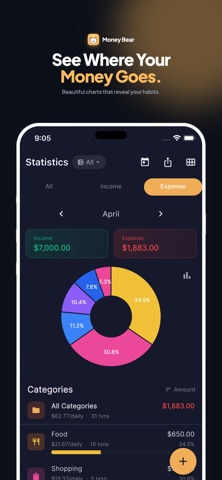
Beautiful Statistics
- Daily, weekly, monthly, and yearly views
- Income vs expense charts
- Category breakdown with pie and bar charts
- Trend analysis across periods
Calendar View
- See transactions day by day on a monthly calendar
- Quickly spot heavy spending days
- Tap any day for a full breakdown
Smart Organization
- Custom categories with icons and colors
- Labels to tag transactions (Want, Need, Savings, Family)
- Quick-add templates for common transactions
- Auto rules to categorize transactions automatically
Export and Reports
- Export to CSV, Excel (XLSX), or PDF
- Filter by date range, category, or wallet
- Useful for taxes, reimbursements, or financial planning
Multi-Currency
- Support for 100+ currencies
- Live exchange rates
- Built-in currency converter
- Loan calculator with amortization schedule
Privacy and Security
- Biometric app lock (fingerprint or face ID)
- Data is encrypted and securely synced via Firebase
- No ads in premium version; optional ads in free version
Looks Great Everywhere
- Modern design with light and dark themes
- Customizable category colors
- Home screen widgets for balance and monthly summary
Available in 20+ languages
- English, Spanish, French, German, Portuguese, Italian, Dutch, Polish,
Turkish, Arabic, Chinese, Japanese, Korean, Thai, Vietnamese, Indonesian,
Malay, Filipino, Khmer, and more
Download Money Bear today and start building better financial habits.
— — —
SUBSCRIPTION INFORMATION
Money Bear offers an optional auto-renewing Pro subscription:
- Monthly Pro: priced as displayed in the app
- Yearly Pro: priced as displayed in the app
Payment will be charged to your Apple ID account at confirmation of purchase. The subscription automatically renews unless it is cancelled at least 24 hours before the end of the current period. Your account will be charged for renewal within 24 hours prior to the end of the current period. You can manage and cancel your subscription in your Apple ID account settings after purchase.
Terms of Use (EULA): https://www.apple.com/legal/internet-services/itunes/dev/stdeula/
Privacy Policy: https://eprojectskh.blogspot.com/2026/04/easy-money-tracker-privacy-policy.html
Safety and technology
Found in the app by AppBrain- Price
- Free
- App size
- 94.3 MB
- Content rating
- Everyone
Technologies used by Money Bear: Expense Manager
Releases
Updates seen on the App Store- Version
- 2.2.4
- Launched
- May 2026
No changelog data
Alternatives
Similar apps and more from Vivorth SanAlternatives to Money Bear: Expense Manager


Also available on Google Play

Rankings
App Store top chartsApp Store Rankings for Money Bear: Expense Manager
About the app and developer
About Money Bear: Expense Manager
Money Bear: Expense Manager is a finance app developed by Vivorth San.
What is the rating of Money Bear: Expense Manager?
Money Bear: Expense Manager has no ratings yet.
Is Money Bear: Expense Manager free?
Money Bear: Expense Manager is free. The app size is 94.28 MB. The latest version available is 2.2.4. The last update was on June 27, 2026.
What are the requirements for Money Bear: Expense Manager?
The app has a content rating of Everyone. The app has been available on the App Store since May 2026.
Developer information for Vivorth San
Address:
Frequently asked questions about Money Bear: Expense Manager
Is Money Bear: Expense Manager free?
Yes. Money Bear: Expense Manager is free on the App Store.
Is Money Bear: Expense Manager still available?
Yes. Money Bear: Expense Manager is on the App Store, and the last update we saw was on June 27, 2026.
How large is Money Bear: Expense Manager?
Money Bear: Expense Manager is 94.28 MB.
Is Money Bear: Expense Manager suitable for children?
App Store rates the content of Money Bear: Expense Manager as suitable for everyone.
Who made Money Bear: Expense Manager?
Money Bear: Expense Manager was developed by Vivorth San. It is listed in the finance category on the App Store.
What are the best alternatives to Money Bear: Expense Manager?
People looking at Money Bear: Expense Manager also look at these finance apps: 佣金记账, Hisab Journey: Budgeting App, Student Expenses: Cash Book, Live Price Currency Translator, CashAI.