
Mongolian Keyboard: Translator
Mongolian Keyboard: Translator is made and published by Rushikesh Trivedi. AppBrain is an independent app data site and isn't affiliated with Rushikesh Trivedi. The app name, icon, screenshots and description belong to Rushikesh Trivedi and are shown as published on the App Store.
AppBrain's verdict
Established- Rating on App Store
- 4.50
- 4 ratings
- Last updated
- September 11, 2021
It doesn't have enough ratings yet to judge what users think.
Rankings
App Store top chartsApp Store Rankings for Mongolian Keyboard: Translator
Competitors
Similar apps and more from Rushikesh TrivediAlternatives to Mongolian Keyboard: Translator




More from Rushikesh Trivedi



Releases
Updates seen on the App Store- Version
- 1.0
- Launched
- September 2021
No changelog data
User feedback
Ratings and reviews on the App StoreComments on Mongolian Keyboard: Translator for iOS
We don't have enough comments to show example comments. Please check back later.
Technology
Found in the app by AppBrain- Price
- Free
- App size
- 29.0 MB
- Content rating
- Everyone
Technologies used by Mongolian Keyboard: Translator
About the app and developer
About Mongolian Keyboard: Translator
Mongolian Keyboard: Translator is an utilities app developed by Rushikesh Trivedi.
User Ratings
Mongolian Keyboard: Translator is rated 4.50 out of 5 stars. The rating is based on 4 ratings.
App Information
Mongolian Keyboard: Translator is freely available from the App Store. The app size is 28.96 MB. The latest version available is 1.0. The last update was on September 11, 2021.
Technical Requirements
The app has a content rating of Everyone. The app has been available on the App Store since September 2021.
Developer information for Rushikesh Trivedi
Address:
Frequently asked questions about Mongolian Keyboard: Translator
Is Mongolian Keyboard: Translator free?
Yes. Mongolian Keyboard: Translator is free on the App Store.
Is Mongolian Keyboard: Translator still available?
Yes. Mongolian Keyboard: Translator is on the App Store, and the last update we saw was on September 11, 2021.
How large is Mongolian Keyboard: Translator?
Mongolian Keyboard: Translator is 28.96 MB.
Is Mongolian Keyboard: Translator suitable for children?
App Store rates the content of Mongolian Keyboard: Translator as suitable for everyone.
How do people rate Mongolian Keyboard: Translator?
Mongolian Keyboard: Translator scores 4.50 out of 5 stars, from 4 ratings on the App Store.
Who made Mongolian Keyboard: Translator?
Mongolian Keyboard: Translator was developed by Rushikesh Trivedi. It is listed in the utilities category on the App Store.
What are the best alternatives to Mongolian Keyboard: Translator?
People looking at Mongolian Keyboard: Translator also look at these utilities apps: Mongolian Keyboard -Translator, Chimege Keyboard, DDISH+, Playhouse-Order, GSign mongolia.
Store listing
By Rushikesh Trivedi, from the App Store




Description by Rushikesh Trivedi Written by the developer, not by AppBrain. Click to read.
If you want to write something in Mongolian, but have still not mastered the language, use this Mongolian keyboard and translator, the best Mongolian keyboard and translator for iOS. You can easily write and if there is any mistake, or you are not able to recall some particular word that would fit, it offers an auto suggestion very quickly, and more importantly very precisely. Even if you are an expert at Mongolian language, you can use this Mongolian keyboard and translator iOS that has a multitude of features and functionalities to make your message appealing to the eye and compelling to the mind of the reader.
This best Mongolian Keyboard And Translator for iOS has been researched very well, so whatever word you intend to write, it picks it up without offering irrelevant word suggestions. This is the reason that makes it the best Mongolian Keyboard And Translator for iOS users.
Next, once you write in Mongolian, you can translate the text to any language of the world just by a few clicks. So you can compare your content both in intent and syntax with other languages easily. Complete your Mongolian writing tasks very easily with this Mongolian keyboard and Translator for iOS. Change font colors, keyboard skins, background images and what not. This Mongolian Keyboard And Translator is all yours to explore.
App Features
• Easily write messages in Mongolian language with the Mongolian keyboard for iOS.
• Changing the font, the colour, underlining features inbuilt in this Mongolian keyboard iOS.
• Directly share messages or delete them with the best Mongolian Keyboard And Translator for iOS as you’d like.
• Keypress sound functionality and vibration functionality to make tying feel fun.
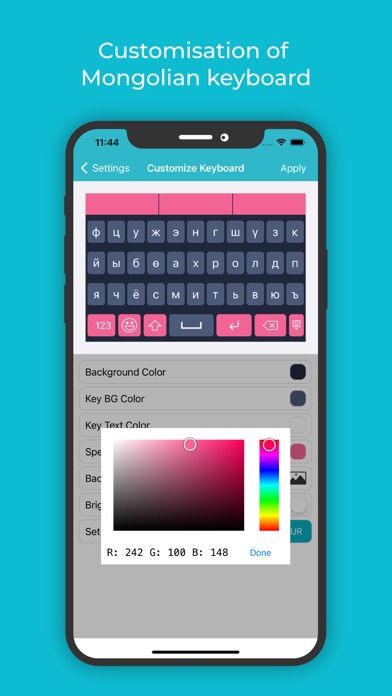
• Change colours for the Background colour, Key background colour, Keyboard text colour, Suggestion box colour etc, so that typing does not seem boring and monotonous with this Mongolian keyboard for iOS.
• With the Mongolian keyboard for iOS, you can even set your own image in the background.
• If you do not wish to spend a lot of time in the setup, use the default theme that comes in built in the best Mongolian Keyboard and Translator for iOS.
• A colour picker allows you to pick any colour of your choice.
• You can also pick out from the many available themes for the keyboard.
• Another important feature in the Mongolian keyboard and Translator, and one that makes this the best Mongolian keyboard and Translator for iOS is its adaptability with apps. Use the keyboard extension feature to type Mongolian directly into any app.
• If you later wish to translate your Mongolian message to any other language, you can easily do so as there are a number of languages already pre-installed in this Mongolian keyboard and Translator with iOS software.
How To Use
• Install the application from Apple AppStore as it is meant for iOS users.
• Once the software for this best Mongolian keyboard and Translator for iOS is installed, you can use the enable extension feature in this app, to sync it with any other app where you want to start writing Mongolian.
• Now use the apps background and theme settings to customise before you start typing, or go with the default theme in the best Mongolian Keyboard for iOS.
• Once you start typing, you can underline, colour or change the font of any letter to emphasise or de-emphasise it in this best Mongolian Keyboard And Translator for iOS.
• Once you’re done with your writing in Mongolian, you can use the translator feature in the best Mongolian Keyboard And Translator for iOS to convert the text into any other language as well.