AppBrain
AppBrain
  • Apps
  • Apps being viewed right now Trending apps today Most popular apps All-time most installed apps Top rated apps iPhone and iPad apps
  • Intelligence ▾
    Intelligence overview → Track any Android app or your whole market
    Track & analyze
    Keyword Tracker & OptimizerTrack & improve Play rankings App Performance ReportOne-off PDF for any app StatisticsFree Android & Play market stats
    Promote your app
    Featured Apps App Links
  • Intelligence
  • Pricing
  • Dashboard
  • Sign up
  • Log in
App Store Apps > Utilities > Monster Remote
Monster Remote icon

Monster Remote

2.11.1
Jan Sallads
4.47
19 reviews
Free

Monster Remote Screenshot 1 of 10
Monster Remote Screenshot 2 of 10
Monster Remote Screenshot 3 of 10
Monster Remote Screenshot 4 of 10
Monster Remote Screenshot 5 of 10
Monster Remote Screenshot 6 of 10
Monster Remote Screenshot 7 of 10
Monster Remote Screenshot 8 of 10
Monster Remote Screenshot 9 of 10
Monster Remote Screenshot 10 of 10
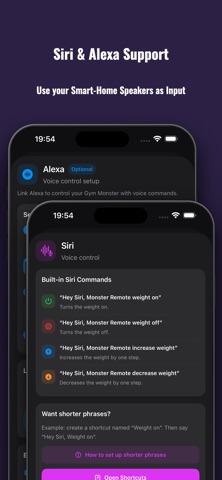
Screenshots by Jan Sallads, from the the App Store listing
View on the App Store

About Monster Remote

Monster Remote is an utilities app developed by Jan Sallads.

User Ratings

Monster Remote is rated 4.47 out of 5 stars. The rating is based on 19 ratings.

App Information

Monster Remote is freely available from the App Store. The app size is 22.28 MB. The latest version available is 2.11.1. The last update was on October 25, 2026.

Technical Requirements

The app has a content rating of Everyone. The app has been available on the App Store since June 2026.

Monster Remote is made and published by Jan Sallads. AppBrain is an independent app data site and isn't affiliated with Jan Sallads. The app name, icon, screenshots and description belong to Jan Sallads and are shown as published on the App Store.

Description by Jan Sallads (from the App Store)
Monster Remote is a wireless remote-control app for compatible home gym machines like the Speediance Gym Monster 1 & 2.

Use your iPhone or iPad to control weight, open a live screen mirror, tap and swipe on the mirrored display, configure workout overlays, launch videos or websites on the machine screen, and trigger supported actions with Hot Mic voice commands, Siri Shortcuts, Alexa, and smart home integrations.

Main features:

• Quick weight control
Turn weight on or off and increase or decrease the load in configurable steps.

• Live Remote Mirror
View the machine screen directly on your iPhone or iPad.

• Tap and swipe control
Use the mirrored screen like a remote touch display. Tap buttons, swipe through screens, and control supported areas from your device.

• Workout overlays
Show useful training information directly on the machine screen, including current exercise progress, cable position, bench angle, accessories, and recent set history.

• Customizable overlay display
Choose which overlay elements should be visible and adjust the overlay background, border, and transparency to match your workout view. (workout number, cable setting, bench angle, historical weight + reps for each exercise)

• Recent set history
Display previous set values for the current exercise so you can quickly compare your latest training performance without leaving the workout screen.

• Hot Mic voice commands
Control supported workout actions by voice without reaching for the machine screen. Use commands like weight on, weight off, heavier, lighter, weight to, start training, pause, skip rest, continue set, new set, new movement, spotter controls, training mode changes, accessory changes, and screen flip.

• Bluetooth microphone support
Use the built-in microphone, AirPods, or other compatible Bluetooth microphones and headsets for voice control.

• YouTube on the machine screen
Open YouTube videos on the GM display for workouts, tutorials, coaching content, or entertainment during training.

• Websites on the machine screen
Send websites to the machine display for training programs, timers, notes, instructions, or anything else you want available while working out.

• Siri Shortcuts
Trigger supported actions through Siri Shortcuts and personal automations.

• Alexa support
Control supported actions through Alexa voice routines and compatible automation setups.

• Smart home integration
Connect Monster Remote with your personal smart home workflows and automation scenes.

• No extra hardware required
Monster Remote works over your local network. No additional remote, bridge, hub, or dedicated hardware is required.

• Wireless setup
Connect to your supported machine over the local network after setup.

• Clean workout-focused design
Fast access to the controls you need without unnecessary clutter.

Monster Remote is designed for users who want easier access to their training controls, especially during workouts where reaching the machine screen is inconvenient.

Important:
Monster Remote requires a compatible machine, local network access, and a completed wireless setup. Some features depend on the machine software version, screen state, voice setup, network quality, and device configuration.

Network note:
Monster Remote communicates with your machine over your local Wi-Fi network. For the best experience, use a stable connection and keep your iPhone or iPad on the same local network as your machine.

Disclaimer:
Monster Remote is an unofficial app. It is not affiliated with, endorsed by, sponsored by, or connected to Speediance. Speediance and Gym Monster are trademarks or product names of their respective owners. Use at your own risk.
Show more Show less

More from Jan Sallads

NZB-Mule icon NZB-Mule
Jan Sallads
5.0
Free
1 ratings
DroidShell icon DroidShell
Jan Sallads
0.0
$8.99
Word Rush: Hidden Word Hunt icon Word Rush: Hidden Word Hunt
Jan Sallads
0.0
Free

Changelog of Monster Remote

No changelog data

Developer information for Jan Sallads

Jan Sallads

Address:

Share Monster Remote

Comments on Monster Remote for iOS

We don't have enough comments to show example comments. Please check back later.

App Store Rankings for Monster Remote

This app is not ranked

Technologies used by Monster Remote

Price drops on Google Play Today's trending apps Apps other people are watching Top new apps Popular Utilities Apps
More hot apps 🔥
AppBrain Intelligence premium content

Subscribe now to get full and unlimited access to AppBrain Intelligence. You'll have access to:

  • App Intelligence dashboard (performance timeline, competitor comparison, country rankings, insight cards)
  • Detailed ranking data per app
  • Full timeline per developer
  • Device market shares data per country
  • Unlimited keyword tracking
1 Month

$75/mo
(billed every month)

SAVE 0%
Subscribe
3 Months

$65/mo
($195 billed every 3 months)

SAVE 13%
Subscribe
1 Year

$57.50/mo
($690 billed every year)

SAVE 23%
Subscribe
Each subscription will automatically renew 3 days before the expiration date for the same time period. Subscriptions can be cancelled at any time before the renewal.

AppBrain is an app data site, we track rankings, ratings, installs for all apps and games on Google Play and the App Store. AppBrain doesn't host app files or APKs, all install links go directly to the official store. All trademarks are owned by their respective owners.

More apps

  • Top Android apps being viewed
  • View Super Velocita
  • Vegas Classic Slots—777 Casino
  • BeechBuddy

App statistics

  • Android statistics
  • Google Play Developer stats
  • Trending Android Apps
  • Trending iOS apps
  • Top popular Apps
  • Buy the best Android phone
  • Buy & sell app businesses

About AppBrain

  • Contact
  • Privacy
  • Documentation
  • DMCA takedowns
  • Blog
  • Android Interstitial Ads: Best practices to optimize your app's earnings
© 2010-2026 - AppBrain