Download Android Apps and Games
AppBrain
  • Apps
  • Apps being viewed right now Trending apps today Most popular apps All-time most downloaded apps Top rated apps
  • Intelligence ▾
    Intelligence overview → Track any Android app or your whole market
    Track & analyze
    Keyword Tracker & OptimizerTrack & improve Play rankings App Performance ReportOne-off PDF for any app StatisticsFree Android & Play market stats
    Promote your app
    Featured Apps App Links
  • Intelligence
  • Pricing
  • Dashboard
  • Sign up
  • Log in
Last updated on: 2026-06-24
App Store Apps > Photo & Video > MoonCatcher
MoonCatcher icon

MoonCatcher

18.1
HIROFUMI MARUO
0.00
0 reviews
$0.99

MoonCatcher Screenshot 1 of 9
MoonCatcher Screenshot 2 of 9
MoonCatcher Screenshot 3 of 9
MoonCatcher Screenshot 4 of 9
MoonCatcher Screenshot 5 of 9
MoonCatcher Screenshot 6 of 9
MoonCatcher Screenshot 7 of 9
MoonCatcher Screenshot 8 of 9
MoonCatcher Screenshot 9 of 9
Download from the App Store

About MoonCatcher

MoonCatcher is an overall app developed by HIROFUMI MARUO.

Download Statistics

User Ratings

The app has no ratings yet.

App Information

MoonCatcher costs $0.99 to download. The APK download size is 22.66 MB. The latest version available is 18.1. The last update was on March 21, 2025.

Technical Requirements

The app has a content rating of Everyone. The app has been available on Google Play December 2014.

Description
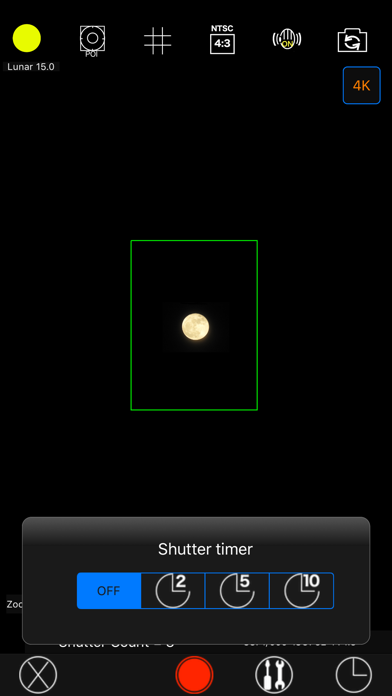
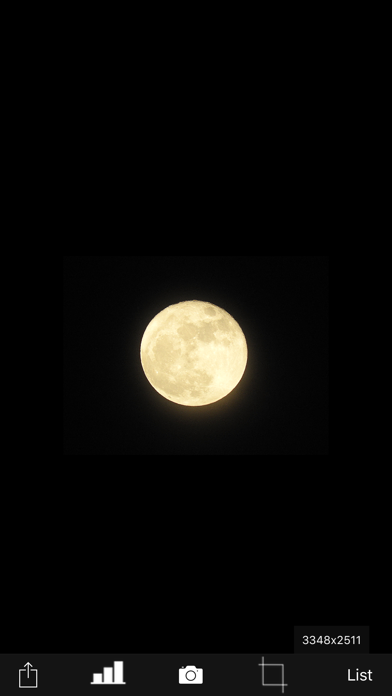
This is an app that allows you to easily photograph the moon at night, including its pattern. You can also zoom easily.

Usage is simple.
(A) Tap the moon from the menu and tap the closest moon shape among the three.
(B) Point the camera at the moon and zoom.
(C) Release the shutter without moving the smartphone (tripod recommended). The shutter will fire several times, so don't let it slide until the end.
If you cannot take any of the photos with the moon in focus, you can try "changing the center of focus" as many times as you like below.

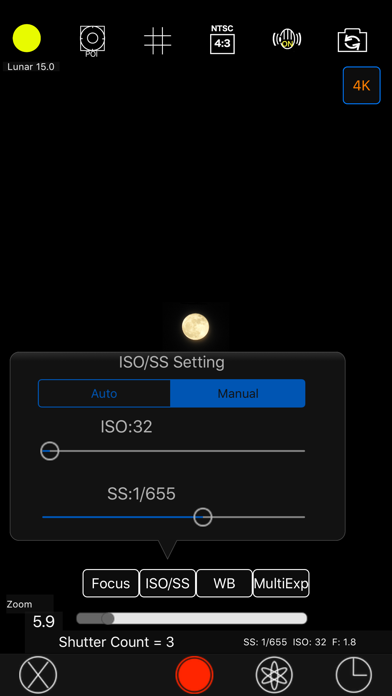
Tap the manual mode button (second button from the bottom right) to enter manual mode, where you can manually set focus, ISO/shutter speed, white balance, and multiple exposure parameters.

-------------------------
The features of this app are
(1) Fully automatic function
- If you select "Moon", the exposure will be automatically darkened in response to the bright moon in the night sky, and the focus will be adjusted to the distance.
Since it fires continuously while changing the focus multiple times, you can choose the best result among them. (The number of consecutive shots and the center of focus can be changed with the slider)

*"Change the focus center": Tap "Moon" on the shooting screen to display the moon shape selection segment, the number of consecutive shots slider, and the focus center slider. Now you can change each value.
Because the moon is far away, it is difficult to focus when zoomed in. Therefore, if you take pictures while changing the focus little by little, you can expect the moon to be in focus at some point.
The focus range is from 0 (nearby) to 1 (far), but in reality, the focus is shifted by 1/5 when shooting. For example, 0.7 to 0.9 (0.8 in the center). By changing the center of focus, you can shift the focus within any range and fire continuously.

- There are two types of night views.
・"Night Scene 1" brightens a dark night scene by one level.
・“Night Scene 2” brightens the image one step brighter than “Night Scene 1”.
It fires continuously while changing the brightness 4 times.

- If you select "HDR", multiple consecutive images with different exposures will be combined to create a pseudo-large dynamic range.
 Multiple exposure 3 times.


(2) Full manual function
You can take photos by manually setting the focal length, exposure, white balance, photo composition method, and number of photos.

・Tap "Focus", "ISO/SS", and "WB" to select auto or manual. 

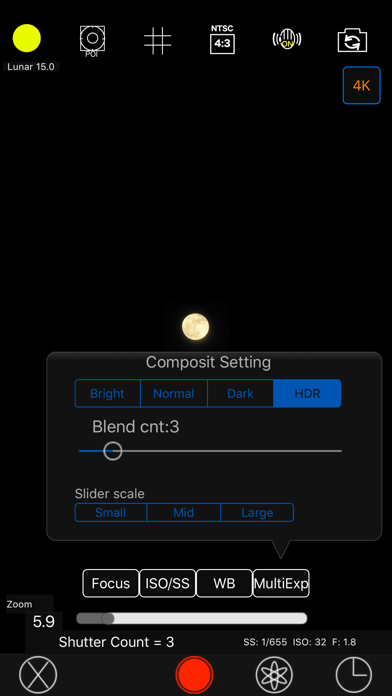
・Tap "Multiple Exposure" to select the multiple exposure composition method and set the number of composite images (up to 100).
The synthesis methods are as following.
Bright: Screen composit (Screen Blend)
Normal: Comparison(light) composition (Lighten Blend)
Dark: Comparison (dark) composition (Darken Blend)
HDR: Special composition (Special Blend)

(3) Other camera functions

・Zoom function: Achieving a zoom ratio of 40 time
・A camera position: The LCD screen side or the back camera is selectable.
・Focus position specification
・Mesh display
・Aspect selection
・Deviation correction selection

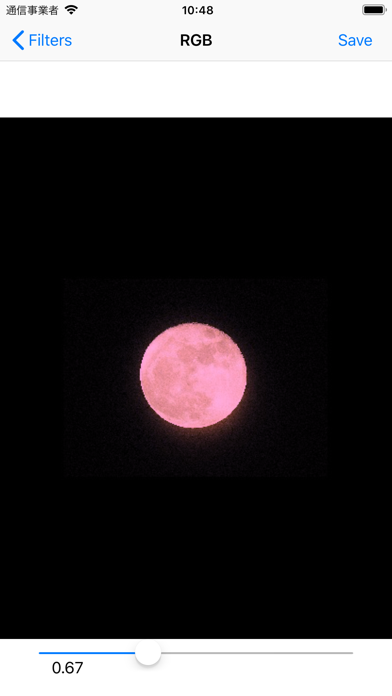
(4) Filter function just after the photography
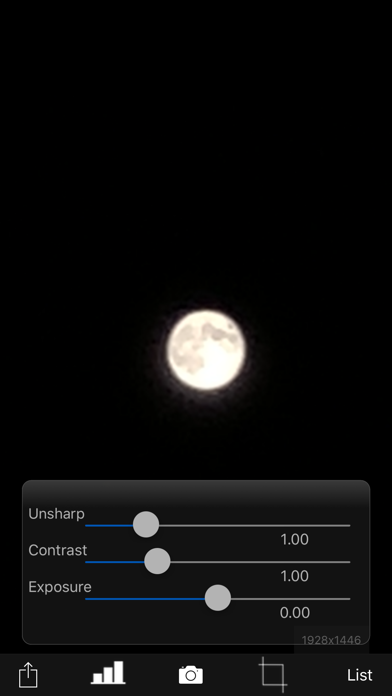
To display the photograph just after photography and the following filtering are possible by slider operation.
・Purity (sharpness)
・Comparison degree (contrast)
・Luminosity (exposure)

・Display list function
The photos taken in this app is stored in the camera roll and in app itself too and you can see the list of them with the shooting date and time information.

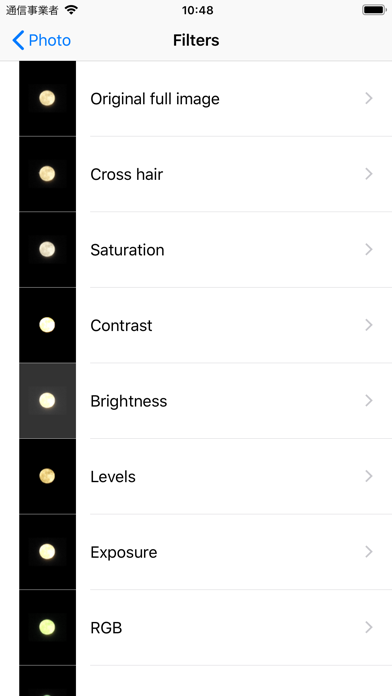
・Image processing function
When you tap the image on the list, it displays the list of filters for image processing.
It has about 70 filters such as 'Brightness','Contrast','Blur','Sharpening','Sepia','Monochrome','Edge detection','Sketch' and so on.

***
This app include the following open sources.
- GPUImage (Copyright (c) 2012, Brad Larson, Ben Cochran, Hugues Lismonde, Keitaroh Kobayashi, Alaric Cole, Matthew Clark, Jacob Gundersen, Chris Williams. All rights reserved.)
Show more Show less

More data about MoonCatcher

Price $0.99
Rating No ratings
Ranking Not ranked
Version 18.1
App download size 22.7 MB
Suitable for Everyone

Alternative downloads for the MoonCatcher app

Higher rated
iMoonCamera3 icon iMoonCamera3
康行 Nagasima
3.2
$3.99
5 ratings
Higher rated
Prime - RAW Manual Camera icon Prime - RAW Manual Camera
Klinger
4.2
$2.99
66 ratings
SmartCaptions icon SmartCaptions
Enrico Corradini
0.0
Free
Higher rated
Slow Shutter Camera - motion blur & light trail icon Slow Shutter Camera - motion blur & light trail
Nine Curves
3.3
$2.99
17 ratings
Higher rated
OneEdit Pro icon OneEdit Pro
Tiger Ng
2.4
$2.99
8 ratings
Higher rated
NIR Color icon NIR Color
JixiPix Software
4.4
$2.99
22 ratings
Higher rated
Analogue - BW Darkroom icon Analogue - BW Darkroom
Marcus Carlsson
4.6
$2.99
109 ratings
Higher rated
Military Binoculars Real Zoom icon Military Binoculars Real Zoom
QMonte Studio
4.4
$2.99
54 ratings

More from HIROFUMI MARUO

FireWorksBld icon FireWorksBld
HIROFUMI MARUO
4.0
$0.99
2 ratings
Super long time-lapse icon Super long time-lapse
HIROFUMI MARUO
1.0
$0.99
1 ratings
VoicePrinter icon VoicePrinter
HIROFUMI MARUO
4.0
Free
1 ratings
MacroPhoto icon MacroPhoto
HIROFUMI MARUO
1.0
$0.99
1 ratings
SoundWatch icon SoundWatch
HIROFUMI MARUO
5.0
Free
1 ratings
KaleidoScope FilterCam icon KaleidoScope FilterCam
HIROFUMI MARUO
1.0
$1.99
1 ratings
SlowlyCam icon SlowlyCam
HIROFUMI MARUO
1.0
Free
1 ratings
Starry sky Camera icon Starry sky Camera
HIROFUMI MARUO
0.0
$0.99

Changelog of MoonCatcher

No changelog data

Developer information for HIROFUMI MARUO

HIROFUMI MARUO

Address:

Share MoonCatcher

Comments on MoonCatcher for iOS

We don't have enough comments to show example comments. Please check back later.

App Store Rankings for MoonCatcher

This app is not ranked

Technologies used by MoonCatcher

iMoonCamera3 icon iMoonCamera3
Prime - RAW Manual Camera icon Prime - RAW Manual Camera
SmartCaptions icon SmartCaptions
Slow Shutter Camera - motion blur & light trail icon Slow Shutter Camera - motion blur & light trail
OneEdit Pro icon OneEdit Pro
NIR Color icon NIR Color
Analogue - BW Darkroom icon Analogue - BW Darkroom
Military Binoculars Real Zoom icon Military Binoculars Real Zoom

Back to top
AppBrain Intelligence premium content

Subscribe now to get full and unlimited access to AppBrain Intelligence. You'll have access to:

  • App Intelligence dashboard (performance timeline, competitor comparison, country rankings, insight cards)
  • Detailed ranking data per app
  • Full timeline per developer
  • Device market shares data per country
1 Month

$75/mo
(billed every month)

SAVE 0%
Subscribe
3 Months

$65/mo
($195 billed every 3 months)

SAVE 13%
Subscribe
1 Year

$57.50/mo
($690 billed every year)

SAVE 23%
Subscribe
Each subscription will automatically renew 3 days before the expiration date for the same time period. Subscriptions can be cancelled at any time before the renewal.

AppBrain is a directory focused on discovering great apps and games. We give statistics, rankings and search options that Google Play and the App Store don't have. All trademarks are owned by their respective owners. AppBrain doesn't offer APKs or binaries, and always lets users install the official version from Google Play or the App Store.

More apps

  • Top Android apps being viewed
  • Coverstar
  • Ask-Me
  • View MEMS Protocols

Android Statistics

  • Android statistics
  • Google Play Developer stats
  • Trending Android Apps
  • Top popular Apps
  • Buy the best Android phone

About AppBrain

  • Contact
  • Privacy
  • Documentation
  • DMCA takedowns
  • Articles
  • Blog
  • Android App Marketing: Learn how to better market your Android app
© 2010-2026 - AppBrain