

Moray: SSH Client & SFTP
Moray: SSH Client & SFTP is made and published by Bartlomiej Zabicki Mobile Developer. AppBrain is an independent app data site and isn't affiliated with Bartlomiej Zabicki Mobile Developer. The app name, icon, screenshots and description belong to Bartlomiej Zabicki Mobile Developer and are shown as published on the App Store.
AppBrain's verdict
- Last updated
- October 14, 2026
Rankings
App Store top chartsApp Store Rankings for Moray: SSH Client & SFTP
Competitors
Similar apps and more from Bartlomiej Zabicki Mobile DeveloperAlternatives to Moray: SSH Client & SFTP


More from Bartlomiej Zabicki Mobile Developer




Releases
Updates seen on the App Store- Version
- 1.2.0
- Launched
- August 2026
No changelog data
User feedback
Ratings and reviews on the App StoreComments on Moray: SSH Client & SFTP for iOS
We don't have enough comments to show example comments. Please check back later.
Technology
Found in the app by AppBrain- Price
- Free
- App size
- 47.4 MB
- Content rating
- Everyone
Technologies used by Moray: SSH Client & SFTP
About the app and developer
About Moray: SSH Client & SFTP
Moray: SSH Client & SFTP is an overall app developed by Bartlomiej Zabicki Mobile Developer.
What is the rating of Moray: SSH Client & SFTP?
Moray: SSH Client & SFTP has no ratings yet.
Is Moray: SSH Client & SFTP free?
Moray: SSH Client & SFTP is free. The app size is 47.44 MB. The latest version available is 1.2.0. The last update was on October 14, 2026.
What are the requirements for Moray: SSH Client & SFTP?
The app has a content rating of Everyone. The app has been available on the App Store since August 2026.
Developer information for Bartlomiej Zabicki Mobile Developer
Bartlomiej Zabicki Mobile Developer
Address:
Frequently asked questions about Moray: SSH Client & SFTP
Is Moray: SSH Client & SFTP free?
Yes. Moray: SSH Client & SFTP is free on the App Store.
Is Moray: SSH Client & SFTP still available?
Yes. Moray: SSH Client & SFTP is on the App Store, and the last update we saw was on October 14, 2026.
How large is Moray: SSH Client & SFTP?
Moray: SSH Client & SFTP is 47.44 MB.
Is Moray: SSH Client & SFTP suitable for children?
App Store rates the content of Moray: SSH Client & SFTP as suitable for everyone.
Who made Moray: SSH Client & SFTP?
Moray: SSH Client & SFTP was developed by Bartlomiej Zabicki Mobile Developer. It is listed in the overall category on the App Store.
What are the best alternatives to Moray: SSH Client & SFTP?
People looking at Moray: SSH Client & SFTP also look at these overall apps: DockPilot AI, Statusline: Agent Quota, Code Bridge: AI Coding Agent, SigilTTY: AI SSH Terminal, ContainerDesk: Docker & K8s.
Store listing
By Bartlomiej Zabicki Mobile Developer, from the App Store


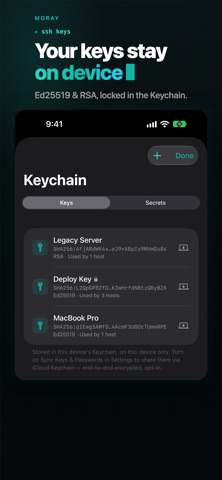


Description by Bartlomiej Zabicki Mobile Developer Written by the developer, not by AppBrain. Click to read.
▸ A REAL TERMINAL
A full terminal powered by SwiftTerm — rich color, a fast keyboard, and smooth scrollback. Open several sessions as tabs, name them, switch between them from the keyboard, search the scrollback, and run commands automatically on connect. Moray remembers what you typed on each server — never a password — so you can search it and re-run. The Smart Bar puts arrows, Esc, Tab, Ctrl, and paste one tap away.
▸ SFTP FILE MANAGER
Browse, upload, download, rename, and delete over SFTP, reopening in the folder you left. Preview with Quick Look, edit text files in place, or pick which app opens each file type. On iPad and Mac, a dual-pane manager copies files and folders between servers — or to your computer — with drag and drop, and a file pane can sit beside the terminal.
▸ YOUR SERVERS IN THE FILES APP
On iPhone and iPad, mount a host and it appears in Files next to iCloud Drive — open a remote file straight into any app that uses the document picker, and save back to it.
▸ PORT-FORWARDING TUNNELS
Forward a local port to a database or dashboard behind your server. Import LocalForward lines from ~/.ssh/config, start every tunnel with one tap, and keep them running with a Live Activity.
▸ KEYS DONE RIGHT
Generate Ed25519 keys, or import Ed25519 and RSA keys. Keys and saved passwords live in the device Keychain — encrypted, never synced unless you opt in, and behind an optional biometric app lock. A new server's fingerprint and key picture are shown before you trust it; a key that later changes stops the connection, with both keys side by side.
▸ SMART AUTOFILL
Moray spots sudo, login and passphrase prompts and offers a Face ID– or Touch ID–gated fill — enter your password once, not every time.
▸ ORGANIZED HOSTS
Group and tag your servers, with an icon and color each. Quick Connect (⇧⌘K) and Siri Shortcuts connect you in seconds; jump hosts reach servers behind a bastion.
▸ SNIPPETS
Save the commands you run all the time — with fill-in placeholders — and run or paste them into any session.
▸ MAKE IT YOURS
Start from built-in terminal themes or design your own with a full color editor. Choose your font — SF Mono, Menlo, or any monospaced font you've installed — plus size, line height and cursor style.
▸ SYNC, YOUR WAY (MORAY PRO)
With Moray Pro, hosts, groups, snippets and host keys sync through your own iCloud — no Moray account, ever. Keys stay on the device unless you turn on iCloud Keychain sync.
▸ APPLE-NATIVE THROUGHOUT
Siri and Spotlight, recent-hosts widgets (Moray Pro), a keyboard-driven Mac app with a menu-bar extra, a biometric app lock, and JSON backup.
________________
FREE & PRO
Free: unlimited hosts, the terminal (up to three sessions at once), a single-pane SFTP file manager, the remote editor, key management, autofill, command history, SSH config import, and Quick Connect. Moray Pro adds iCloud sync, port-forwarding tunnels, jump hosts, automatic key auth, dual-pane transfers and server-to-server copy, Files app mounts, unlimited terminal tabs, custom themes, unlimited snippets, and widgets — as a monthly or yearly subscription, or a one-time lifetime purchase.
________________
PRIVATE BY DESIGN
• No account and no vendor servers — sync (Moray Pro) is your iCloud, or nothing
• Private keys and passwords stay in the Keychain, device-local by default
• Host-key checks you can see: a new server's fingerprint is shown before it's trusted, and a changed key stops the connection until you decide
________________
Privacy Policy: https://moray.bartstudio.io/privacy/
Terms of Use (EULA): https://www.apple.com/legal/internet-services/itunes/dev/stdeula/