

Morse Code Translator & Decode
Morse Code Translator & Decode is made and published by Ahmad Sattar. AppBrain is an independent app data site and isn't affiliated with Ahmad Sattar. The app name, icon, screenshots and description belong to Ahmad Sattar and are shown as published on the App Store.
AppBrain's verdict
- Last updated
- September 26, 2026
- Size
- 56.4 MB
User feedback
Ratings and reviews on the App StoreComments on Morse Code Translator & Decode for iOS
We don't have enough comments to show example comments. Please check back later.
Store listing
By Ahmad Sattar, from the App Store


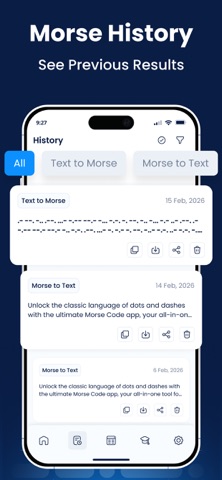

Description by Ahmad Sattar Written by the developer, not by AppBrain. Click to read.
How to Use The Morse Code Translator App?
Follow the steps to use this Morse code translator app:
• Install the Morse code translator app on your device.
• Open the Morse code app.
• Providing plain text, the app will automatically convert text into Morse code.
• Now you can copy, download, or share the Morse code.
The above steps explain the process of converting text or alphabets into Morse code. Similarly, you can paste code in the input box and let the app translate and decode it into plain text.
Key Features of the Morse Code Translator
1. Double Way Translator:
The Morse code app is a double-way translator. It can code plain text into Morse code as well as decode Morse code into plain text, alphabets, or numbers.
2. Transmission Options:
You can play the Morse Code signals into sound, flashlight, and vibration by clicking the respective icons.
3. Customizable:
Our Morse code decoder app divides letters by a single slash (/), and words by a double slash (//). You can adjust and customize these default separators in the settings menu. Similarly, you customize or change the frequency.
4. No Words or Code Limit:
The Morse code translator app can decode an unlimited number of words into clear text. Similarly, there is no specific limit for characters or words. Here, you can encode or decode lengthy messages without any boundaries
5. Finger Tap Keyboard
The Morse to text translator app offers a finger tap keyboard, using which you can type Morse code. The keyboard has a dot for a short tap, a dash for a long tap, and a slash for a separator.
6. Quick Codes:
It provides users with a list of “Quick codes” that are commonly used during Morse code communication. This featur will help you communicate instantly by providing you with ready-made text messages that you can copy and convert into Morse code.
7. Manual Sending:
The manual sending feature lets users easily share Morse Code messages without typing. It is ideal for those who have learned Morse code. This option allows users to use vibrations or the device’s flashlight to transmit Morse code messages manually.
8. Custom Speed, Frequency, and Separator
You can configure sound frequency, separator (Gap), and playing speed according to your needs.
Benefits of the Morse Code Translator
• The Morse code app can help you learn Morse code. For this, the application provides an easy module.
• The Morse code translator does not demand that users spend even a single penny. Every conversion and learning opportunity is without any charge or subscription plan.
• This Morse code translator also provides users with a “Dark Mode”. Enabling the Dark mode is useful for eye protection and your device’s battery life.
• Our free Morse to text translating app is available in a wide range of languages.
• It is very fast in encoding as well as decoding Morse code.
• There are no distracting ads displayed on this app.
Note:
We value your privacy. None of your data will be shared with third parties.
If you have any further questions or encounter any problems while using this app, please feel free to contact us.
Payment will be charged to your iTunes Account at confirmation of purchase. Your subscription will automatically renew unless auto-renew is turned off at least 24 hours before the end of the current subscription period. Automatic renewals cost the same price you were originally charged for the subscription. You can manage your subscriptions and turn off auto-renewal by visiting your account settings in the App Store after purchase..
Terms of Use:
https://www.morsecodetranslator.info/terms-condition
Privacy Policy:
https://www.morsecodetranslator.info/privacy-policy
Safety and technology
Found in the app by AppBrain- Price
- Free
- App size
- 56.4 MB
- Content rating
- Everyone
Technologies used by Morse Code Translator & Decode
Releases
Updates seen on the App Store- Version
- 1.0.6
- Launched
- January 2026
No changelog data
Alternatives
Similar apps and more from Ahmad SattarMore from Ahmad Sattar


Rankings
App Store top chartsApp Store Rankings for Morse Code Translator & Decode
About the app and developer
About Morse Code Translator & Decode
Morse Code Translator & Decode is a productivity app developed by Ahmad Sattar.
User Ratings
The app has no ratings yet.
App Information
Morse Code Translator & Decode is freely available from the App Store. The app size is 56.37 MB. The latest version available is 1.0.6. The last update was on September 26, 2026.
Technical Requirements
The app has a content rating of Everyone. The app has been available on the App Store since January 2026.
Developer information for Ahmad Sattar
Address:
Frequently asked questions about Morse Code Translator & Decode
Is Morse Code Translator & Decode free?
Yes. Morse Code Translator & Decode is free on the App Store.
Is Morse Code Translator & Decode still available?
Yes. Morse Code Translator & Decode is on the App Store, and the last update we saw was on September 26, 2026.
How large is Morse Code Translator & Decode?
Morse Code Translator & Decode is 56.37 MB.
Is Morse Code Translator & Decode suitable for children?
App Store rates the content of Morse Code Translator & Decode as suitable for everyone.
Who made Morse Code Translator & Decode?
Morse Code Translator & Decode was developed by Ahmad Sattar. It is listed in the productivity category on the App Store.