

Morse Trainer QT is made and published by 伟光 高. AppBrain is an independent app data site and isn't affiliated with 伟光 高. The app name, icon, screenshots and description belong to 伟光 高 and are shown as published on the App Store.
AppBrain's verdict
- Last updated
- September 16, 2026
Rankings
App Store top chartsApp Store Rankings for Morse Trainer QT
Competitors
Similar apps and more from 伟光 高Alternatives to Morse Trainer QT



More from 伟光 高

Releases
Updates seen on the App Store- Version
- 1.0.0
- Launched
- September 2026
No changelog data
User feedback
Ratings and reviews on the App StoreComments on Morse Trainer QT for iOS
We don't have enough comments to show example comments. Please check back later.
Technology
Found in the app by AppBrain- Price
- Free
- App size
- 4.44 MB
- Content rating
- Everyone
Technologies used by Morse Trainer QT
About the app and developer
About Morse Trainer QT
Morse Trainer QT is an education app developed by 伟光 高.
What is the rating of Morse Trainer QT?
Morse Trainer QT has no ratings yet.
Is Morse Trainer QT free?
Morse Trainer QT is free. The app size is 4.44 MB. The latest version available is 1.0.0. The last update was on September 16, 2026.
What are the requirements for Morse Trainer QT?
The app has a content rating of Everyone. The app has been available on the App Store since September 2026.
Developer information for 伟光 高
Address:
Frequently asked questions about Morse Trainer QT
Is Morse Trainer QT free?
Yes. Morse Trainer QT is free on the App Store.
Is Morse Trainer QT still available?
Yes. Morse Trainer QT is on the App Store, and the last update we saw was on September 16, 2026.
How large is Morse Trainer QT?
Morse Trainer QT is 4.44 MB.
Is Morse Trainer QT suitable for children?
App Store rates the content of Morse Trainer QT as suitable for everyone.
Who made Morse Trainer QT?
Morse Trainer QT was developed by 伟光 高. It is listed in the education category on the App Store.
What are the best alternatives to Morse Trainer QT?
People looking at Morse Trainer QT also look at these education apps: Morse ICR Trainer, Dot Dash: Morse Code, MTP Callsign Trainer, Morse Code Trainer - CW Key, Cadenza: Morse Code Trainer.
Store listing
By 伟光 高, from the App Store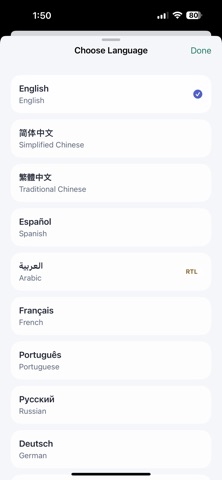




Description by 伟光 高 Written by the developer, not by AppBrain. Click to read.
Build direct sound-to-character recognition without first translating signals into dots and dashes. Koch-style progression introduces patterns gradually; Farnsworth spacing preserves character rhythm while adjusting the overall pace.
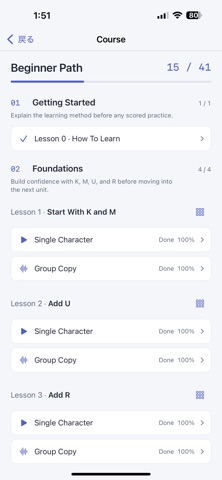
STRUCTURED BEGINNER COURSE
• One introduction explains the method before scored practice.
• 41 guided lessons start with K and M, then add A–Z, 0–9, period, comma, question mark, hyphen, slash, and equals sign.
• Learned characters remain active for cumulative recognition.
• Each lesson includes a preview, single-character practice, immediate feedback, replay, error review, and detailed results.
• Every lesson also provides Group Copy: 10 groups of 5 characters for continuous reception.
• Passing requires 90% accuracy. Lessons and required Group Copy tasks advance the chapter path.
• Switch the keyboard between lesson characters only and the full layout.
• The course map clearly shows lesson status and chapter or premium locks.
Gradual load, active recall, immediate correction, and the move from isolated characters to continuous copy form one learning path. Separate character and effective speeds preserve signal shape while allowing more response time.
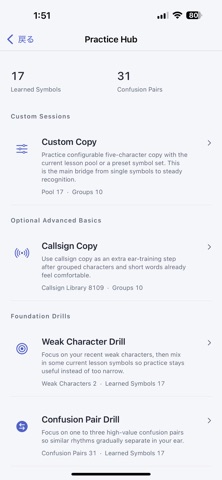
FOCUSED PRACTICE
Custom Copy
• Choose the course pool, letters, digits, punctuation, letters plus digits, or your own set.
• Configure 1–1,000 five-character groups and both speeds independently.
• Choose Current Characters or the full keyboard, with full playback controls and answer review.
Weak Character Drill
• Uses recent errors to target weak characters, mixed with part of the current pool; groups and speeds remain configurable.
Confusion Pair Drill
• Trains one to three similar-sounding pairs with the same group and speed controls.
Cumulative Review
• Samples evenly from learned characters without introducing new material.
Lesson Group Copy
• Provides a continuous-copy task for every lesson, with correct text, input, error positions, accuracy, and best result.
• Completing required tasks unlocks the next chapter.
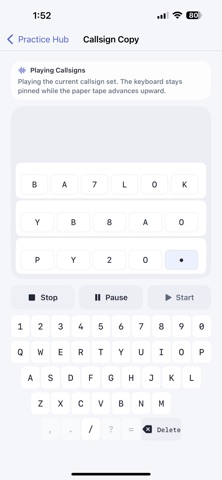
Callsign Copy
• Build sessions from the full callsign library; set count, repeats, and both speeds.
• A dedicated screen and letters/digits/slash keyboard lead to character-level review.
Digits and punctuation can also be trained separately through Custom Copy presets.
MORSE REFERENCE AND STATISTICS
Browse letters, digits, and punctuation by category, and tap any item to hear its Morse sound.
Statistics cover streak, sessions, time, today/week/month views, practice days, accuracy, correct characters, lesson and symbol progress, recent weaknesses, and mode-by-mode totals.
SETTINGS AND DEVICES
• Separate character and effective speed controls; full unlock supports up to 60 WPM.
• Tone adjustable from 300–1,200 Hz and configurable start delay.
• Restore default settings or reset learning progress separately.
• Adaptive iPhone and iPad layouts, with light and dark appearance.
• Interface in 12 languages, including right-to-left support for Arabic.
ICLOUD SYNC
Sync course progress, streak, and the latest 2,000 completed sessions through one iCloud account. Every completed practice starts background sync; offline changes remain local and retry automatically. Settings includes status and manual sync.
No separate app account is required. Synced learning data is stored in the user’s private iCloud database.
FREE ACCESS AND FULL UNLOCK
Try the introduction and Lessons 1–7. One non-consumable purchase unlocks Lessons 8–41, the full callsign library, higher speeds, expanded pools, and remaining content.
This is a one-time purchase, not a subscription. Restore Purchases is included.