

MosaicMachine – Video Blur
MosaicMachine – Video Blur is made and published by Takahiro Ito. AppBrain is an independent app data site and isn't affiliated with Takahiro Ito. The app name, icon, screenshots and description belong to Takahiro Ito and are shown as published on the App Store.
AppBrain's verdict
- Last updated
- September 26, 2026
Rankings
App Store top chartsApp Store Rankings for MosaicMachine – Video Blur
Competitors
Similar apps and more from Takahiro ItoMore from Takahiro Ito


Releases
Updates seen on the App Store- Version
- 1.5
- Launched
- July 2026
No changelog data
User feedback
Ratings and reviews on the App StoreComments on MosaicMachine – Video Blur for iOS
We don't have enough comments to show example comments. Please check back later.
Technology
Found in the app by AppBrain- Price
- Free
- App size
- 7.75 MB
- Content rating
- Everyone
Technologies used by MosaicMachine – Video Blur
About the app and developer
About MosaicMachine – Video Blur
MosaicMachine – Video Blur is a photo & video app developed by Takahiro Ito.
User Ratings
The app has no ratings yet.
App Information
MosaicMachine – Video Blur is freely available from the App Store. The app size is 7.75 MB. The latest version available is 1.5. The last update was on September 26, 2026.
Technical Requirements
The app has a content rating of Everyone. The app has been available on the App Store since July 2026.
Developer information for Takahiro Ito
Address:
Frequently asked questions about MosaicMachine – Video Blur
Is MosaicMachine – Video Blur free?
Yes. MosaicMachine – Video Blur is free on the App Store.
Is MosaicMachine – Video Blur still available?
Yes. MosaicMachine – Video Blur is on the App Store, and the last update we saw was on September 26, 2026.
How large is MosaicMachine – Video Blur?
MosaicMachine – Video Blur is 7.75 MB.
Is MosaicMachine – Video Blur suitable for children?
App Store rates the content of MosaicMachine – Video Blur as suitable for everyone.
Who made MosaicMachine – Video Blur?
MosaicMachine – Video Blur was developed by Takahiro Ito. It is listed in the photo & video category on the App Store.
Store listing
By Takahiro Ito, from the App Store


Description by Takahiro Ito Written by the developer, not by AppBrain. Click to read.
MosaicMachine finds faces, pets, bodies, and text, and hides them.
It was built out of the usual frustrations with mosaic apps: having to upload the very photos you don't want seen, quality loss on save, and a paywall in front of the save button. Detection, effects, and export all run on your iPhone, so nothing is sent anywhere and saving is free.
■ Faces and pets, hidden automatically
Human faces, dogs, and cats are detected for you. In video, the effect follows them as they move, so there is no frame-by-frame work. Tap anyone you want to keep visible.
■ Not just the face. The whole body
Choose Full Body when clothes or build could give someone away. Or narrow it down to eyes only or mouth only. Combine it with Hide Everything Else to keep only yourself and hide the whole background.
■ Plates and name tags, found and hidden
Detect Text finds license plates, name tags, and addresses in screen recordings. Tap one and it is tracked and hidden. You can also paint with a brush or draw a region by hand, and zoom the preview up to 5x for small text.
■ Nine ways to hide
Mosaic, blur, black bar, emoji, pointillism, crystal, hexagon, frosted glass, and sparkle. Adjust the strength, and soften the edges so nothing looks like a mask.
■ Fix it afterwards on the timeline
When tracking drifts, move the box at that moment and the frames around it blend naturally. Mute a range of audio, generate subtitles with on-device speech recognition and edit them, and trim the ends, all in one place.
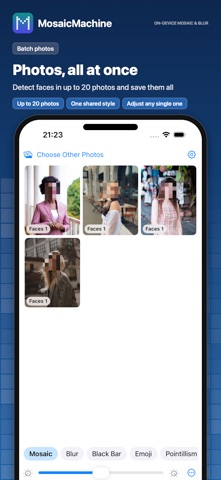
■ Photos, all at once
Pick up to 20 photos. Every face is detected and hidden with one shared style, then saved together. Open any single photo in the full editor if it needs a touch.
■ Saved exactly as previewed, at full quality
Preview and export use the same processing, so what you see is what is saved. Video keeps its original resolution, frame rate, and color information. Share right after saving.
■ On iPad too
On iPad, the preview and controls sit side by side.
■ Features
- Automatic face, dog, and cat detection with tracking; tap to toggle each one
- Full body, whole face, eyes only, mouth only, and hide everything else
- Text detection, brush, draw a region, 1x to 5x zoom
- Nine styles, adjustable strength, soft edges
- Timeline: keyframe fixes, mute ranges, subtitles (auto and manual), trim
- Batch photos (up to 20)
- Full-quality export and instant sharing
■ Price
Every editing feature is free, with no watermark and no time limit. A single small banner ad appears at the bottom of the screen. A one-time Remove Ads purchase hides it. No subscription.
■ Privacy
Photos, videos, and face data never leave your device. Subtitle speech recognition runs on your iPhone as well.