

Mossca Remote is made and published by 明星 张. AppBrain is an independent app data site and isn't affiliated with 明星 张. The app name, icon, screenshots and description belong to 明星 张 and are shown as published on the App Store.
AppBrain's verdict
- Last updated
- July 29, 2026
Rankings
App Store top chartsApp Store Rankings for Mossca Remote
This app is not ranked
Competitors
Similar apps and more from 明星 张Alternatives to Mossca Remote


More from 明星 张


Releases
Updates seen on the App Store- Version
- 1.0
- Launched
- July 2026
No changelog data
User feedback
Ratings and reviews on the App StoreComments on Mossca Remote for iOS
We don't have enough comments to show example comments. Please check back later.
Technology
Found in the app by AppBrain- Price
- Free
- App size
- 6.94 MB
- Content rating
- Everyone
Technologies used by Mossca Remote
About the app and developer
About Mossca Remote
Mossca Remote is a music app developed by 明星 张.
User Ratings
The app has no ratings yet.
App Information
Mossca Remote is freely available from the App Store. The app size is 6.94 MB. The latest version available is 1.0. The last update was on July 29, 2026.
Technical Requirements
The app has a content rating of Everyone. The app has been available on the App Store since July 2026.
Developer information for 明星 张
Address:
Store listing
By 明星 张, from the App Store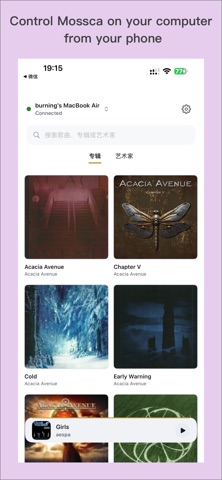


Screenshots by 明星 张, from the the App Store listing
Description by 明星 张 Written by the developer, not by AppBrain. Click to read.
Mossca Remote is the official remote control app for Mossca on Mac, allowing you to control your desktop music playback experience directly from your iPhone or iPad.
Whether you are sitting on the sofa, relaxing in another room, or listening through your home audio system, Mossca Remote makes it easy to browse albums, control playback, adjust volume, and manage your listening experience over the same Wi-Fi network.
Key Features:
• Real-time playback control: play, pause, skip tracks, and jump to specific songs.
• Playback queue management: view and manage upcoming tracks with ease.
• Volume and output control: adjust volume remotely and switch between Exclusive and Shared Output modes.
• Now Playing display: view the current album artwork, track title, artist, and playback status.
• Multi-language support: Chinese, English, and Japanese interface support.
• Stable local connection: automatically discover and connect to Mossca on your Mac over the same Wi-Fi network.
• Lightweight interface: clean, focused, and easy to use.
Ideal For:
• Controlling Mac music playback from your sofa or listening position.
• Switching albums or adjusting volume without returning to your Mac.
• Using Mossca with home audio systems, external DACs, or desktop speakers.
Privacy & Security:
• No personal data collection.
• Communication happens within your local network.
• Designed for private and secure home listening.
Feedback:
Any feedback or suggestions are welcome.
Contact: mynameisfung@gmail.com
Whether you are sitting on the sofa, relaxing in another room, or listening through your home audio system, Mossca Remote makes it easy to browse albums, control playback, adjust volume, and manage your listening experience over the same Wi-Fi network.
Key Features:
• Real-time playback control: play, pause, skip tracks, and jump to specific songs.
• Playback queue management: view and manage upcoming tracks with ease.
• Volume and output control: adjust volume remotely and switch between Exclusive and Shared Output modes.
• Now Playing display: view the current album artwork, track title, artist, and playback status.
• Multi-language support: Chinese, English, and Japanese interface support.
• Stable local connection: automatically discover and connect to Mossca on your Mac over the same Wi-Fi network.
• Lightweight interface: clean, focused, and easy to use.
Ideal For:
• Controlling Mac music playback from your sofa or listening position.
• Switching albums or adjusting volume without returning to your Mac.
• Using Mossca with home audio systems, external DACs, or desktop speakers.
Privacy & Security:
• No personal data collection.
• Communication happens within your local network.
• Designed for private and secure home listening.
Feedback:
Any feedback or suggestions are welcome.
Contact: mynameisfung@gmail.com