

Motion Graphix Animator
Motion Graphix Animator is made and published by PixelSplincher. AppBrain is an independent app data site and isn't affiliated with PixelSplincher. The app name, icon, screenshots and description belong to PixelSplincher and are shown as published on the App Store.
AppBrain's verdict
Established- Rating on App Store
- 4.11
- 9 ratings
- Last updated
- October 14, 2025
- Size
- 133.4 MB
It doesn't have enough ratings yet to judge what users think.
User feedback
Ratings and reviews on the App StoreComments on Motion Graphix Animator for iOS
We don't have enough comments to show example comments. Please check back later.
Store listing
By PixelSplincher, from the App Store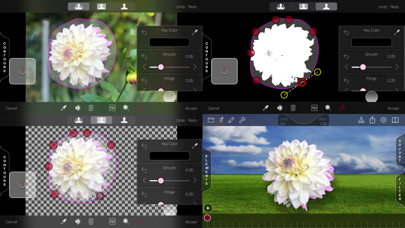

Description by PixelSplincher Written by the developer, not by AppBrain. Click to read.
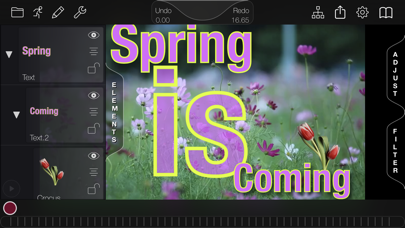
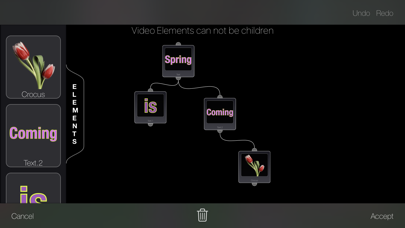
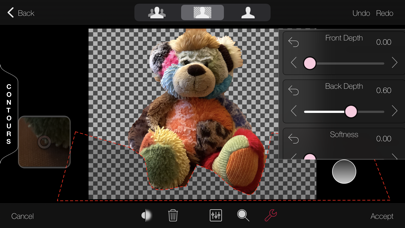
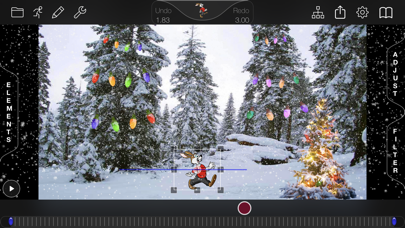
Motion Graphix lets you add as many layers as you like, and animate them. Layers can be made not just from still pictures, but also from videos and animated GIFs. You can create your own text elements with outlines and shadows, or define your own basic shapes using standard Bezier curves and color gradient fills. And Motion Graphix includes a built-in sprite cutter, making it easy to cut elements out of your own photos by tracing a Bezier curve around them, or by using Apple’s AI background removal And once you cut an element out, it is added to your library, to reuse in future projects.
You can also animate hand-drawn elements. Sketch a line or letter, and Motion Graphix will draw it on as the animation plays. This is really great for making underlines or circles to highlight parts or places in your background picture. You can also add particle-system layers, like snow, fireworks, bubbles, and more.
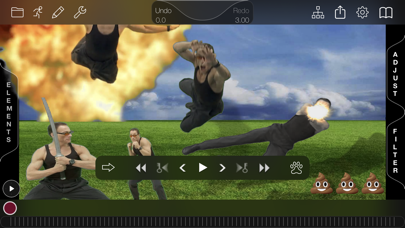
And because advanced keyframe animation controls underlie the quick and intuitive process of simply setting the time and moving the element. You can dig in for precise control of your motion when needed, or let Motion Graphix do the work with built-in motions like spiral, jitter, bounce and more. For matching graphics to a moving background, try the revolutionary 'Digital Tracking' system: use your digit to follow the motion while the video plays, then apply that motion to a layer.
When you're done, share a picture or movie to Photos or any app that accepts sharing, including Mail, Messages, YouTube, Dropbox and many more. If you have set depths on your layers, you can even save out stereoscopic renders in standard split-screen formats, red-blue anaglyph 3d format, or VR format suitable for viewing with Google Cardboard type viewers.
Features:
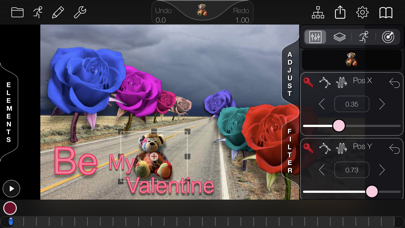
Easy-to-use keyframe-based animation system, just set the time and adjust the layer
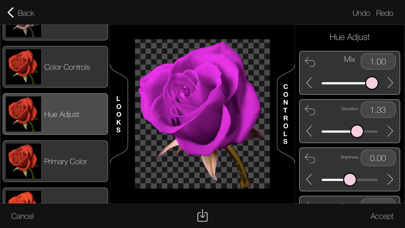
Animated filtering on background picture or movie: Color correction, blurring, still photo position and zoom
Large built-in sprite library including animated character and visual effects elements
Cut out your own sprites from any picture manually or with AI
Create and animate text elements with font, fill and outline control
Create your own basic shape and Bezier curves with fill and outline controls
Animate colored, transparent, soft shadows and glows for any layer
Import animated GIF images to use as sprites
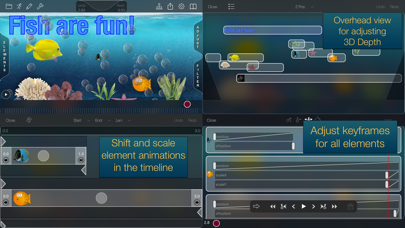
Dope sheet - View and adjust keyframes for all your elements side-by-side in one place.
Particle generator with presets - Snow, Smoke, Fire, Fireworks, Starfield, Bubbles, Sparkler
Digital tracking - Use your digit to follow features on moving video, track any sprite to follow the motion
Animated drawing - Handwriting, arrows, annotations draw themselves over time
2.5D Animation: elements scale up and down as they move into or out of the screen, above or below other layers
Stereoscopic output of 2.5D animation in anaglyph (red/blue), side-by-side, top-and-bottom and spatial formats
Export MP4 h264, HDR, ProRes, MV-HEVC and GIF video, HEIC, PNG and JPG stills
Export to 4k, Full HD, HD(720), half HD and SD resolutions
Unlimited undo, redo.
Safety and technology
Found in the app by AppBrain- Price
- $6.99
- App size
- 133.4 MB
- Content rating
- Everyone
Technologies used by Motion Graphix Animator
Releases
Updates seen on the App Store- Version
- 4.03
- Launched
- June 2017
No changelog data
Alternatives
Similar apps and more from PixelSplincherAlternatives to Motion Graphix Animator






More from PixelSplincher

Rankings
App Store top chartsApp Store Rankings for Motion Graphix Animator
About the app and developer
About Motion Graphix Animator
Motion Graphix Animator is a photo & video app developed by PixelSplincher.
What is the rating of Motion Graphix Animator?
Motion Graphix Animator is rated 4.11 out of 5 stars, based on 9 ratings.
Is Motion Graphix Animator free?
Motion Graphix Animator costs $6.99. The app size is 133.38 MB. The latest version available is 4.03. The last update was on October 14, 2025.
What are the requirements for Motion Graphix Animator?
The app has a content rating of Everyone. The app has been available on the App Store since June 2017.
Developer information for PixelSplincher
Address:
Frequently asked questions about Motion Graphix Animator
Is Motion Graphix Animator free?
No. Motion Graphix Animator costs $6.99 on the App Store.
Is Motion Graphix Animator still available?
Yes. Motion Graphix Animator is on the App Store, and the last update we saw was on October 14, 2025.
How large is Motion Graphix Animator?
Motion Graphix Animator is 133.38 MB.
Is Motion Graphix Animator suitable for children?
App Store rates the content of Motion Graphix Animator as suitable for everyone.
How do people rate Motion Graphix Animator?
Motion Graphix Animator scores 4.11 out of 5 stars, from 9 ratings on the App Store.
Who made Motion Graphix Animator?
Motion Graphix Animator was developed by PixelSplincher. It is listed in the photo & video category on the App Store.
What are the best alternatives to Motion Graphix Animator?
People looking at Motion Graphix Animator also look at these photo & video apps: Steiner Cinder, Live Streamer for Action Cams, TOV – Video Caption Editing, LanMe Editor, Fragment - iPhoneography App.