

MotionTagger: Video Form Coach
MotionTagger: Video Form Coach is made and published by Shuhei Ota. AppBrain is an independent app data site and isn't affiliated with Shuhei Ota. The app name, icon, screenshots and description belong to Shuhei Ota and are shown as published on the App Store.
AppBrain's verdict
- Last updated
- August 25, 2026
- Size
- 51.6 MB
User feedback
Ratings and reviews on the App StoreComments on MotionTagger: Video Form Coach for iOS
We don't have enough comments to show example comments. Please check back later.
Store listing
By Shuhei Ota, from the App Store



Description by Shuhei Ota Written by the developer, not by AppBrain. Click to read.
MotionTagger brings recording, slow-motion review, side-by-side comparison, annotations, and practice history into one focused sports video workspace. Record in the app or choose videos from your device, then return to the exact moment you want to study without switching between multiple tools.
Use it to understand timing, posture, balance, joint position, and the sequence of a movement. MotionTagger does not judge your technique automatically; it gives athletes and coaches precise controls for reviewing the video together and making their own observations.
[ Start with the video you need ]
Record a new practice session in portrait or landscape, or choose an existing clip from your device. You can review one video by itself or add a second video when you want to compare attempts, angles, or a reference movement.
[ Record and mark ]
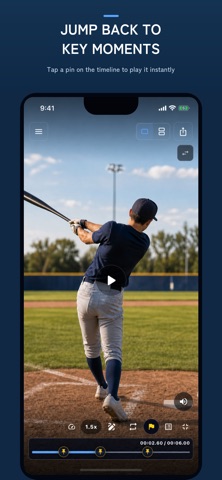
Record practice without leaving the app. Add markers while filming whenever you notice a good attempt, a missed cue, or a moment you want to discuss. After recording, open a marker to jump directly back to that point instead of searching through the entire clip.
[ Review precisely ]
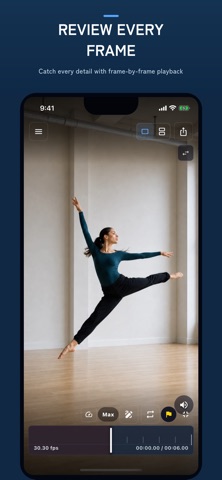
Use slow playback, frame stepping, timeline seeking, and loop ranges to inspect timing and body position in detail. Move a frame at a time around impact, release, landing, or another decisive moment. Repeat only the section you need until the movement becomes easier to understand.
Double-tap the left or right side to jump 5 seconds. While a video is playing, hold it for temporary 2x speed and release to return to the previous playback speed. These gestures make it quicker to move between setup, action, and follow-through.
[ Compare movements ]
Place two videos side by side and align matching moments. Compare today’s attempt with an earlier session, your movement with a reference clip, or the same movement from front and side angles. Adjust the sync point so both videos reach the key moment together, then play or step through them while keeping the comparison aligned.
[ Annotate and share ]
Pause on a key frame and add freehand marks, straight lines, arrows, circles, or text notes. Use them to point out body angles, movement direction, alignment, space, or the next cue to remember.
Save the annotated frame to your device or share it with a coach, teammate, athlete, or family member. A still image with a clear visual note can make feedback easier to understand than a long message.
[ Keep practice organized ]
Save videos, sync points, loop ranges, markers, and annotations as projects. Browse them in a list when you know which session you need, or use the calendar to review practice by date. Reopen a project to continue from the same comparison, loop, and notes instead of rebuilding the review each time. Projects are managed on your device.
[ Useful across different activities ]
MotionTagger can support detailed self-review and coaching in activities such as:
- golf swings and putting strokes
- baseball pitching, batting, and fielding
- tennis serves and groundstrokes
- running, jumping, and throwing drills
- strength training, fitness, and mobility practice
- dance, martial arts, and other technique-focused movement
[ A simple review routine ]
1. Record a practice or choose a video.
2. Mark or seek to the movement you want to study.
3. Slow down, step frame by frame, or repeat a short range.
4. Add a second video and synchronize the key moment when comparison helps.
5. Draw or write what you notice, then save the project or share a still image.
The free plan supports up to 10 saved projects. MotionTagger PREMIUM removes the saved-project limit.
Recommended for athletes reviewing their own practice, coaches giving visual feedback, instructors explaining technique, and anyone who wants to turn recorded movement into a concrete next step.
Safety and technology
Found in the app by AppBrain- Price
- Free
- App size
- 51.6 MB
- Content rating
- Everyone
Technologies used by MotionTagger: Video Form Coach
Releases
Updates seen on the App Store- Version
- 1.0.0
- Launched
- August 2026
No changelog data
Alternatives
Similar apps and more from Shuhei OtaAlternatives to MotionTagger: Video Form Coach


More from Shuhei Ota


Rankings
App Store top chartsApp Store Rankings for MotionTagger: Video Form Coach
About the app and developer
About MotionTagger: Video Form Coach
MotionTagger: Video Form Coach is a sports app developed by Shuhei Ota.
User Ratings
The app has no ratings yet.
App Information
MotionTagger: Video Form Coach is freely available from the App Store. The app size is 51.60 MB. The latest version available is 1.0.0. The last update was on August 25, 2026.
Technical Requirements
The app has a content rating of Everyone. The app has been available on the App Store since August 2026.
Developer information for Shuhei Ota
Address:
Frequently asked questions about MotionTagger: Video Form Coach
Is MotionTagger: Video Form Coach free?
Yes. MotionTagger: Video Form Coach is free on the App Store.
Is MotionTagger: Video Form Coach still available?
Yes. MotionTagger: Video Form Coach is on the App Store, and the last update we saw was on August 25, 2026.
How large is MotionTagger: Video Form Coach?
MotionTagger: Video Form Coach is 51.60 MB.
Is MotionTagger: Video Form Coach suitable for children?
App Store rates the content of MotionTagger: Video Form Coach as suitable for everyone.
Who made MotionTagger: Video Form Coach?
MotionTagger: Video Form Coach was developed by Shuhei Ota. It is listed in the sports category on the App Store.
What are the best alternatives to MotionTagger: Video Form Coach?
People looking at MotionTagger: Video Form Coach also look at these sports apps: BaseballDraw: Swing Analyzer, 野球の物理 打球と投球のシミュレーター, Batting STATS Manager, Motionline, Baseball Inning Scoreboard.