

Mouse Jiggler – Mouse Mover
Mouse Jiggler – Mouse Mover is made and published by Bohdan Bilous. AppBrain is an independent app data site and isn't affiliated with Bohdan Bilous. The app name, icon, screenshots and description belong to Bohdan Bilous and are shown as published on the App Store.
AppBrain's verdict
- Last updated
- October 7, 2026
Rankings
App Store top chartsApp Store Rankings for Mouse Jiggler – Mouse Mover
Competitors
Similar apps and more from Bohdan BilousMore from Bohdan Bilous


Releases
Updates seen on the App Store- Version
- 3.5
- Launched
- February 2025
No changelog data
User feedback
Ratings and reviews on the App StoreComments on Mouse Jiggler – Mouse Mover for iOS
We don't have enough comments to show example comments. Please check back later.
Technology
Found in the app by AppBrain- Price
- Free
- App size
- 38.6 MB
- Content rating
- Everyone
Technologies used by Mouse Jiggler – Mouse Mover
About the app and developer
About Mouse Jiggler – Mouse Mover
Mouse Jiggler – Mouse Mover is an utilities app developed by Bohdan Bilous.
What is the rating of Mouse Jiggler – Mouse Mover?
Mouse Jiggler – Mouse Mover has no ratings yet.
Is Mouse Jiggler – Mouse Mover free?
Mouse Jiggler – Mouse Mover is free. The app size is 38.55 MB. The latest version available is 3.5. The last update was on October 7, 2026.
What are the requirements for Mouse Jiggler – Mouse Mover?
The app has a content rating of Everyone. The app has been available on the App Store since February 2025.
Developer information for Bohdan Bilous
Address:
Frequently asked questions about Mouse Jiggler – Mouse Mover
Is Mouse Jiggler – Mouse Mover free?
Yes. Mouse Jiggler – Mouse Mover is free on the App Store.
Is Mouse Jiggler – Mouse Mover still available?
Yes. Mouse Jiggler – Mouse Mover is on the App Store, and the last update we saw was on October 7, 2026.
How large is Mouse Jiggler – Mouse Mover?
Mouse Jiggler – Mouse Mover is 38.55 MB.
Is Mouse Jiggler – Mouse Mover suitable for children?
App Store rates the content of Mouse Jiggler – Mouse Mover as suitable for everyone.
Who made Mouse Jiggler – Mouse Mover?
Mouse Jiggler – Mouse Mover was developed by Bohdan Bilous. It is listed in the utilities category on the App Store.
Store listing
By Bohdan Bilous, from the App Store


Description by Bohdan Bilous Written by the developer, not by AppBrain. Click to read.
Key Features:
• Cursor Interaction Support: Provides gentle cursor movement when subtle interaction or visual feedback is needed.
• Focus & Attention Support: Designed to help users with ADHD maintain focus through continuous visual cues and interaction feedback.
• Accessibility Design: Helps users maintain cursor visibility and consistent interaction for visual or functional support.
1. Visual Accessibility (Cursor Tracking)
• Users with low vision rely on a visible cursor as a visual anchor.
• Subtle cursor movement helps keep the pointer easy to locate, reducing eye strain and improving orientation on screen.
2. Motor Accessibility (Reduced Effort)
• Users with limited motor control or fatigue may find frequent small movements difficult.
• The app reduces the need for repetitive manual input by providing gentle cursor movement when needed.
3. Cognitive Accessibility (Focus & Awareness)
• Users with ADHD and attention-related challenges benefit from continuous visual feedback.
• Subtle cursor movement helps maintain focus and confirms that the interface is responsive.
4. Assistive Device Compatibility
• Users relying on external input devices or alternative controls may have pauses between interactions.
• Gentle cursor movement helps maintain interaction continuity during these moments.
• Flexible Movement Options: Choose between different movement styles and configure behavior based on your needs.
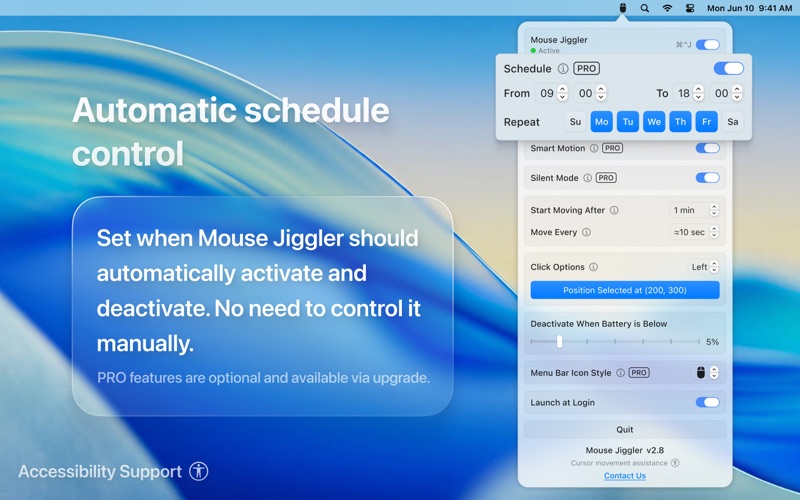
• Scheduling Options: Configure when cursor movement starts and stops automatically.
• Lightweight & Efficient: Minimal system impact, no background daemons or complex setups.
• Broad Device Compatibility: Works with mice, touchpads, trackballs, and other input devices.
Mouse Jiggler requires access to provide cursor movement and optional click actions. These permissions are used strictly for functionality - no data collection, key logging, or tracking occurs. Your privacy is fully protected.
Support your focus and stay engaged with Mouse Jiggler.
Website: https://mousejigglermac.com
Privacy Policy: https://mousejigglermac.com/privacy-policy
Terms of Use: https://mousejigglermac.com/terms-of-use
Support: hello@mousejigglermac.com