

Movavi Photo Editor: Edit Easy
Movavi Photo Editor: Edit Easy is made and published by Movavi Emea LLC. AppBrain is an independent app data site and isn't affiliated with Movavi Emea LLC. The app name, icon, screenshots and description belong to Movavi Emea LLC and are shown as published on the App Store.
AppBrain's verdict
- Last updated
- February 27, 2024
Rankings
App Store top chartsApp Store Rankings for Movavi Photo Editor: Edit Easy
Competitors
Similar apps and more from Movavi Emea LLCMore from Movavi Emea LLC





Releases
Updates seen on the App Store- Version
- 24.1.2
- Launched
- December 2014
No changelog data
User feedback
Ratings and reviews on the App StoreComments on Movavi Photo Editor: Edit Easy for iOS
We don't have enough comments to show example comments. Please check back later.
Technology
Found in the app by AppBrain- Price
- Free
- App size
- 88.0 MB
- Content rating
- Everyone
Technologies used by Movavi Photo Editor: Edit Easy
About the app and developer
About Movavi Photo Editor: Edit Easy
Movavi Photo Editor: Edit Easy is a photo & video app developed by Movavi Emea LLC.
What is the rating of Movavi Photo Editor: Edit Easy?
Movavi Photo Editor: Edit Easy has no ratings yet.
Is Movavi Photo Editor: Edit Easy free?
Movavi Photo Editor: Edit Easy is free. The app size is 88.00 MB. The latest version available is 24.1.2. The last update was on February 27, 2024.
What are the requirements for Movavi Photo Editor: Edit Easy?
The app has a content rating of Everyone. The app has been available on the App Store since December 2014.
Developer information for Movavi Emea LLC
Address:
Store listing
By Movavi Emea LLC, from the App Store


Description by Movavi Emea LLC Written by the developer, not by AppBrain. Click to read.
Take image editing to the next level with Movavi:
► Create beautiful collages and humorous photo manipulations with the Change Background tool. Thanks to Movavi’s unique optimized algorithm, people in pictures can be selected automatically, and easy-to-use tools separate objects from the background in no time. Then replace the current background with a solid color or apply a different image – it’s that simple.
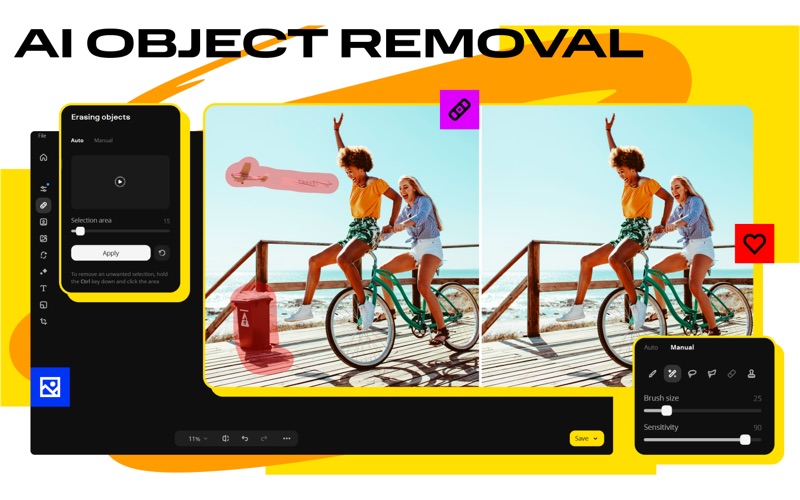
► Easily remove random bystanders, intrusive fences, or ugly power lines from your travel panoramas with AI.
► Handy retouching tools help you hide skin blemishes, remove wrinkles, reduce shine, whiten teeth, and remove red-eye.
► Give yourself a complete makeover with our all-in-one make-up kit: experiment with different shades of blusher, eyeshadow and lipstick, redefine eyebrows, add mascara and foundation. Give your eyes or hair a new color. Want more? You can even reshape your face and enlarge your eyes!
► Movavi makes it easy to fix the most common image flaws: salvage overexposed or overly dark images manually or let the smart automatic filter improve the quality of your photos, and remove digital noise. Work with image elements individually: select problem areas and adjust the settings to get the result you want. Take care of composition issues, too: crop, rotate, and flip images with one click.
► Rescue old photos with the smart restoration tool: get rid of scratches and creases, apply magic enhancement to revive colors.
► Finally, give your shots that special touch with stylish presets, expressive text captions, elegant frames, and more!
PRICING
Movavi Photo Editor requires a subscription. There's also a trial version so you can try the program before you commit.
LEGAL
The duration and price of each subscription are shown on the Movavi Photo Editor plan page at the time of purchase. Payment will be charged to your iTunes account at the time of purchase. Subscriptions automatically renew unless auto-renewal is turned off no later than 24 hours before the end of the current period. Subscriptions and auto-renewal can be managed or turned off in your iTunes account settings. Any unused portion of a free trial period is forfeited as soon as a subscription is purchased.
Terms of Use: https://www.movavi.com/tos.html
Privacy Policy: https://www.movavi.com/privacy.html
We’re always happy to hear from you and help you out if you’re stuck with something: movavi.com/support.html