MoviePro - Pro Video Camera is made and published by
Deepak Sharma.
AppBrain is an independent app data site and isn't affiliated with Deepak Sharma.
The app name, icon, screenshots and description belong to Deepak Sharma and are shown as
published on the App Store.
About MoviePro - Pro Video Camera
MoviePro - Pro Video Camera is a photo & video app developed by Deepak Sharma.
What is the rating of MoviePro - Pro Video Camera?
MoviePro - Pro Video Camera is rated 4.40 out of 5 stars, based on 1.8 thousand ratings.
Is MoviePro - Pro Video Camera free?
MoviePro - Pro Video Camera is free. The app size is 27.75 MB. The latest version available is 10.0.4. The last update was on September 30, 2026.
What are the requirements for MoviePro - Pro Video Camera?
The app has a content rating of Everyone. The app has been available on the App Store since August 2012.
Description by Deepak Sharma(from the App Store)
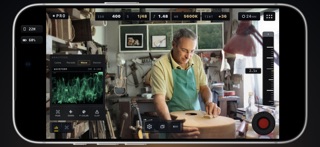
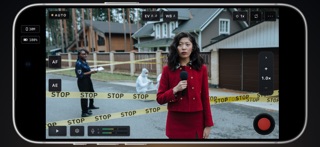
Make every shot your own. MoviePro brings manual camera control, professional recording formats, live scopes and audio tools to iPhone and iPad. Shoot films, documentaries, music performances, field reports and everyday moments with a setup that fits the scene. All capture modes are free.
PRO CONTROL, READY TO SHOOT
Start in Pro with direct access to ISO, shutter speed or angle, white balance, tint, focus and zoom. Use automatic settings where you need them and take manual control where it matters. Adjust aperture on supported variable-aperture cameras. Set A/B focus and zoom points for repeatable moves, and save camera setups as presets for your next shoot.
Switch to Auto for fast-moving situations. Tap to place focus and exposure, use focus or exposure lock, hold white balance, and adjust brightness and motion blur without managing every setting yourself.
RECORD FOR YOUR WORKFLOW • 4K, 1080p and 720p with H.264 or HEVC • ProRes 422, HQ, LT and Proxy on supported devices • Full-sensor ProRes RAW and RAW HQ to a compatible external SSD or ProVideo Storage on device • Apple Log and Apple Log 2, SDR and HDR recording • Frame rates up to 240 fps where supported, with exact NTSC rates in Pro • Time of Day or Record Run timecode on supported recording paths • Aspect-ratio guides and crops, anamorphic desqueeze and 35mm adapter flip • Selectable stabilization and Long-Record Mode for extended takes
SEE YOUR LOG FOOTAGE IN COLOR
View Apple Log and Apple Log 2 as Original Log, Rec.709 or Rec.2100 HLG HDR. Keep the viewing transform in the preview while recording the original Log image, or bake the selected look into supported recordings. Preview and recording choices stay explicit, so you know what you are saving.
JUDGE THE IMAGE
Open the waveform, RGB parade, Vectorscope or Histogram to evaluate exposure and color. Check focus with peaking and exposure with zebras, false color and clipping indicators. Send a clean HDMI picture to a compatible external display.
HEAR WHAT YOU ARE RECORDING
Connect a wired microphone, USB audio interface, wireless receiver or supported Bluetooth microphone. Select your audio source, adjust available input gain and monitor through headphones. Expanded meters and peak hold help you watch levels, with warnings for clipping, silence and disconnection. Choose AAC, LPCM or 32-bit Float audio where supported.
TWO CAMERAS, ONE MOMENT
Use Dual Capture on compatible devices to record two angles together. Choose picture-in-picture, split screen, separate files or switching between cameras in a single recording. Move and resize the picture-in-picture inset while filming.
DIRECT FROM ANOTHER DEVICE
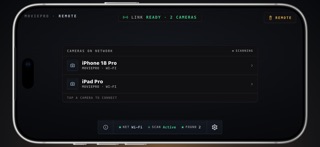
With the Remote Control purchase, use another iPhone or iPad to see the camera's live picture, adjust supported controls and start, pause or stop a take over Wi-Fi or Personal Hotspot. Compatible Apple-silicon Macs can also act as controllers using the iPad app. Apple Watch offers preview and start/stop control.
KEEP TRACK OF YOUR TAKES
Record to the MoviePro Library, Photos, Files or compatible external storage. Check storage and thermal status during a shoot. Review Take Receipts and clip information for recording details and warnings, mark Favorites or Good Takes, and share your footage. Dedicated iPad layouts work in portrait and landscape.
FREE CAMERA. OPTIONAL REMOTE CONTROL.
Use Auto, Pro, scopes, presets and Dual Capture without a recording purchase. Unlock Remote Control with a one-time purchase; no subscription is required. Eligible previous purchases can be restored in the app.
Features, formats and frame rates vary by device, operating system, camera and recording setup.
Support: support@moviepro.app Privacy Policy: https://www.moviepro.app/Privacy-Policy.html Terms of Use: https://www.apple.com/legal/internet-services/itunes/dev/stdeula/
Each subscription will automatically renew 3 days before the expiration date for
the same time period. Subscriptions can be cancelled at any time before the renewal.