

MP3Converter - Video & Audio
MP3Converter - Video & Audio is made and published by 国辉 满. AppBrain is an independent app data site and isn't affiliated with 国辉 满. The app name, icon, screenshots and description belong to 国辉 满 and are shown as published on the App Store.
AppBrain's verdict
EstablishedLoved by users- Rating on App Store
- 4.67
- 1,451 ratings
- Last updated
- June 2, 2026
Users love it: 4.7 stars from 1,451 ratings.
Rankings
App Store top chartsApp Store Rankings for MP3Converter - Video & Audio
Competitors
Similar apps and more from 国辉 满Alternatives to MP3Converter - Video & Audio




More from 国辉 满





Releases
Updates seen on the App Store- Version
- 3.1
- Launched
- November 2020
No changelog data
User feedback
Ratings and reviews on the App StoreComments on MP3Converter - Video & Audio for iOS
We don't have enough comments to show example comments. Please check back later.
Technology
Found in the app by AppBrain- Price
- Free
- App size
- 80.7 MB
- Content rating
- Everyone
Technologies used by MP3Converter - Video & Audio
About the app and developer
About MP3Converter - Video & Audio
MP3Converter - Video & Audio is an utilities app developed by 国辉 满.
What is the rating of MP3Converter - Video & Audio?
MP3Converter - Video & Audio is rated 4.67 out of 5 stars, based on 1.5 thousand ratings.
Is MP3Converter - Video & Audio free?
MP3Converter - Video & Audio is free. The app size is 80.71 MB. The latest version available is 3.1. The last update was on June 2, 2026.
What are the requirements for MP3Converter - Video & Audio?
The app has a content rating of Everyone. The app has been available on the App Store since November 2020.
Developer information for 国辉 满
Address:
Store listing
By 国辉 满, from the App Store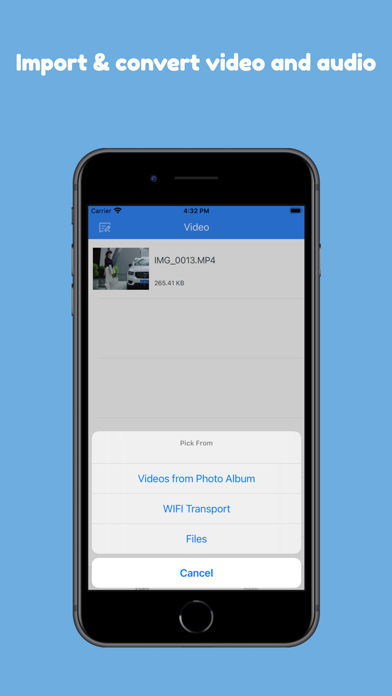
Description by 国辉 满 Written by the developer, not by AppBrain. Click to read.
Convert video to MP3 or transform videos into other formats effortlessly. Create ringtones, extract audio, or convert video formats for free!
With the Fastest Media Converter
Easily convert videos to MP3 or switch between video formats with a range of customizable options. Extract high-quality audio or convert videos to your preferred format in seconds.
Import Videos from Anywhere:
- Import videos from your photo library
- Transfer videos from your computer
- Access videos stored on iCloud Drive
- Convert screen-recorded videos
Convert Any Video to MP3 or Other Video Formats
From MP4 to AVI, MKV to MOV, this tool can handle it all:
- Supported Video Files: mp4, m4v, mkv, avi, wmv, f4v, f4p, mov, vob, qt, mpg, mpeg, m1v, mpv, 3gp, 3g2, rmvb, mts, m2ts, xvid, flv, rm, divx, asf, webm, wtv, dvr-ms, ogv, swf
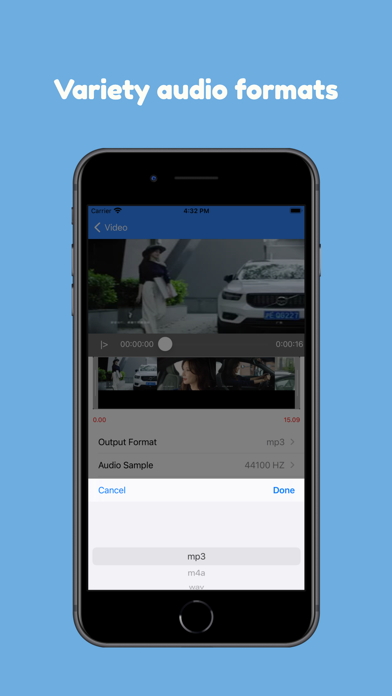
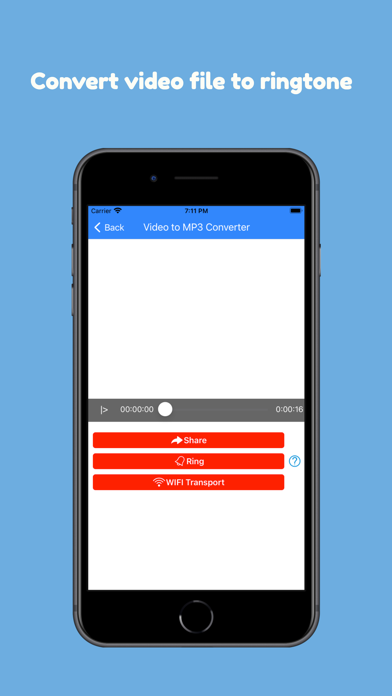
- Convert to Video or Audio Formats: Convert to mp4, mov, avi, mkv, or extract audio as mp3, wav, m4a, flac, ogg, amr, mp2, and m4r (for iPhone ringtones).
High Quality Audio and Video Settings
Use advanced settings to fine-tune your output quality:
- Audio Bitrate: Select a higher bitrate for better MP3 quality.
- Audio Sample Rate: Extract CD or DVD-quality MP3.
- Cut Audio: Convert specific portions of the video into MP3 or other formats.
- Fade In/Out: Create a smooth listening experience with fade effects.
- Video Resolution: Adjust resolution for your video output.
- Aspect Ratio: Maintain or customize aspect ratios like 16:9, 4:3, and more.
Free, Secure, and Private
This tool is completely free and works locally on your iOS device.
- No Network Required: Perform conversions offline without data usage.
- Private and Secure: Your files stay on your device, ensuring total privacy.
Simple, Powerful, and Free
Whether you want to convert video to MP3, adjust video formats, or create ringtones, this app does it all—quickly and easily!