

MPH Tracker : Speedometer
MPH Tracker : Speedometer is made and published by Cindi Lee. AppBrain is an independent app data site and isn't affiliated with Cindi Lee. The app name, icon, screenshots and description belong to Cindi Lee and are shown as published on the App Store.
AppBrain's verdict
- Last updated
- October 9, 2026
Rankings
App Store top chartsApp Store Rankings for MPH Tracker : Speedometer
Competitors
Similar apps and more from Cindi LeeMore from Cindi Lee


Releases
Updates seen on the App Store- Version
- 1.0
- Launched
- October 2026
No changelog data
User feedback
Ratings and reviews on the App StoreComments on MPH Tracker : Speedometer for iOS
We don't have enough comments to show example comments. Please check back later.
Technology
Found in the app by AppBrain- Price
- Free
- App size
- 10.4 MB
- Content rating
- Everyone
Technologies used by MPH Tracker : Speedometer
About the app and developer
About MPH Tracker : Speedometer
MPH Tracker : Speedometer is a navigation app developed by Cindi Lee.
What is the rating of MPH Tracker : Speedometer?
MPH Tracker : Speedometer has no ratings yet.
Is MPH Tracker : Speedometer free?
MPH Tracker : Speedometer is free. The app size is 10.40 MB. The latest version available is 1.0. The last update was on October 9, 2026.
What are the requirements for MPH Tracker : Speedometer?
The app has a content rating of Everyone. The app has been available on the App Store since October 2026.
Developer information for Cindi Lee
Address:
Store listing
By Cindi Lee, from the App Store



Description by Cindi Lee Written by the developer, not by AppBrain. Click to read.
Monitor your current speed through a dynamic speedometer ranging from 0 to 240, while continuously capturing essential journey statistics. Whether you are reviewing a short commute or analyzing a longer trip, the app gives you a clear perspective of how your journey unfolded.
Track important driving metrics including:
• Current Speed — View your real-time speed through an intuitive 0–240 speedometer.
• Maximum Speed — Discover the highest speed recorded during your journey.
• Average Speed — Review your calculated average speed across the trip.
• Distance — Keep track of the total distance covered.
• Duration — See how long your journey lasted.
• Journey History — Keep previous trip information organized for later reference.
• Time-Based History — Review your activity by day, week, month, or year.
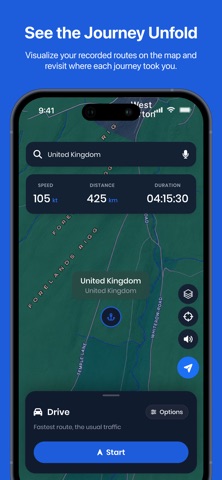
• Map View — Visualize your journey and explore your recorded route geographically.
Understand Every Journey
Instead of relying only on a live speed reading, explore the complete picture of your journey. Compare distance, duration, average speed, and maximum speed to better understand your recorded trips over time.
Organized History
Your journey records remain structured through convenient time-based views. Browse daily, weekly, monthly, or yearly history to quickly revisit previously recorded activity.
Visualize Your Route
The integrated map experience adds a geographic perspective to your journey, allowing you to see where your recorded trip took place rather than viewing statistics in isolation.
Designed for Clarity
A focused interface keeps essential information within reach without unnecessary complexity. From live speed monitoring to historical journey analysis, every feature is designed around straightforward access to meaningful driving data.
Turn ordinary journeys into organized, measurable records—with speed, statistics, history, and maps brought together in one streamlined experience.