

MPP Project Wizard
MPP Project Wizard is made and published by Cardinate Consulting LLC. AppBrain is an independent app data site and isn't affiliated with Cardinate Consulting LLC. The app name, icon, screenshots and description belong to Cardinate Consulting LLC and are shown as published on the App Store.
AppBrain's verdict
- Last updated
- September 15, 2026
- Size
- 10.7 MB
User feedback
Ratings and reviews on the App StoreComments on MPP Project Wizard for iOS
We don't have enough comments to show example comments. Please check back later.
Store listing
By Cardinate Consulting LLC, from the App Store
Description by Cardinate Consulting LLC Written by the developer, not by AppBrain. Click to read.
Create project plans with AI. Edit Microsoft Project files. Turn changing priorities into a schedule you can act on.
MPP Project Wizard brings AI-powered project creation and editing to your iPhone, iPad, and Mac. Start with a blank project or open an existing MPP or Project XML file, then build, refine, and share your plan in one workspace.
DESCRIBE IT. BUILD IT.
Tell AI Planner what you want to achieve. Turn a project brief into proposed tasks, milestones, resources, and dependencies. Shape the plan through conversation, with focused clarifying questions when key details are missing.
MAKE CHANGES IN YOUR OWN WORDS
Ask AI Planner to break down a phase, add work, adjust dependencies, or reorganize your schedule. Review the proposed changes before applying them. You make the decisions; AI helps with the planning.
TAKE CONTROL OF THE DETAILS
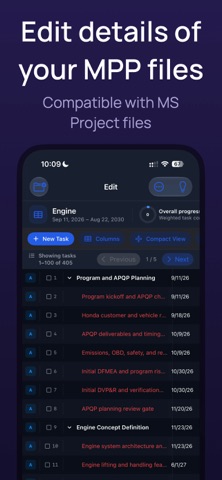
Fine-tune tasks, dates, durations, progress, resources, and assignments. Manage milestones and dependencies, including finish-to-start, start-to-start, finish-to-finish, and start-to-finish relationships with leads and lags. Validate schedule logic and review project health as your plan develops.
WORK WITH YOUR PROJECT FILES
Open and edit MPP and Project XML schedules, then save your updated plan. Bring existing projects into your workflow and keep working with familiar file formats.
SHARE A PLAN PEOPLE CAN FOLLOW
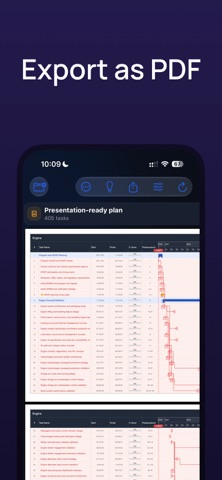
Bring your schedule into the next meeting with a polished Gantt PDF. Use PDF Studio to prepare clear project timelines for status updates, approvals, and handoffs.
For project managers, engineers, consultants, coordinators, and anyone ready to turn a complex idea into an organized plan.
MEMBERSHIP & AI ALLOWANCE
Subscriptions renew automatically until canceled. Your account may be charged for renewal within 24 hours before the next subscription period begins. You can manage or cancel your subscription in your Apple Account settings.
Need more AI assistance? Optional additional allowance packs are available through Apple In-App Purchase. Monthly allowance is used first. Purchased extra allowance does not expire and remains available until used. AI features require an internet connection.
Subscriptions renew automatically unless canceled at least 24 hours before the current period ends. Manage or cancel your subscription in your App Store account settings.
INDEPENDENT APP & TRADEMARK NOTICE
MPP Project Wizard is developed by Cardinate Consulting LLC. It is not affiliated with, endorsed by, or sponsored by Microsoft Corporation. Microsoft and Microsoft Project are trademarks of the Microsoft group of companies. References to Microsoft Project describe file compatibility.
AI-generated proposals may contain errors. Review proposed changes before applying them to your project.
TERMS OF USE
Standard Apple Terms of Use (EULA): https://www.apple.com/legal/internet-services/itunes/dev/stdeula/
Safety and technology
Found in the app by AppBrain- Price
- Free
- App size
- 10.7 MB
- Content rating
- Everyone
Technologies used by MPP Project Wizard
Releases
Updates seen on the App Store- Version
- 1.0
- Launched
- September 2026
No changelog data
Alternatives
Similar apps and more from Cardinate Consulting LLCAlternatives to MPP Project Wizard



More from Cardinate Consulting LLC


Rankings
App Store top chartsApp Store Rankings for MPP Project Wizard
About the app and developer
About MPP Project Wizard
MPP Project Wizard is a productivity app developed by Cardinate Consulting LLC.
User Ratings
The app has no ratings yet.
App Information
MPP Project Wizard is freely available from the App Store. The app size is 10.67 MB. The latest version available is 1.0. The last update was on September 15, 2026.
Technical Requirements
The app has a content rating of Everyone. The app has been available on the App Store since September 2026.
Developer information for Cardinate Consulting LLC
Address:
Frequently asked questions about MPP Project Wizard
Is MPP Project Wizard free?
Yes. MPP Project Wizard is free on the App Store.
Is MPP Project Wizard still available?
Yes. MPP Project Wizard is on the App Store, and the last update we saw was on September 15, 2026.
How large is MPP Project Wizard?
MPP Project Wizard is 10.67 MB.
Is MPP Project Wizard suitable for children?
App Store rates the content of MPP Project Wizard as suitable for everyone.
Who made MPP Project Wizard?
MPP Project Wizard was developed by Cardinate Consulting LLC. It is listed in the productivity category on the App Store.
What are the best alternatives to MPP Project Wizard?
People looking at MPP Project Wizard also look at these productivity apps: DoneTonic, ChatMPP, Airmail for Business, PDF Editor: Edit & Change Text, Site Task - Lean Construction.