
MsyChords is made and published by Bernhard Feiten. AppBrain is an independent app data site and isn't affiliated with Bernhard Feiten. The app name, icon, screenshots and description belong to Bernhard Feiten and are shown as published on the App Store.
AppBrain's verdict
- Rating on App Store
- 4.00
- 3 ratings
- Last updated
- October 2, 2023
- Size
- 39.1 MB
It doesn't have enough ratings yet to judge what users think.
User feedback
Ratings and reviews on the App StoreComments on MsyChords for iOS
We don't have enough comments to show example comments. Please check back later.
Store listing
By Bernhard Feiten, from the App Store



Description by Bernhard Feiten Written by the developer, not by AppBrain. Click to read.
Performance control
Five presets, four buttons and two sliders allow to control the play performance.
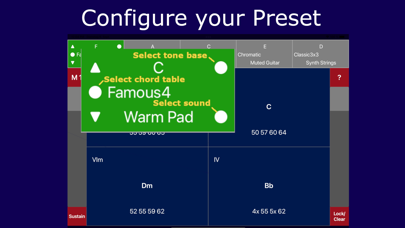
- Presets -- Five presets can be changed with one finger tip. The preset is configured by touching the white circle on the selector plane. A chord table is selected from a directory, the tone base (key) is set and a the sound can be chosen from a sound font.
- Level control -- The sliders allow to adjust the volume at any time while playing. The slider on the left side and on the right side are synchronized and have the exact identical effect.
- Play mode & arpeggiator -- The left top button allows to select different play modes by tapping or sliding the button. Mode 1 plays the chords exactly as they are denoted. Mode 2 supports to play inversions of the chord. Mode 3 to mode 7 provide different arpeggio patterns.
- Speed control & help -- The right top button has two functions. For play mode 1 and 2, the button provides a help and settings page. In play mode 3 to mode 7, the button allows to control the speed of the arpeggios. The speed can be set by tapping or by sliding the button.
- Sustain control -- The left bottom button provides a kind of a damper pedal. If pressed, the played chords continue to sound until the button is released.
- Lock sustain and clear -- The right bottom button provides a lock sustain mode. The touched chord continues to sound until a next chord is played. The mode is enabled by pressing the right bottom button while the left bottom button is pressed.
Chord tables
A chord table is a collection of chords organized in rows and columns. The chord consists of arbitrary tones and a chord name chord. Further the table has an entry for a base tone (key).
- Chord tones -- The tones are denoted as duodecimal MIDI numbers. Thereby we have two numbers for one tone. The first number is the octave, the second number is the semitone within the octave. As there are twelve semitones in an octave, the tone A#/Bb is denoted as 'X' and B is denoted as 'T'.
```|0:C|1:C#,Db|2:D| 3:D#,Eb|4:E|5:F|6:F#,Gb|7:G|8:G#,Ab|9:A|x:A#,Bb|t:B|```
- Chord name -- The name of the chords can be chosen arbitrary. But when the first letter is one of ABCDEFG, the letter is used to determine the musical function step in relation to the base tone. In that case the second letter is analyzed in addition if it is a # or b. Also transposing of the chord names is supported then.
- Chord table selection -- The selection panel shows files of the MsyChords directory in alphabetical order. New chord tables can be created, renamed and deleted.
Editing chord tables
The edit mode is started by long pressing the preset selector button the selector button changes to red.
- Editing chord tones -- Editing the chord tones is done with a dedicated keyboard showing the numbers 0 .. 9,X,T.
- Editing chord names -- Editing the chord names is done with a keyboard providing text symbols supporting arbitrary text.
- Add or delete rows or columns -- In edit mode rows and columns can be added or deleted by clicking on '⌑'. Also the position of the chord table button can be changed.
- Move cell -- Chord table cells can be moved to other positions by touching '=' and moving the cell.
- Save -- If a new table is loaded and the current table was modified, the user is asked to save the table or to ignore the changes. Saving is supported in the full version.
- iCloud directory -- Chord tables a can be imported and exported via the MsyChords iCloud directory.
Sound font files
One sound font with 10 sounds is in-build (from FluidR3_GM.sf2 from Frank Wen). Other arbitrary .sf2 sound font files can be loaded via the MsyChords iCloud directory.
Safety and technology
Found in the app by AppBrain- Price
- Free
- App size
- 39.1 MB
- Content rating
- Everyone
Technologies used by MsyChords
Releases
Updates seen on the App Store- Version
- 1.1
- Launched
- November 2022
No changelog data
Alternatives
Similar apps and more from Bernhard FeitenAlternatives to MsyChords







More from Bernhard Feiten
Rankings
App Store top chartsApp Store Rankings for MsyChords
About the app and developer
About MsyChords
MsyChords is a music app developed by Bernhard Feiten.
User Ratings
MsyChords is rated 4.00 out of 5 stars. The rating is based on 3 ratings.
App Information
MsyChords is freely available from the App Store. The app size is 39.14 MB. The latest version available is 1.1. The last update was on October 2, 2023.
Technical Requirements
The app has a content rating of Everyone. The app has been available on the App Store since November 2022.
Developer information for Bernhard Feiten
Address:
Frequently asked questions about MsyChords
Is MsyChords free?
Yes. MsyChords is free on the App Store.
Is MsyChords still available?
Yes. MsyChords is on the App Store, and the last update we saw was on October 2, 2023.
How large is MsyChords?
MsyChords is 39.14 MB.
Is MsyChords suitable for children?
App Store rates the content of MsyChords as suitable for everyone.
How do people rate MsyChords?
MsyChords scores 4.00 out of 5 stars, from 3 ratings on the App Store.
Who made MsyChords?
MsyChords was developed by Bernhard Feiten. It is listed in the music category on the App Store.
What are the best alternatives to MsyChords?
People looking at MsyChords also look at these music apps: Chordio+: create & learn music, MIDI SolFa Mode-Go-Round, MIDI Pro, Ear Training - Music Skills, TriKey.