

MTerm - SSH Terminal
MTerm - SSH Terminal is made and published by kazuki oinuma. AppBrain is an independent app data site and isn't affiliated with kazuki oinuma. The app name, icon, screenshots and description belong to kazuki oinuma and are shown as published on the App Store.
AppBrain's verdict
- Rating on App Store
- 5.00
- 1 ratings
- Last updated
- July 20, 2026
It doesn't have enough ratings yet to judge what users think.
Rankings
App Store top chartsApp Store Rankings for MTerm - SSH Terminal
Competitors
Similar apps and more from kazuki oinumaAlternatives to MTerm - SSH Terminal


Releases
Updates seen on the App Store- Version
- 1.8.0
- Launched
- February 2026
No changelog data
User feedback
Ratings and reviews on the App StoreComments on MTerm - SSH Terminal for iOS
We don't have enough comments to show example comments. Please check back later.
Technology
Found in the app by AppBrain- Price
- Free
- App size
- 22.6 MB
- Content rating
- High
Technologies used by MTerm - SSH Terminal
About the app and developer
About MTerm - SSH Terminal
MTerm - SSH Terminal is an overall app developed by kazuki oinuma.
User Ratings
MTerm - SSH Terminal is rated 5.00 out of 5 stars. The rating is based on one rating ratings.
App Information
MTerm - SSH Terminal is freely available from the App Store. The app size is 22.55 MB. The latest version available is 1.8.0. The last update was on July 20, 2026.
Technical Requirements
The app has a content rating of High Maturity. The app has been available on the App Store since February 2026.
Developer information for kazuki oinuma
Address:
Frequently asked questions about MTerm - SSH Terminal
Is MTerm - SSH Terminal free?
Yes. MTerm - SSH Terminal is free on the App Store.
Is MTerm - SSH Terminal still available?
Yes. MTerm - SSH Terminal is on the App Store, and the last update we saw was on July 20, 2026.
How large is MTerm - SSH Terminal?
MTerm - SSH Terminal is 22.55 MB.
Is MTerm - SSH Terminal suitable for children?
App Store gives MTerm - SSH Terminal a high maturity rating. It is meant for adults.
How do people rate MTerm - SSH Terminal?
MTerm - SSH Terminal has one rating of 5.00 stars on the App Store.
Who made MTerm - SSH Terminal?
MTerm - SSH Terminal was developed by kazuki oinuma. It is listed in the overall category on the App Store.
What are the best alternatives to MTerm - SSH Terminal?
People looking at MTerm - SSH Terminal also look at these overall apps: MT — Mosh Terminal, Termova - SSH Agent Client, VibeTerm, Onepilot: SSH Shell Terminal, NetShell - SSH Terminal.
Store listing
By kazuki oinuma, from the App Store


Description by kazuki oinuma Written by the developer, not by AppBrain. Click to read.
MTerm is a professional SSH client and iOS terminal emulator built specifically for AI-driven remote development. If you need serious developer tools on mobile, MTerm delivers a stable, persistent, and fully featured terminal environment for modern workflows.
Designed for developers who manage Linux, Mac, and cloud servers, MTerm combines a powerful SSH terminal, remote IDE, workspace persistence, and AI-focused tooling into one seamless experience.
PERFECT FOR DEVELOPERS WHO
- Run Claude Code, Codex, or other AI CLI tools remotely
- Search for a professional SSH client for iPad or iPhone
- Need a reliable iOS terminal emulator
- Work in remote development environments
- Manage servers via SSH daily
- Build AI-driven workflows on the go
MTerm is optimized for uninterrupted AI coding and serious remote development.
――――――――――――
AI DEVELOPMENT WORKSPACE
- Integrated SSH terminal + remote IDE + prompt manager
- Multi-window and multi-pane support for parallel AI workflows
- Workspace saving with CMD + S
- Restore native pane layouts instantly on reconnect
- Built for long-running development sessions
PERSISTENT SSH SESSIONS
- Keep SSH sessions alive when switching apps
- Designed for sustained remote development
- Active sessions visible in Notification Center
- Monitor running sessions with Live Activities
ADVANCED SSH CLIENT
- Password, SSH Key, and Keychain authentication
- Jump Host (bastion) support
- Local and Remote Port Forwarding
- Secure, stable connections for Linux, macOS, and cloud servers
- Mosh support for resilient connections on unstable mobile networks
MTERM PLUGIN SYSTEM
- Extend terminal capabilities with MTerm Plugins
- Integrate your Mac or remote server environment
- Session persistence powered by abduco
- Reconnect to long-running terminal sessions safely
- Display the current Git branch directly in the terminal footer
SNIPPETS & CLIPBOARD HISTORY
- Save commands and code as reusable snippets
- Quickly paste from clipboard history
- Ideal for repetitive development and AI prompt workflows
ENHANCED AI PROMPT INPUT
- Attach images and files directly in the prompt editor
- Optimized for Claude Code and AI CLI usage
- Seamless integration with the SSH terminal
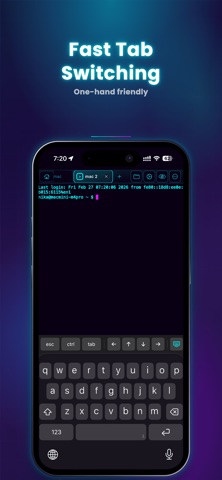
MULTI-PANE & TAB MANAGEMENT
- Native split-view terminal emulator
- Connect to multiple servers simultaneously
- Organize sessions with tabs
- Independent layouts per tab
- Vertical tab mode for better session navigation
- Unlimited panes (Pro)
CUSTOMIZABLE ACCESSORY BAR
- Configure shortcut buttons in the software keyboard toolbar
- Improve command efficiency without external tools
- Designed for fast command input on touch devices
BUILT-IN REMOTE EDITOR (Pro)
- Edit code, JSON, and Markdown directly on remote servers
- Designed for uninterrupted development
IMAGE PREVIEW (Pro)
- Instantly preview files
- Useful for reviewing AI-generated assets
FULL CJK & IME SUPPORT
- Accurate rendering for Japanese, Chinese, and Korean text
- Full IME input compatibility
- Stable long-form text input in terminal environments
MAGIC KEYBOARD & HARDWARE KEYBOARD SUPPORT
- Full keyboard shortcuts
- Optimized for professional iPad development
- Turn your iPad or iPhone into a serious developer workstation
――――――――――――
MTerm is not just another SSH client.
It’s an AI-focused iOS terminal built for real remote development.
Advanced features are unlocked with Pro.
Privacy Policy: https://mterm.app/en/privacy
Terms of Use: https://www.apple.com/legal/internet-services/itunes/dev/stdeula/