MU:note is made and published by
Jisoo Kim.
AppBrain is an independent app data site and isn't affiliated with Jisoo Kim.
The app name, icon, screenshots and description belong to Jisoo Kim and are shown as
published on the App Store.
About MU:note
MU:note is an education app developed by Jisoo Kim.
User Ratings
The app has no ratings yet.
App Information
MU:note is freely available from the App Store. The app size is 40.12 MB. The latest version available is 2.0.1. The last update was on October 7, 2026.
Technical Requirements
The app has a content rating of Everyone. The app has been available on the App Store since September 2026.
Description by Jisoo Kim(from the App Store)
Ever started a practice timer and forgot to stop it?
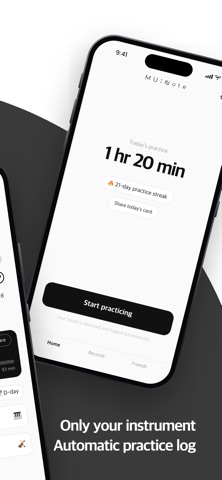
MU:note listens and keeps only the time you actually played. Press start, practice — the app does the rest.
Built for music majors and students who are in the practice room every day.
■ Only playing time counts
MU:note recognizes the instrument you set — and nothing else. A quick pause to turn a page stays part of the flow. Once silence lasts 15 seconds or more, that time is left out. When you finish, you see the time you truly played, and how focused it was.
Piano, strings, winds, voice, and classical guitar are supported. Each instrument sounds different, so detection is tuned to the one you choose. Cello, double bass, bassoon, trumpet, trombone, horn, tuba and more: pick the character that plays your instrument and it stands in your practice room.
■ Audio is never recorded
Sound is analyzed on your device and discarded instantly. No audio file is created. Nothing is sent anywhere. MU:note doesn't listen to what you play — only whether you're playing.
■ Keep a note of your day
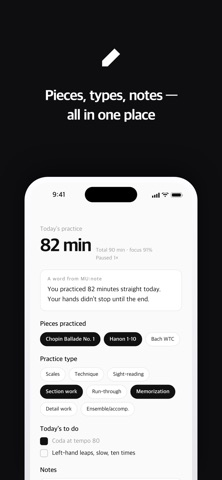
After each session, pick the pieces and practice types, and jot a quick note. The calendar shows every practice day, with daily totals and focus.
■ A word from MU:note
When a single session passes 20 minutes, a two-sentence note arrives, drawn from your history. It's for signed-in users, and uses only stats — practice time, focus, practice types. Your notes and piece names are never sent.
■ Start without an account
Records and the calendar work without signing up. Past months' details and the note from MU:note open when you sign in. Sign in, and your history is stored safely — switch phones or reinstall, and it comes back.
■ Quiet reminders
One gentle reminder a day, at the time you choose. It never scolds you for a day off. Off by default.
■ Friends in the same practice room
Connect with a friend code and their Mucho walks into your practice room. A friend who practiced today plays; after a few days off, they lie down. Pick a Mucho that plays your instrument, and send friends Nice work · Awesome · Off to practice too · Let's practice! You choose what friends can see. Pieces and memos are never shown to anyone.
■ Today's practice, as a card
Save a reflection and the day becomes a single card. You can make one from any past day in the calendar too. Your practice room, with your friends in it, becomes a card as well, reactions and all. Cards are made on your phone and never sent to a server.
■ Dress up in the store
In the store you can pick outfits, hairstyles and accessories for your Mucho and decorate your practice room. Friends see what your Mucho wears in their practice room, and when you visit a friend's room you see the background and props they chose. Change the calendar theme and the calendar and summary card in the Records tab take on that color. Each month, specials you can only get that month open too. Notes are a currency used only inside the app.
The time MU:note counts is the time we practiced together. Practice done without the app is still practice.
Each subscription will automatically renew 3 days before the expiration date for
the same time period. Subscriptions can be cancelled at any time before the renewal.