Mud Portal is a full-featured MUD client for iPhone — connect to any text-based multiplayer world with desktop-class power and screen-reader-first design.
ACCESSIBILITY FIRST
- VoiceOver: every control labeled; long text reads in order, title first
- Gag triggers silence spam for VoiceOver too
- Bluetooth/hardware keyboard: Up/Down recalls history
CONNECT & PLAY
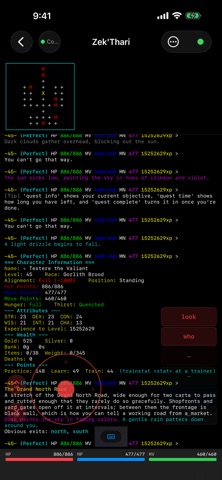
- Full Telnet, 16-/256-color ANSI, optional TLS encryption and MCCP2 compression
- Multiple simultaneous sessions with tab switching
- Reconnects automatically if the network blips
- GMCP support — vitals (auto-detects nonstandard gauges), room tracking
QUICK COMMAND GROUPS (NEW)
- Group quick commands by name and color — always-expanded or tap-to-open, per-button color overrides
- Flip buttons: one button holds two commands, alternating each press
- Reorder groups and buttons to match how you play
DISCOVER MUD DIRECTORY (NEW)
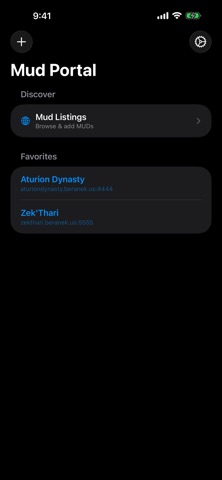
- Browse a curated, live MUD directory — filter by genre or screen-reader-friendliness, sort A-Z/Z-A, add with a tap; works offline from a cache
- Submit a MUD, or report one inactive, right from the app
LOCK SCREEN & DYNAMIC ISLAND (PRO)
- Live Activity + Dynamic Island: each session's server, character, connect time, idle-timeout countdown — disconnect right there, on-device only, no server involved
- If iOS pauses the app in the background, the card says so plainly instead of guessing
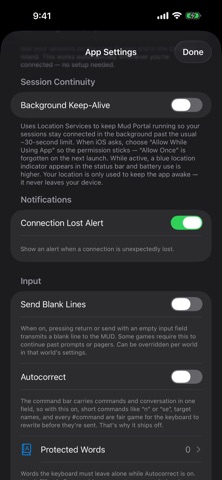
BACKGROUND KEEP-ALIVE (PRO, OPTIONAL)
- Off by default — turn on in Settings to stay connected, foreground or background
- Uses location only to keep the session active — never stored or sent; iOS always shows its own location indicator while it's on
SPLIT-SCREEN MAPS
- Servers using ANSI scroll regions get a pinned map above scrolling text, working automatically with standard VT100 positioning
iCLOUD SYNC
- Optional Pro sync: servers, triggers, aliases, scripts, and maps stay in step across devices via your private iCloud, off by default
- Device prefs (D-pad, haptics, fonts) stay per-device; clear status if sync needs attention
AUTOMATION
- Powerful triggers — regex/text match to highlight, gag, rewrite, send, play sounds, or vibrate; aliases with argument substitution and $variables
- Organize triggers, aliases, scripts, and timers into toggleable Classes; tick timers repeat commands on an interval
- Built-in scripting — variables, loops, conditionals, functions, #wait pauses, #if conditionals
- Combat tracking with real-time overlay and summary; smart, context-aware command suggestions
SESSION LOGS
- In-app log viewer (ANSI color) saved to Files (On My iPhone → Mud Portal) — color or plain text
CONTROLS
- D-pad with optional diagonals, movable to either side; four editable macro buttons, long-press to edit
- Landscape: D-pad and quick commands on opposite edges (top-aligned, scrollable); lock orientation per server
- Command history with prefix search; scrollback with scroll-lock indicator
- iPad / hardware keyboard: Cmd/Option + 1-9 jumps to a session
EXTRAS
- Built-in or imported alert sounds, preview first; in-app Help & Guide
- Adjustable font size per server; configurable timeout, graceful disconnect
NO ADS, NO GIMMICKS
Connecting, unlimited servers, maps, triggers, filtering, and every accessibility feature are free — no ads, no tracking.
MUD PORTAL PRO (optional)
Pro unlocks scripting, advanced/conditional triggers, combat analytics, smart suggestions, iCloud sync, Lock Screen/Dynamic Island, Background Keep-Alive, unlimited triggers/classes/timers/sounds. Yearly subscription or lifetime unlock; tips welcome.
Two MUD worlds are pre-loaded — add your own anytime.
Mud Portal Pro is an auto-renewing subscription, charged to your Apple ID at purchase; it renews automatically unless canceled at least 24 hours before the period ends. Manage or cancel anytime in Apple ID Account Settings.
Terms of Use (EULA): https://www.apple.com/legal/internet-services/itunes/dev/stdeula/
Privacy Policy: https://beranek.us/mudportal-privacy-policy.html
Show more
Show less