

Mugaam Recruiter
Mugaam Recruiter is made and published by Skyraan Technologies. AppBrain is an independent app data site and isn't affiliated with Skyraan Technologies. The app name, icon, screenshots and description belong to Skyraan Technologies and are shown as published on the App Store.
AppBrain's verdict
- Last updated
- February 28, 2024
Rankings
App Store top chartsApp Store Rankings for Mugaam Recruiter
Competitors
Similar apps and more from Skyraan Technologies











Releases
Updates seen on the App Store- Version
- 1.0
- Launched
- February 2024
No changelog data
User feedback
Ratings and reviews on the App StoreComments on Mugaam Recruiter for iOS
We don't have enough comments to show example comments. Please check back later.
Technology
Found in the app by AppBrain- Price
- Free
- App size
- 10.8 MB
- Content rating
- Everyone
Technologies used by Mugaam Recruiter
About the app and developer
About Mugaam Recruiter
Mugaam Recruiter is a business app developed by Skyraan Technologies.
User Ratings
The app has no ratings yet.
App Information
Mugaam Recruiter is freely available from the App Store. The app size is 10.75 MB. The latest version available is 1.0. The last update was on February 28, 2024.
Technical Requirements
The app has a content rating of Everyone. The app has been available on the App Store since February 2024.
Developer information for Skyraan Technologies
Address:
Frequently asked questions about Mugaam Recruiter
Is Mugaam Recruiter free?
Yes. Mugaam Recruiter is free on the App Store.
Is Mugaam Recruiter still available?
Yes. Mugaam Recruiter is on the App Store, and the last update we saw was on February 28, 2024.
How large is Mugaam Recruiter?
Mugaam Recruiter is 10.75 MB.
Is Mugaam Recruiter suitable for children?
App Store rates the content of Mugaam Recruiter as suitable for everyone.
Who made Mugaam Recruiter?
Mugaam Recruiter was developed by Skyraan Technologies. It is listed in the business category on the App Store.
What are the best alternatives to Mugaam Recruiter?
People looking at Mugaam Recruiter also look at these business apps: Candidsuite, SaraswatiInfo, Spires Recruit, Zoho Recruit - Hire with AI, Recruitment.Exchange.
Store listing
By Skyraan Technologies, from the App Store




Description by Skyraan Technologies Written by the developer, not by AppBrain. Click to read.
By representing each of the companies registered in Mugaam, each recruiter or employer is provided with secured login credentials while registering their business on the Mugaam job portal site. Once registered, the same login credentials can be used to login to the Mugaam Recruitment app, and if the password is forgotten, an employer can reset it through the registered email address. After entering the dashboard, the recruiters are empowered with several features, such as job Posts, analytics, industry, recruiter information, and much more, each of which has its own purpose.
Note: An employer or recruiter can’t post jobs directly in the Mugaam Recruiters App. Mugaam supports social media logins such as Facebook, Google, and Apple accounts.
As new jobs are posted daily, a recruiter must be aware of the Mugaam job post validity, which is up to a maximum of 30 days; after that, the job will expire. Get ready to be explored with each of the features and their sub-functions of the Mugaam Recruiters App. Let’s see each of the job posts' behavior individually below:
1.Job Posts: Just start to engage with all the possible jobs posted by the respected recruiter, with each card representing certain values.
• Received – The Number of applications received.
• Suggested: Based on the skill set that sorts candidate.
• Shortlisted: Each application is finalized for the post.
• Status: Make the job posting active or inactive.
One can use the filter to see the listings for Active, In-Active or Expired job posts on the same page.
On clicking a job post, one is offered with,
• New: Candidate lists that have not yet been seen.
• Viewed: The candidate list has been viewed.
• Considered: candidates who may or may not be chosen.
• Shortlisted: A job seeker who has been chosen for a position.
• Candidates who have been rejected.
These lists can be sorted out based on different time periods, say last week, last month, and custom date ranges.
Again, clicking on the candidates’ information may take the employer or recruiter to the candidate's resume to have an overview of it, and next in line would take the recruiter to the candidate's contact details. The recruiter has the option to download the uploaded resume.
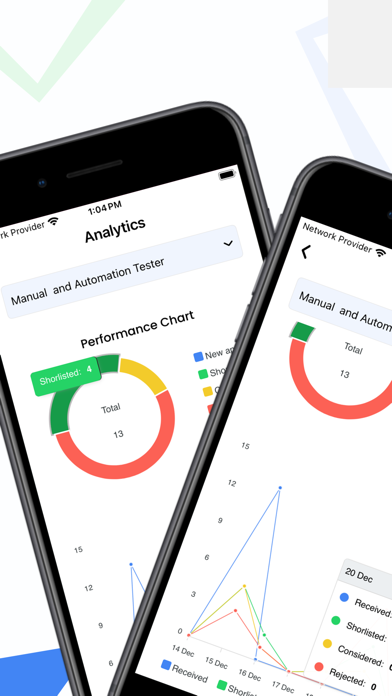
2.Analytics: Select a particular job post to view their individual performance in attracting job applicants in a more graphical format, say,
• Performance Graph: It’s a bar graph representation of job visits, jobs applied, and jobs saved.
• Performance Chart: Let's see the job or application status in a pie chart.
• Line Graph: Recruiters' decisions on applications represented here.
Only the active jobs alone will showcase the analytics information.
3.Industry (or) Organization: Just make the readers or job applicants aware of the particular information on the company.
• About: Let’s have a brief introduction about the company, who is the director of the company, and so on.
• Documents: government-authorized verification.
• Gallery: Companies picture (or image) albums with teams.
• Active Jobs: Employers' post and actively maintain jobs.
4.My Info (or) Recruiters Info: Representing the recruiter’s information here.
• About: The most informative data about the recruiter.
• Documents: An official paper authorizing the recruiter.