Mult Controller is an overall app developed by 淞元 石.
Download Statistics
User Ratings
The app has no ratings yet.
App Information
Mult Controller is FREE to download. The APK download size is 3.30 MB. The latest version available is 1.0. The last update was on June 22, 2026.
Technical Requirements
The app has a content rating of Everyone. The app has been available on Google Play 1 day ago.
Description
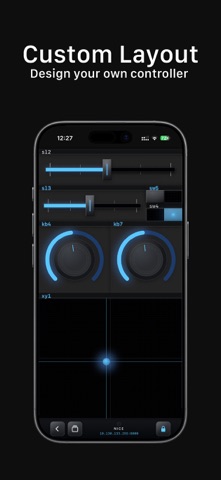
Mult Controller is a canvas-based OSC and MIDI controller for iOS. Build your own control surface — place knobs, pads, sliders, and sensor-driven widgets on an open canvas, then lock it and play.
CANVAS AND SESSIONS
Name a session, choose OSC or MIDI, set a destination, and a blank canvas appears. Toggle edit/performance mode with the lock button. In edit mode, drag and configure components freely. In performance mode, the layout freezes and controls go live. Sessions save automatically as JSON files visible in Files.app under Mult Controller → Sessions/. Run multiple sessions simultaneously — each has its own transport destination.
11 BUILT-IN COMPONENTS
Knob — rotary dial, continuous output. Slider — linear fader in Small, Medium, and Large. Button — momentary or latch; fires MIDI Note or CC. Switch — persistent on/off toggle. XY Pad — two-axis touchpad, two independent values. Physical Pad — XY pad with real momentum physics; release and the point coasts. Image Pad — samples RGB from a photo; streams red, green, blue as three values. Gyro Pad — device tilt drives XY output automatically, no touch needed. AR Coordinates — ARKit tracks position in space and emits X, Y, Z continuously. Compass — magnetometer outputs heading in degrees (0–360). Envelope Follower — microphone amplitude drives a control channel in real time.
OSC
Sends OSC 1.0 over UDP. Type a destination IP and port — no pairing needed. Broadcast mode reaches every device on the subnet. Choose a coalescing rate of 30, 60, or 120 Hz. Compatible with Ableton Live, Max/MSP, SuperCollider, QLab, TouchDesigner, Resolume, and any OSC-capable software.
MIDI
Switch a session to MIDI and components send over CoreMIDI 2.0. Connect via Bluetooth MIDI or Network MIDI over Wi-Fi. Each component has its own channel, CC number, message type, note, and velocity — fully configurable per control.
PERMISSIONS
MultOSC requests permissions only for the components that need them. iOS will prompt you the first time a component is activated. To grant or revoke permissions manually, go to Settings → Privacy & Security on your device.
Camera — required by AR Coordinates to run ARKit world tracking. Without it, the component places on canvas but outputs nothing.
Microphone — required by Envelope Follower to read amplitude. Without it, the output stays at zero.
Bluetooth — required to discover and pair BLE MIDI instruments and controllers.
Local Network — required for OSC UDP packets and Network MIDI over Wi-Fi. Without it, no messages leave the device.
Location (When in Use) — required by Compass to read magnetometer heading via CoreLocation. Without it, the needle stays at 0°.
If a permission is denied, the affected component stays placed on the canvas but its output freezes. Re-enable the permission in Settings and the component resumes immediately — no restart needed.
PRIVACY
MultOSC collects no data — no analytics, no crash reporters, no usage tracking. Session files are plain text in your Documents folder. The only outbound traffic is the OSC and MIDI you configure yourself.
AppBrain offers valuable information about your app and those of your competitors. Join AppBrain for free and claim this app to view more ranking data, view history etc.
Each subscription will automatically renew 3 days before the expiration date for
the same time period. Subscriptions can be cancelled at any time before the renewal.