AppBrain
AppBrain
  • Apps
  • Apps being viewed right now Trending apps today Most popular apps All-time most installed apps Top rated apps iPhone and iPad apps
  • Intelligence ▾
    Intelligence overview → Track any Android app or your whole market
    Track & analyze
    Keyword Tracker & OptimizerTrack & improve Play rankings App Performance ReportOne-off PDF for any app StatisticsFree Android & Play market stats
    Promote your app
    Featured Apps App Links
  • Intelligence
  • Pricing
  • Dashboard
  • Sign up
  • Log in
App Store Apps > Utilities > Multiple Timer Countdown Alarm
Multiple Timer Countdown Alarm icon

Multiple Timer Countdown Alarm

1.2
Kutay YILMAZ
0.00
0 reviews
Free

Multiple Timer Countdown Alarm Screenshot 1 of 4
Multiple Timer Countdown Alarm Screenshot 2 of 4
Multiple Timer Countdown Alarm Screenshot 3 of 4
Multiple Timer Countdown Alarm Screenshot 4 of 4
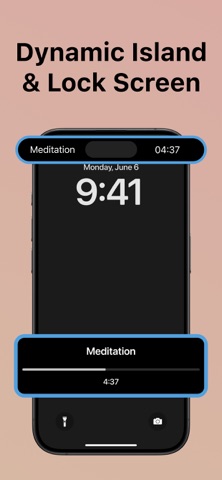
Screenshots by Kutay YILMAZ, from the the App Store listing
View on the App Store

About Multiple Timer Countdown Alarm

Multiple Timer Countdown Alarm is an utilities app developed by Kutay YILMAZ.

User Ratings

The app has no ratings yet.

App Information

Multiple Timer Countdown Alarm is freely available from the App Store. The app size is 13.73 MB. The latest version available is 1.2. The last update was on December 8, 2024.

Technical Requirements

The app has a content rating of Everyone. The app has been available on the App Store since November 2024.

Multiple Timer Countdown Alarm is made and published by Kutay YILMAZ. AppBrain is an independent app data site and isn't affiliated with Kutay YILMAZ. The app name, icon, screenshots and description belong to Kutay YILMAZ and are shown as published on the App Store.

Description by Kutay YILMAZ (from the App Store)
Countdown Timer・Multi Clock is an all-in-one timer app designed to meet your everyday needs. Whether you're looking to boost productivity, manage your workouts, or simply measure time with precision, this intuitive and versatile app is perfect for you.

Key Features:
Multiple Timers:
Manage several timers simultaneously. Create, customize, and start multiple timers with just a single tap. This feature is ideal for multitasking, whether you're cooking, studying, or handling different activities at once.

Countdown & Interval Timers:
Set countdowns for specific tasks or use interval timers for fitness routines such as HIIT, Pomodoro technique, or other time-based exercises. Our interval timer is highly customizable, allowing you to adjust work and rest periods to fit your training needs.

Stopwatch Functionality:
Use the built-in stopwatch for precise time tracking. Whether you're timing workouts, laps, or any other activity, the stopwatch ensures you get accurate results down to the second.

Widgets for Quick Access:
With widget support, access your timers directly from your home screen. Start, stop, or reset timers instantly without opening the app, making it convenient for those on the go.

Customizable Notifications & Alerts:
Set sound or vibration alerts to notify you when a timer ends. Choose from a variety of sounds or even customize your alert tone, ensuring you never miss an important task or deadline.

Interval Training Support:
Perfect for athletes, fitness enthusiasts, or anyone practicing interval training like Tabata or HIIT. You can set intervals for your workout sessions, making it easy to switch between high-intensity work periods and recovery times.

Pomodoro Timer:
Improve your focus and productivity using the Pomodoro technique. Work for 25 minutes and take short breaks to stay fresh and efficient throughout the day.

Clock & Time Management Tools:
Use our app as a clock with features like world clock, time tracking, and more, helping you manage your time effectively whether it's for personal or professional use.

Fitness & Workout Timers:
For gym-goers, runners, or anyone who exercises, the app provides custom fitness timers. Track your sets, reps, and rest periods with precision to maximize your performance during workouts.

Beautiful, User-Friendly Interface:
The sleek and intuitive design ensures that you can set up and manage timers quickly and easily. With a clean layout, you can access all features effortlessly, making time management simpler than ever.

Terms&Conditions: https://www.apple.com/legal/internet-services/itunes/dev/stdeula/
Privacy Policy: https://www.termsfeed.com/live/4417e139-649e-475d-898f-9c08a147ed4e
Show more Show less

Alternatives to Multiple Timer Countdown Alarm

Multitimer Countdown: CountKit icon Multitimer Countdown: CountKit
Ishtiak Ahmed
4.0
Free
4 ratings
Multi Timer & Interval Timer icon Multi Timer & Interval Timer
Stas Foltea
0.0
Free
Multistage Timers icon Multistage Timers
RAGEIX LLC
0.0
Free
TimeMate - 習慣化ルーチンタイマー icon TimeMate - 習慣化ルーチンタイマー
arai.me
0.0
Free
LiteTimer - Simple Timer icon LiteTimer - Simple Timer
博 杨
5.0
Free
1 ratings
Family Safety Plan icon Family Safety Plan
Swiftmade OÜ
5.0
Free
1 ratings
MinSec - Multi Timer icon MinSec - Multi Timer
Tomohisa Uchida
5.0
Free
3 ratings

More from Kutay YILMAZ

Bill Organizer: Billy icon Bill Organizer: Billy
Kutay YILMAZ
4.7
Free
6 ratings
Bill Organizer: Billy Pro icon Bill Organizer: Billy Pro
Kutay YILMAZ
0.0
Free

Changelog of Multiple Timer Countdown Alarm

No changelog data

Developer information for Kutay YILMAZ

Kutay YILMAZ

Address:

Share Multiple Timer Countdown Alarm

Comments on Multiple Timer Countdown Alarm for iOS

We don't have enough comments to show example comments. Please check back later.

App Store Rankings for Multiple Timer Countdown Alarm

This app is not ranked

Technologies used by Multiple Timer Countdown Alarm

Apps other people are watching Today's trending apps Popular Utilities Apps Price drops on Google Play Top new apps
Multitimer Countdown: CountKit icon Multitimer Countdown: CountKit
Multi Timer & Interval Timer icon Multi Timer & Interval Timer
Multistage Timers icon Multistage Timers
TimeMate - 習慣化ルーチンタイマー icon TimeMate - 習慣化ルーチンタイマー
LiteTimer - Simple Timer icon LiteTimer - Simple Timer
Family Safety Plan icon Family Safety Plan
MinSec - Multi Timer icon MinSec - Multi Timer
AppBrain Intelligence premium content

Subscribe now to get full and unlimited access to AppBrain Intelligence. You'll have access to:

  • App Intelligence dashboard (performance timeline, competitor comparison, country rankings, insight cards)
  • Detailed ranking data per app
  • Full timeline per developer
  • Device market shares data per country
  • Unlimited keyword tracking
1 Month

$75/mo
(billed every month)

SAVE 0%
Subscribe
3 Months

$65/mo
($195 billed every 3 months)

SAVE 13%
Subscribe
1 Year

$57.50/mo
($690 billed every year)

SAVE 23%
Subscribe
Each subscription will automatically renew 3 days before the expiration date for the same time period. Subscriptions can be cancelled at any time before the renewal.

AppBrain is an app data site, we track rankings, ratings, installs for all apps and games on Google Play and the App Store. AppBrain doesn't host app files or APKs, all install links go directly to the official store. All trademarks are owned by their respective owners.

More apps

  • Top Android apps being viewed
  • FolderWall: All Apps Organizer
  • Dino Dig Tycoon stats
  • GhostDroid

App statistics

  • Android statistics
  • Google Play Developer stats
  • Trending Android Apps
  • Trending iOS apps
  • Top popular Apps
  • Buy the best Android phone
  • Buy & sell app businesses

About AppBrain

  • Contact
  • Privacy
  • Documentation
  • DMCA takedowns
  • Blog
  • Android app Install tracking and attribution options for the AppBrain ad network
© 2010-2026 - AppBrain