

MuseTap is made and published by 新棋 佘. AppBrain is an independent app data site and isn't affiliated with 新棋 佘. The app name, icon, screenshots and description belong to 新棋 佘 and are shown as published on the App Store.
AppBrain's verdict
- Last updated
- October 12, 2026
- Size
- 4.79 MB
User feedback
Ratings and reviews on the App StoreComments on MuseTap for iOS
We don't have enough comments to show example comments. Please check back later.
Store listing
By 新棋 佘, from the App Store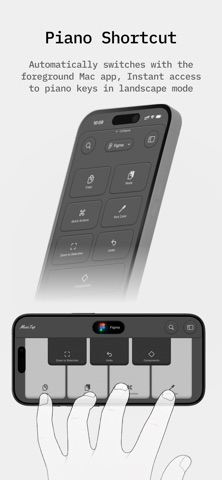


Screenshots by 新棋 佘, from the the App Store listing
Description by 新棋 佘 Written by the developer, not by AppBrain. Click to read.
Turn your iPhone into a Mac remote control. On the same local network, it quickly discovers and connects to your Mac.MuseTap is specifically designed for "couch users," refreshing your Mac experience on the living room TV screen with the smooth fluidity of using Apple TV.
With customizable shortcuts, you can launch apps, open websites with one tap, and freely operate your Mac. MuseTap also provides convenient media and system controls, including play/pause, volume, and display management (e.g., switching displays/screensavers). Pair once, connect faster—perfect for browsing on the couch, controlling media, or using your Mac without leaving your seat.
Main Features
Seamless Touch Control Experience: High-precision touchpad supports gesture swipes, taps, and scrolling. Optimized for large screens with responsive and fluid operation.
Remote Keyboard Input: Type directly on your Mac using your iPhone's keyboard. Searching for videos, entering passwords, or replying to messages has never been this convenient.
Rapid App Launching: Built-in customizable quick launcher. Open browsers, video software, or specific web pages with a single click, instantly accessing content.
Media and System Controls: Easily adjust volume, play/pause. Supports remote sleep, shutdown, and network wake-on-LAN for your Mac.
Original remote control themes: Featuring multiple custom app icon designs with continuously updated remote control themes.
With customizable shortcuts, you can launch apps, open websites with one tap, and freely operate your Mac. MuseTap also provides convenient media and system controls, including play/pause, volume, and display management (e.g., switching displays/screensavers). Pair once, connect faster—perfect for browsing on the couch, controlling media, or using your Mac without leaving your seat.
Main Features
Seamless Touch Control Experience: High-precision touchpad supports gesture swipes, taps, and scrolling. Optimized for large screens with responsive and fluid operation.
Remote Keyboard Input: Type directly on your Mac using your iPhone's keyboard. Searching for videos, entering passwords, or replying to messages has never been this convenient.
Rapid App Launching: Built-in customizable quick launcher. Open browsers, video software, or specific web pages with a single click, instantly accessing content.
Media and System Controls: Easily adjust volume, play/pause. Supports remote sleep, shutdown, and network wake-on-LAN for your Mac.
Original remote control themes: Featuring multiple custom app icon designs with continuously updated remote control themes.
Safety and technology
Found in the app by AppBrain- Price
- $19.99
- App size
- 4.79 MB
- Content rating
- High
Technologies used by MuseTap
Releases
Updates seen on the App Store- Version
- 1.2.2
- Launched
- January 2026
No changelog data
Alternatives
Similar apps and more from 新棋 佘
Rankings
App Store top chartsApp Store Rankings for MuseTap
This app is not ranked
About the app and developer
About MuseTap
MuseTap is an utilities app developed by 新棋 佘.
What is the rating of MuseTap?
MuseTap has no ratings yet.
Is MuseTap free?
MuseTap costs $19.99. The app size is 4.79 MB. The latest version available is 1.2.2. The last update was on October 12, 2026.
What are the requirements for MuseTap?
The app has a content rating of High Maturity. The app has been available on the App Store since January 2026.
Developer information for 新棋 佘
Address: