

Music Rover - Discover Player
Music Rover - Discover Player is made and published by birnimal APP. AppBrain is an independent app data site and isn't affiliated with birnimal APP. The app name, icon, screenshots and description belong to birnimal APP and are shown as published on the App Store.
AppBrain's verdict
- Rating on App Store
- 4.63
- 8 ratings
- Last updated
- September 28, 2026
It doesn't have enough ratings yet to judge what users think.
Rankings
App Store top chartsApp Store Rankings for Music Rover - Discover Player
Competitors
Similar apps and more from birnimal APPAlternatives to Music Rover - Discover Player


More from birnimal APP



Releases
Updates seen on the App Store- Version
- 2.4.5
- Launched
- September 2022
No changelog data
User feedback
Ratings and reviews on the App StoreComments on Music Rover - Discover Player for iOS
We don't have enough comments to show example comments. Please check back later.
Technology
Found in the app by AppBrain- Price
- Free
- App size
- 30.1 MB
- Content rating
- High
Technologies used by Music Rover - Discover Player
About the app and developer
About Music Rover - Discover Player
Music Rover - Discover Player is a music app developed by birnimal APP.
User Ratings
Music Rover - Discover Player is rated 4.63 out of 5 stars. The rating is based on 8 ratings.
App Information
Music Rover - Discover Player is freely available from the App Store. The app size is 30.12 MB. The latest version available is 2.4.5. The last update was on September 28, 2026.
Technical Requirements
The app has a content rating of High Maturity. The app has been available on the App Store since September 2022.
Developer information for birnimal APP
Address:
Store listing
By birnimal APP, from the App Store


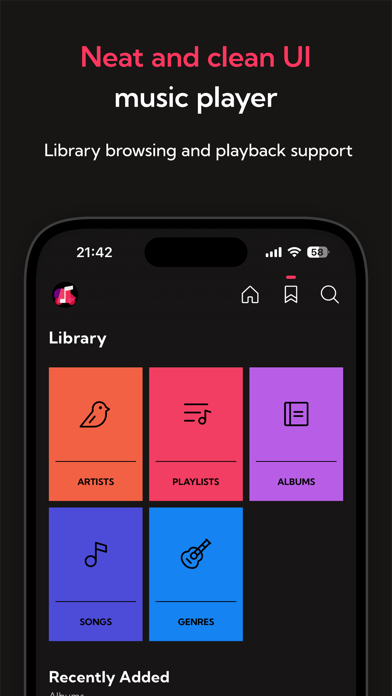

Description by birnimal APP Written by the developer, not by AppBrain. Click to read.
* To access all features of this app, an Apple Music subscription is required. If you are not subscribed, Apple Music songs will play as 30-second preview versions.
---
[ AI Assistant suggests tracks ]
The assistant with AI will select tracks based on your requests and create a track list.
Like your personal music curator, the assistant will help you discover music.
---
[ Start station immediately ]
Station is an Apple Music feature that automatically plays recommended songs based on song or artist.
As soon as you drag your favorite song to the Station icon in the lower right corner, the station will start and automatically play songs related to that song.
---
[ Three playback queues ]
Even if a song is popular or recommended, you will not know if you like it until you actually listen to it.
In order to listen to a variety of songs, the application has the following three types of playback queues.
A queue is a list of songs to be played.
- Listen Now Queue
This is a basic queue that is automatically added when you play Apple Music content.
- Listen Later Queue (Save temporarily)
This queue is for temporarily saving a song in case you want to listen to it but are interested in another song at the moment.
The song will remain even after you exit the application, so we recommend using it if you are not sure if you want to add the song to your playlist.
- Playlist (Save the song)
This queue provides immediate access to one of the playlists in the music library.
You can also long press a song or album and drag it to the playlist icon to immediately add it to the currently selected playlist.
Use this function if you want to save a song you like.
---
[ Drag and drop ]
Albums, playlists, and songs can be added to each queue or stations can be started by drag and drop.
---
[ Quickly display albums and artists ]
From each song, you can view the album and artist page for that song.
---
[ Charts and radios in various countries ]
Charts and radios are not limited to your own country. You can display content from all over the world.
* Songs not published in your area may not be displayed or played.
---
Recommended usage
1. Check the home screen regularly for recommendations
Music Rover's home screen will show you recommended albums and playlists based on the songs you have played so far (* for Apple Music subscribers). The recommendations change based on what you have listened to recently and are updated frequently, so the more you listen, the more likely you are to find new music.
2. Automatic playback of songs based on your favorite songs
When you start a station from a song of your choice, a song based on that song will automatically be selected and played. You can start a station as soon as you press and hold a song or album and drag it to the station icon in the lower right corner. You can also start a station from the currently playing song.
3. Listen to related albums and artists
Make sure to listen to the albums and artists of your favorite songs, and the songs of artists related to that artist. You can move from the related artist on the artist page to other artist pages one after another. If you have a lot of songs on your mind, we recommend adding songs to the "Listen Later" queue and listening to them later.
---
Subscription
Please refer to the following terms and conditions when using subscriptions.
1. Privacy policy: https://app.birnimal.net/en/ios/music-rover/privacy-policy
2. Terms of use: https://www.apple.com/legal/internet-services/itunes/dev/stdeula/