

MusicShelf Offline Player
MusicShelf Offline Player is made and published by Tetsuya Kawashima. AppBrain is an independent app data site and isn't affiliated with Tetsuya Kawashima. The app name, icon, screenshots and description belong to Tetsuya Kawashima and are shown as published on the App Store.
AppBrain's verdict
- Last updated
- October 19, 2026
Rankings
App Store top chartsApp Store Rankings for MusicShelf Offline Player
Competitors
Similar apps and more from Tetsuya KawashimaAlternatives to MusicShelf Offline Player


More from Tetsuya Kawashima


Releases
Updates seen on the App Store- Version
- 1.0.2
- Launched
- August 2026
No changelog data
User feedback
Ratings and reviews on the App StoreComments on MusicShelf Offline Player for iOS
We don't have enough comments to show example comments. Please check back later.
Technology
Found in the app by AppBrain- Price
- Free
- App size
- 7.96 MB
- Content rating
- Everyone
Technologies used by MusicShelf Offline Player
About the app and developer
About MusicShelf Offline Player
MusicShelf Offline Player is a music app developed by Tetsuya Kawashima.
User Ratings
The app has no ratings yet.
App Information
MusicShelf Offline Player is freely available from the App Store. The app size is 7.96 MB. The latest version available is 1.0.2. The last update was on October 19, 2026.
Technical Requirements
The app has a content rating of Everyone. The app has been available on the App Store since August 2026.
Developer information for Tetsuya Kawashima
Address:
Store listing
By Tetsuya Kawashima, from the App Store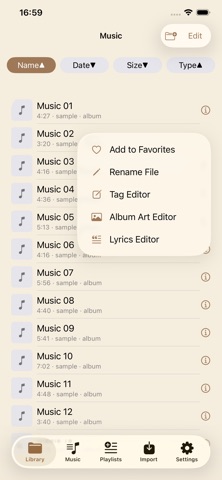


Description by Tetsuya Kawashima Written by the developer, not by AppBrain. Click to read.
【Who it’s for】
• Organize and play downloaded MP3, FLAC, M4A, and more
• Keep your folder structure as-is
• Listen reliably without an internet connection
• Edit tags, lyrics, and album art on device
【Features】
■ Import files
• Import from the Files app
• Upload from a browser on the same Wi‑Fi network (PIN protected)
■ Library management
• Library tab: browse by folder, sort
• Music tab: flat list of all tracks, search, sort
• Scan tags and show thumbnails
■ Playback
• Mini player + full-screen player
• Playback speed up to 8×
• A‑B repeat, bookmarks, resume from last position
• Repeat / shuffle, sleep timer
• Video playback and Picture in Picture (PiP)
• Lock Screen and Control Center controls
■ Lyrics
• Synced LRC display (full-screen)
• Embedded MP3 lyrics (USLT)
• Edit and save lyrics
■ Tags & artwork
• Edit tags for MP3 (ID3) and other supported formats
• Set or remove album art
• Optional Shift_JIS tag reload for MP3
■ Playlists & queues
• Create and manage playlists
• Save and switch between playback queues (up to 50)
• Playback history and saved A‑B repeat ranges
■ Home Screen widgets
• Playback controls
• One-tap queue switching
【Supported formats (examples)】
MP3, M4A, AAC, WAV, FLAC, AIFF, MP4, MOV, and more
【Notes】
• This app plays files already on your device. It does not stream music or sell downloads.
• Lyrics are not fetched from the internet. Use LRC files or embedded MP3 lyrics.
• Tag editing may not apply to every file format depending on how the file is saved.