

MusiStop
MusiStop is made and published by Hirame Entertainment LLC. AppBrain is an independent app data site and isn't affiliated with Hirame Entertainment LLC. The app name, icon, screenshots and description belong to Hirame Entertainment LLC and are shown as published on the App Store.
AppBrain's verdict
- Last updated
- September 13, 2026
- Size
- 5.38 MB
User feedback
Ratings and reviews on the App StoreComments on MusiStop for iOS
We don't have enough comments to show example comments. Please check back later.
Store listing
By Hirame Entertainment LLC, from the App Store


Description by Hirame Entertainment LLC Written by the developer, not by AppBrain. Click to read.
- The user specifies how many more songs to play. That number of songs will be played, and playback will automatically stop at the last song.
- The listening experience ends naturally. Therefore, it's perfect for your favorite songs.
----How to Use----
- Specifying and changing the number of songs is easy.
- Playback automatically stops after the specified number of songs have been played.
- Even if you close the app, you can reopen it and playback will start from the next song.
- Changing albums during playback is also easy. Even if you change albums, the current song will play to the end, and then it will move to the next album.
- While playback is in progress, the user can put their device to sleep or use another app*1.
---- Music items that can be played ----
- Music library (albums, playlists) stored on the device or iCloud
- Recently played items (albums, playlists, stations) on Apple Music*2.
- Recently played items (albums, playlists, stations) on Apple Music Classical*2.
---- Main screen ----
- "Album Artwork": Displays the album artwork. You can switch to a gray display.
- "Progress bar": Displays the playback position of each song. You can hide the bar.
- "Remaining time display": You can check the playing time of the specified number of songs. You can hide the display.
- "-,+" button: Specify the number of songs to play. You can specify a predetermined number by long-pressing.
- "play, stop, next, prev" buttons: play/stop/advance/return operations.
- "Shuffle": Switch to shuffle mode.
- "Artwork": Shows/hides the album artwork.
- "Notify": iPhone notifies of automatic stop by vibration. iPad notifies of automatic stop by the gradual lighting of the screen.
- "Settings" button (upper left): Moves to the settings screen.
- "AirPlay Selection" button (upper left): Displays the AirPlay selection menu. It turns red when AirPlay is selected. You can hide the button.
- "EQ (Equalizer)" button (top left)*3: Displays the EQ screen. It turns red when EQ is on. It turns blue when EQ is off.
- "List" button (upper right): Moves to the playback queue confirmation screen.
- "Select" button (upper right): Moves to the music item selection screen.
----Selection screen----
- A list of music items (playlists, albums, etc.) is displayed.
- Selecting a music item will add it to the playback queue.
- You can add multiple music items. You can also add songs one by one.
- You can also search for music items using text.
----Playback Queue Screen----
- A list of songs to play is displayed.
- Tap the artwork to display the menu.
- The menu allows you to set this song as the start song or go to the current start song line.
- You can change the order of songs by dragging and dropping. You can change the order of multiple songs at once.
----EQ Screen----*3
-The spectrum of the output waveform is displayed.
-You can adjust the frequency response of the playback output.
-Save up to 4 custom settings.
-Limitations: EQ cannot be applied to the following music data:
Subscription tracks (Apple Music, etc.), special formats like Dolby Atmos, and cloud songs (not downloaded).
These tracks will be played using standard playback.
----Settings screen----
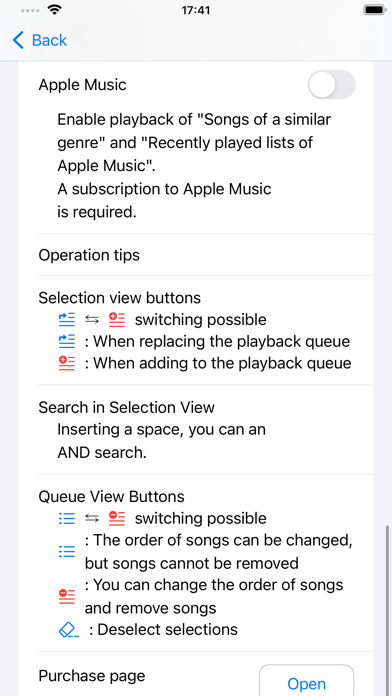
- You can make various settings.
- Also provides operation tips.
----Free trial and in-app purchases----
- During the free trial, the purchase page will be displayed occasionally.
- An in-app purchase will remove the purchase page from displaying.
- There are no functional limitations during the free trial.
- footnote -
* When you start the app for the first time, you will be asked for permission to use the media library. Permission is required to play music.
*1 Application that outputs audio may not be used together.
*2 A paid subscription to Apple Music or Apple Music Classical is required.
*3 The equalizer (EQ) is available on iOS 17 and later, and iPadOS 17 and later.
Safety and technology
Found in the app by AppBrain- Price
- Free
- App size
- 5.38 MB
- Content rating
- Everyone
Technologies used by MusiStop
Releases
Updates seen on the App Store- Version
- 2.3.8
- Launched
- December 2022
No changelog data
Rankings
App Store top chartsApp Store Rankings for MusiStop
About the app and developer
About MusiStop
MusiStop is a music app developed by Hirame Entertainment LLC.
What is the rating of MusiStop?
MusiStop has no ratings yet.
Is MusiStop free?
MusiStop is free. The app size is 5.38 MB. The latest version available is 2.3.8. The last update was on September 13, 2026.
What are the requirements for MusiStop?
The app has a content rating of Everyone. The app has been available on the App Store since December 2022.
Developer information for Hirame Entertainment LLC
Address:
Frequently asked questions about MusiStop
Is MusiStop free?
Yes. MusiStop is free on the App Store.
Is MusiStop still available?
Yes. MusiStop is on the App Store, and the last update we saw was on September 13, 2026.
How large is MusiStop?
MusiStop is 5.38 MB.
Is MusiStop suitable for children?
App Store rates the content of MusiStop as suitable for everyone.
Who made MusiStop?
MusiStop was developed by Hirame Entertainment LLC. It is listed in the music category on the App Store.