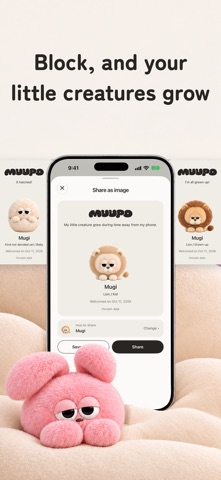
muupo: App Blocker & Focus is a health & fitness app developed by ORCADOT, K.K.
User Ratings
The app has no ratings yet.
App Information
muupo: App Blocker & Focus is freely available from the App Store. The app size is 120.70 MB. The latest version available is 1.4.2. The last update was on November 19, 2026.
Technical Requirements
The app has a content rating of Everyone. The app has been available on the App Store since October 2026.
muupo: App Blocker & Focus is made and published by
ORCADOT, K.K.
AppBrain is an independent app data site and isn't affiliated with ORCADOT, K.K.
The app name, icon, screenshots and description belong to ORCADOT, K.K. and are shown as published on the App Store.
Description by ORCADOT, K.K.(from the App Store)
When the time you set arrives, or you reach a place you chose, the apps you keep opening are blocked. While they're blocked, a fluffy little creature sleeps — and grows. muupo is an app blocker for iPhone, in 9 languages. No ads. News inside the app tells you about new friends and events.
■ Set a rule once. It runs on its own Make a time rule — say, weeknights from 11 PM to 7 AM — and the block starts on its own. There's also a Start button for right now. Your rules live in the Rules tab, and you can start from a template.
■ Arrive somewhere, and the block starts (Place rules) Save a place such as a cram school or a library. The block starts when you arrive and ends when you leave. The start and end can shift by a few minutes. For this, muupo uses your location even when the app is closed ("Always" location access). Location is used only to start the block when you arrive at a place you chose (and end it when you leave), and it is never sent to muupo's servers. When you search for a place, the words you type and a location used to find nearby places are sent to Apple's map service.
■ Put your phones down together (With friends) Pick a time and invite friends to a Room. Everyone's chosen apps stop at the same moment, and the creatures you bring sleep side by side. Up to 6 people. Others in the Room can see your nickname, the Room name and your creature's look.
■ Only the apps you choose Block just the apps you reach for without thinking — social, video, games. Phone and maps keep working. Home also shows how long you used your apps today.
■ Time away from your apps makes your creature grow While apps are blocked, your muu sleeps on its stage and grows: egg → baby → kid → grown-up. Which creature it becomes is a surprise. One day a grown-up leaves the nest, and your next egg arrives.
■ Winter friends and rarity This winter's new friends: Holy Night Friends. Creatures have a rarity from 1 to 3 stars, with secret ones and ones in rare colors. They gather in My muus after leaving the nest, and the more leave, the more special eggs arrive (2 stars or more, or 3 stars, guaranteed).
■ Points for customizing and eggs You get 1pt a month for free, or 5pt a month with Plus, and you can buy point packs in the Shop. Use points to customize Home (stage, monitor, wallpaper, phrase) or to welcome a special egg. Which creature you get is drawn at random from the ones you haven't met yet; the odds are shown in the app. You can hold up to 50pt.
■ Invite a friend, and you both get 3pt When a friend starts muupo with your invite code and does their first block, you each get 3pt (for up to 5 friends).
■ Unlock level LV.1 stops right away, LV.2 needs a 3-second hold, LV.3 makes you wait longer each try, and MAX keeps the block on until its end time. LV.2 to MAX are part of Plus. Place rule blocks go up to LV.3.
■ How it works • Blocking uses iOS Screen Time (Family Controls). muupo uses the permission only inside the app and never sends your app usage anywhere. If you turn off the Screen Time permission in iOS Settings, the block stops, even on MAX. • Some system apps, like Phone and Settings, can't be blocked by iOS. A block may start a few minutes late.
■ muupo Plus (optional) With Plus: unlimited time and place rules (free: one of each), unlock levels LV.2 to MAX, 5pt every month, and weekly and monthly trends of your app time. • Monthly or yearly subscription, both with a 1-week free trial. The price in your currency is shown in the App Store before you buy • Payment is charged to your Apple ID when you confirm. Unless you cancel at least 24 hours before the trial — and after that, each period — ends, the plan you chose starts and renews automatically. Manage it in Settings → Apple ID → Subscriptions. • Terms: https://muupo.app/terms • Privacy: https://muupo.app/privacy
Each subscription will automatically renew 3 days before the expiration date for
the same time period. Subscriptions can be cancelled at any time before the renewal.