

AppBrain's verdict
- Rating on App Store
- 5.00
- 1 ratings
- Last updated
- December 2, 2025
- Size
- 44.2 MB
It doesn't have enough ratings yet to judge what users think.
User feedback
Ratings and reviews on the App StoreComments on My Calendar Alarms for iOS
We don't have enough comments to show example comments. Please check back later.
Store listing
By Project A, Inc., from the App StoreDescription by Project A, Inc. Written by the developer, not by AppBrain. Click to read.
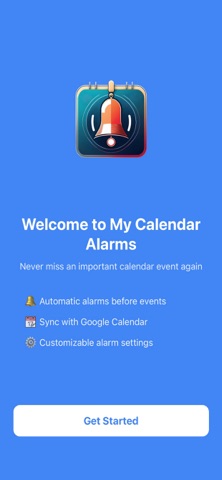
My Calendar Alarms ensures you never miss an important meeting, appointment, or event again. Get reliable, customizable notifications before every event on your Calendar, even when your phone is locked or the app is closed.
Why My Calendar Alarms?
In addition to standard calendar reminders that can be easy to miss, My Calendar Alarms gives you additional control over when and how you're notified. Set custom alarm times, choose from multiple alert sounds, and manage everything from one simple interface.
Key Features:
• Reliable Notifications - Alarms work even when your phone is locked or the app is closed
• Google Calendar Integration - Seamlessly syncs with your Google Workspace calendars
• Custom Alarm Timing - Set how many minutes before each event you want to be alerted
• Multiple Calendar Support - Choose which calendars on your account to sync and monitor
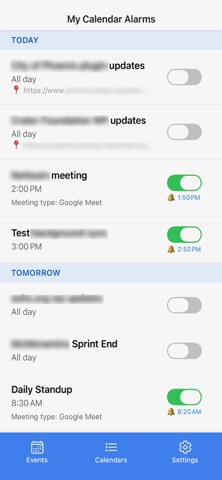
• Per-Event Control - Enable or disable alarms for individual events with a single tap
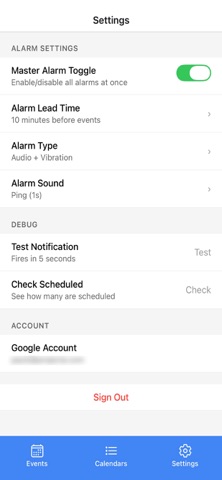
• Master Toggle - Quickly silence all alarms when needed (vacation mode, focus time, etc.)
• Custom Alert Sounds - Pick from multiple notification sounds to match your preference
• Clean, Simple Interface - See all your upcoming events and alarm status at a glance
Perfect For:
• Professionals juggling multiple meetings throughout the day
• Students who need reliable reminders for classes and study sessions
• Anyone who has ever missed an important appointment
• People who want more control than standard calendar notifications provide
• Teams using Google Workspace for scheduling
How It Works
• Connect your Google Calendar account (More calendar types in the works)
• Choose which calendars to monitor
• Set your preferred alarm timing (e.g., 10 minutes before events)
• Customize your alert sound and preferences
• Let My Calendar Alarms handle the rest
• The app automatically syncs your calendar when you refresh and schedules reliable notifications for upcoming events. Toggle alarms on or off for specific events, or use the master switch to silence everything when you need uninterrupted time.
Privacy & Security:
Your calendar data is synced directly with Google using secure OAuth authentication in read-only mode. We don't store your events on our servers. Everything stays on your device. We only read the calendar information needed to schedule your alarms.
Requirements
• Google Calendar account (Google Workspace or personal Gmail)
• iOS notification permissions for alarm delivery
What Users Love
• "Finally, loud calendar reminders to remind me to prepare for my next virtual meeting."
• "The per-event control is exactly what I needed."
• "Love that I can silence everything during vacation without losing my settings."
Coming Soon - We're constantly improving My Calendar Alarms with new features like Outlook/Microsoft 365 and support, smart filtering options, and quiet hours scheduling.
Support Questions or feedback? We're here to help! Contact us at help@projecta.com
Download My Calendar Alarms today and take control of your schedule.
Safety and technology
Found in the app by AppBrain- Price
- Free
- App size
- 44.2 MB
- Content rating
- Everyone
Technologies used by My Calendar Alarms
Releases
Updates seen on the App Store- Version
- 1.0.4
- Launched
- October 2025
No changelog data
Alternatives
Similar apps and more from Project A, Inc.Alternatives to My Calendar Alarms


More from Project A, Inc.


Rankings
App Store top chartsApp Store Rankings for My Calendar Alarms
About the app and developer
About My Calendar Alarms
My Calendar Alarms is an utilities app developed by Project A, Inc.
What is the rating of My Calendar Alarms?
My Calendar Alarms is rated 5.00 out of 5 stars, based on one rating ratings.
Is My Calendar Alarms free?
My Calendar Alarms is free. The app size is 44.20 MB. The latest version available is 1.0.4. The last update was on December 2, 2025.
What are the requirements for My Calendar Alarms?
The app has a content rating of Everyone. The app has been available on the App Store since October 2025.
My Calendar Alarms is made and published by Project A, Inc. AppBrain is an independent app data site and isn't affiliated with Project A, Inc. The app name, icon, screenshots and description belong to Project A, Inc. and are shown as published on the App Store.
Developer information for Project A, Inc.
Address: