My Exam Timer is a productivity app developed by SUMEET SINHA.
What is the rating of My Exam Timer?
My Exam Timer is rated 5.00 out of 5 stars, based on one rating ratings.
Is My Exam Timer free?
My Exam Timer is free. The app size is 1.08 MB. The latest version available is 1.1. The last update was on May 29, 2026.
What are the requirements for My Exam Timer?
The app has a content rating of Everyone. The app has been available on the App Store since May 2026.
Description by SUMEET SINHA(from the App Store)
Take control of high-stakes testing halls and classrooms with My Exam Timer—the ultimate native tool built specifically for school invigilators, assessment coordinators, instructors, and dedicated students.
Managing complex examination schedules across an entire room or auditorium shouldn't rely on error-prone dry-erase whiteboards or rigid single-countdown timers. My Exam Timer delivers a streamlined, multi-session dashboard directly to your iPhone or iPad, providing a fail-safe environment where every second counts.
Whether you are administering concurrent IB, A-Level, GCSE, university midterms, or professional mock exams, this application simplifies the administrative burden so you can focus on academic integrity.
KEY FEATURES:
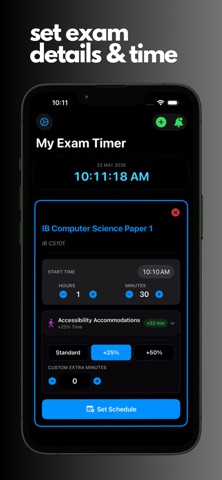
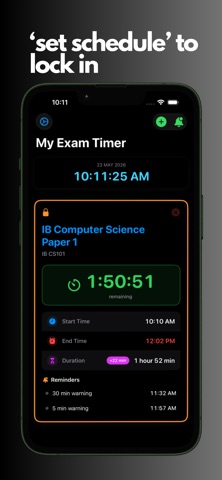
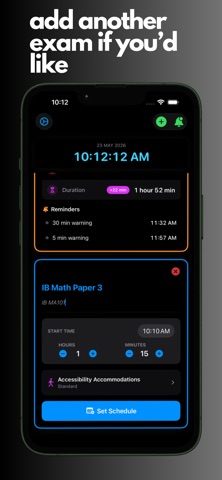
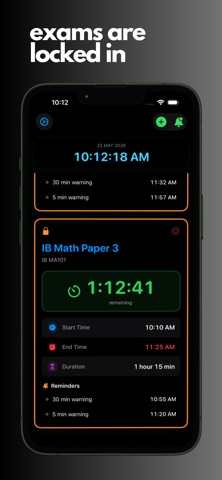
• ADVANCED MULTI-SESSION ARCHITECTURE Run multiple separate exam sessions, individual syllabus papers, or distinct class groups side-by-side on a single, clean visual grid layout. Track varying durations and parameters simultaneously without cross-contamination.
• BUILT-IN ACCESSIBILITY & ACCOMMODATIONS ENGINE Effortlessly comply with local special educational needs (SEN) or official assessment board guidelines (such as JCQ or ADA regulations). Instantly apply standard +25% Extra Time or +50% Extra Time toggles, or input custom extra minutes. The app automatically recalculates active end times and milestone intervals instantly without resetting ongoing clocks.
• FAIL-SAFE LIVE SESSION RECOVERY Exam room technology requires absolute dependability. Built with local storage persistence, your data is saved instantly as you configure it. If your device battery drops or the application process closes unexpectedly, all active testing metrics, countdown intervals, and custom metadata fields restore perfectly right upon reboot.
• HARDWARE BACKGROUND ALERTS & AUDIO PROMPTS Never miss an announcement marker again. The app pre-calculates structural testing milestones, delivering automated push notifications and clear speech-synthesized warnings for the crucial 30-minute remaining marker, the 5-minute remaining marker, and the final absolute "TIME IS UP!" announcement—even when your screen is locked or the device is sleeping.
• CLEAN, HIGH-CONTRAST INTERFACE Designed for readability across deep rooms and halls. The fixed core typography display stays prominent while keeping layout controls organized. Easily switch between Light and Dark themes to match your aesthetic preference.
Eliminate manual clock calculations and whiteboard tracking. Bring objective, auditable timeline management to your next testing cycle with My Exam Timer.
SUPPORT & FEEDBACK: We are committed to absolute accuracy in exam room administration. If you have feature requests, queries, or need help, contact us directly at contact@sumeetsinha.com.
Each subscription will automatically renew 3 days before the expiration date for
the same time period. Subscriptions can be cancelled at any time before the renewal.