

My Eyes Vision Simulator
My Eyes Vision Simulator is made and published by Edbo Techologies LLC. AppBrain is an independent app data site and isn't affiliated with Edbo Techologies LLC. The app name, icon, screenshots and description belong to Edbo Techologies LLC and are shown as published on the App Store.
AppBrain's verdict
- Rating on App Store
- 5.00
- 4 ratings
- Last updated
- March 29, 2026
- Size
- 48.2 MB
It doesn't have enough ratings yet to judge what users think.
User feedback
Ratings and reviews on the App StoreComments on My Eyes Vision Simulator for iOS
We don't have enough comments to show example comments. Please check back later.
Store listing
By Edbo Techologies LLC, from the App Store
Description by Edbo Techologies LLC Written by the developer, not by AppBrain. Click to read.
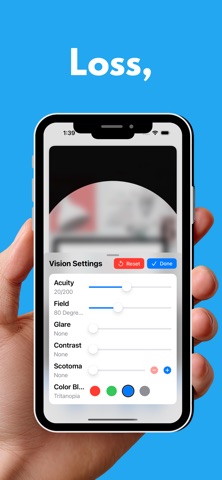
My Eyes Vision Simulator lets you experience what the world looks like through the eyes of someone living with a visual impairment. Designed as an advocacy tool for the visually impaired, educators (especially TCVIs & O&Ms), caregivers, rehabilitation professionals, family members and anyone who wants to better understand blindness and low vision.
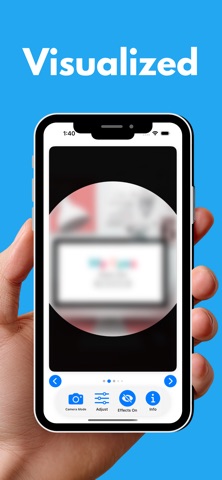
Apply real-time visual effects to sample photographs or your live camera feed and see firsthand how different eye conditions affect everyday activities like reading, navigating a street, riding the bus, or shopping for groceries.
VISUAL EFFECTS YOU CAN SIMULATE:
• Reduced Acuity — Blur the image from 20/20 all the way to light perception only, following the Snellen acuity scale
• Tunnel Vision — Restrict the field of vision from a full 180 degrees down to just a few degrees, simulating peripheral vision loss
• Glare — Wash out the image to simulate photophobia and light sensitivity
• Darkness — Dim the image to simulate night blindness and reduced light conditions
• Scotomas — Add up to 10 draggable blind spots and resize them to simulate macular degeneration, diabetic retinopathy, and other conditions
• Color Blindness — Simulate red, green, blue, or total color blindness
DESIGNED FOR ACCESSIBILITY:
My Eyes was built from the ground up with VoiceOver support. Every slider, button, and control includes descriptive labels, hints, and real-time value announcements. All 24 sample images include detailed accessibility descriptions. The built-in guide provides VoiceOver instructions for every feature.
KEY FEATURES:
• Live camera mode — apply vision simulation to your real environment in real time
• 24 sample photographs showing real-world scenes
• Combine multiple effects to simulate complex vision conditions
• Drag scotomas to demonstrate how blind spot location affects function
• Arrange multiple scotomas to simulate hemianopias
• Toggle effects on and off instantly to compare impaired and typical vision
• Reset all settings with one tap
• Built-in illustrated guide with VoiceOver tips for every feature
• Works on iPhone and iPad
Whether you are a teacher explaining vision loss at an IEP, a family member trying to understand a loved one's experience, or a professional training others in accessibility, My Eyes brings vision simulation to your fingertips.
Safety and technology
Found in the app by AppBrain- Price
- Free
- App size
- 48.2 MB
- Content rating
- Everyone
Technologies used by My Eyes Vision Simulator
Releases
Updates seen on the App Store- Version
- 1.2
- Launched
- March 2026
No changelog data
Alternatives
Similar apps and more from Edbo Techologies LLCAlternatives to My Eyes Vision Simulator







Rankings
App Store top chartsApp Store Rankings for My Eyes Vision Simulator
About the app and developer
About My Eyes Vision Simulator
My Eyes Vision Simulator is an education app developed by Edbo Techologies LLC.
User Ratings
My Eyes Vision Simulator is rated 5.00 out of 5 stars. The rating is based on 4 ratings.
App Information
My Eyes Vision Simulator is freely available from the App Store. The app size is 48.25 MB. The latest version available is 1.2. The last update was on March 29, 2026.
Technical Requirements
The app has a content rating of Everyone. The app has been available on the App Store since March 2026.
Developer information for Edbo Techologies LLC
Address: