

My Home EV Charging
My Home EV Charging is made and published by Numocity Technologies. AppBrain is an independent app data site and isn't affiliated with Numocity Technologies. The app name, icon, screenshots and description belong to Numocity Technologies and are shown as published on the App Store.
AppBrain's verdict
- Last updated
- July 22, 2026
Rankings
App Store top chartsApp Store Rankings for My Home EV Charging
Competitors
Similar apps and more from Numocity TechnologiesAlternatives to My Home EV Charging





More from Numocity Technologies


Releases
Updates seen on the App Store- Version
- 3.00.13
- Launched
- January 2021
No changelog data
User feedback
Ratings and reviews on the App StoreComments on My Home EV Charging for iOS
We don't have enough comments to show example comments. Please check back later.
Technology
Found in the app by AppBrain- Price
- Free
- App size
- 105.7 MB
- Content rating
- Everyone
Technologies used by My Home EV Charging
About the app and developer
About My Home EV Charging
My Home EV Charging is a business app developed by Numocity Technologies.
User Ratings
The app has no ratings yet.
App Information
My Home EV Charging is freely available from the App Store. The app size is 105.73 MB. The latest version available is 3.00.13. The last update was on July 22, 2026.
Technical Requirements
The app has a content rating of Everyone. The app has been available on the App Store since January 2021.
Developer information for Numocity Technologies
Address:
Store listing
By Numocity Technologies, from the App Store




Description by Numocity Technologies Written by the developer, not by AppBrain. Click to read.
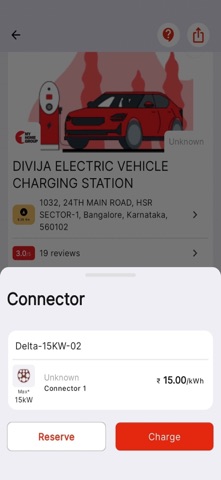
MyHome app allows you to locate and navigate to a charging station, easily start and stop charging, view live charging status, when the charging process is complete and pay for the electricity in easy steps.
Features include:
Discover charging stations:
• You can search for a particular location and all charging stations in that location will be displayed on the map
• Find out charger types to map compatibility with your EV, filter by type of connectors
• Check charge point availability in real time
• Help other users by posting your own reviews and ratings.
Registration and getting started:
• You can register directly on the app, top-up the credit balance to charge your EV using any online payment method ( Credit card / Debit card / UPI / Wallets )
• Simple scan action, select type of charging (Time/Energy) and proceed.
• With the MyHome app you can charge your EV while you grab a cup of coffee and the MyHome app lets you know when to come back.
Transactions History and Usage History:
• You can see all the information of historical transactions in the app, which provides details of money spent at which charging station and when.
Notifications:
• Receive reminders for keeping sufficient balance in the account
• Get notified when charging is completed and receive invoices and credit balance information
• Receive SMS / email for transactions and billing details.