

My Ramadan App
My Ramadan App is made and published by Mosque Madrasah Wakaf Shared Services. AppBrain is an independent app data site and isn't affiliated with Mosque Madrasah Wakaf Shared Services. The app name, icon, screenshots and description belong to Mosque Madrasah Wakaf Shared Services and are shown as published on the App Store.
AppBrain's verdict
- Last updated
- March 15, 2024
Rankings
App Store top chartsApp Store Rankings for My Ramadan App
Competitors
Similar apps and more from Mosque Madrasah Wakaf Shared ServicesAlternatives to My Ramadan App






More from Mosque Madrasah Wakaf Shared Services

Releases
Updates seen on the App Store- Version
- 3.1
- Launched
- March 2024
No changelog data
User feedback
Ratings and reviews on the App StoreComments on My Ramadan App for iOS
We don't have enough comments to show example comments. Please check back later.
Technology
Found in the app by AppBrain- Price
- Free
- App size
- 49.8 MB
- Content rating
- Everyone
Technologies used by My Ramadan App
About the app and developer
About My Ramadan App
My Ramadan App is a lifestyle app developed by Mosque Madrasah Wakaf Shared Services.
User Ratings
The app has no ratings yet.
App Information
My Ramadan App is freely available from the App Store. The app size is 49.80 MB. The latest version available is 3.1. The last update was on March 15, 2024.
Technical Requirements
The app has a content rating of Everyone. The app has been available on the App Store since March 2024.
Developer information for Mosque Madrasah Wakaf Shared Services
Frequently asked questions about My Ramadan App
Is My Ramadan App free?
Yes. My Ramadan App is free on the App Store.
Is My Ramadan App still available?
Yes. My Ramadan App is on the App Store, and the last update we saw was on March 15, 2024.
How large is My Ramadan App?
My Ramadan App is 49.80 MB.
Is My Ramadan App suitable for children?
App Store rates the content of My Ramadan App as suitable for everyone.
Who made My Ramadan App?
My Ramadan App was developed by Mosque Madrasah Wakaf Shared Services. It is listed in the lifestyle category on the App Store.
What are the best alternatives to My Ramadan App?
People looking at My Ramadan App also look at these lifestyle apps: My Ramadan 2025: Prayer Times, Ajmal, MyIman: Dhikr Dua Adhkar Azkar, BrightSign Glove, My Kitab.
Store listing
By Mosque Madrasah Wakaf Shared Services, from the App Store




Description by Mosque Madrasah Wakaf Shared Services Written by the developer, not by AppBrain. Click to read.
**Features**
- Multiple profiles creation
- Fasting chart with 3 different stickers to track your child’s performance.
- Tarawih chart with "I prayed" and "I didn't pray" stickers.
- Juz Amma surahs with "I read" and "I memorized" sticker.
- Prayer schedule time (Singapore timing).
- Selected Du’a which can be recited during Ramadan.
- Backup feature inclusive
1 My Fasting Poster Chart with Stickers:
• The poster comes with 3 different stickers to track your child’s performance in fasting. Stickers indicating "Masha Allah, I fasted!", "Alhamdulillah I tried!" and "Insha Allah, I’ll try next time..."
• Remind your child to click and drop a sticker on the numbered box every day. Praise your child if they managed to fast the whole day and encourage your child to try again if they did not succeed
2 My Tarawih Chart:
• Share with your child the virtues of Tarawih prayers.
• Encourage your child to pray Tarawih together with you either at home or in the mosque.
• Remind your child to click and drop a sticker on the numbered box every day. Praise your child if they managed to pray tarawih and encourage your child to try again if they did not succeed.
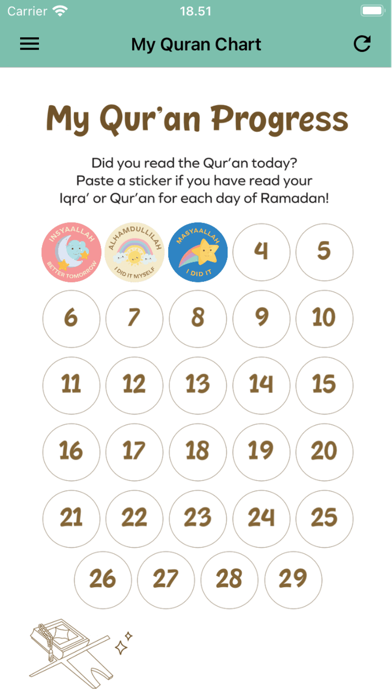
3 Quran Chart:
• Share with your child the virtues of Al Quran and the Night of Power (Lailatul Qadr)
• Encourage your child to recite the Al-Quran with you with some tafsir (explanation) of the contents.
• Remind your child to click and drop a sticker indicating I recited after each surah recital. Praise your child if they managed to complete recitation of the whole Juz Amma for little ones. Encourage your child to try again if they did not succeed.
Parents/Guardians Teaching Tips
• Introduce fasting as one of the five Pillars of Islam.
• Explain to your child what are the dos and don’ts while fasting.
• Explain the importance of fasting as stated in Al-Qur’an and Hadith.
• Set a realistic goal for each child before Ramadan on how many days they wish to fast.
• Remember to reward your child at the end of the month as a way to recognise their efforts.
• Bear in mind that children are not expected to pray Tarawih as diligently as an adult. However, older children can be strongly encouraged to pray the full set of Tarawih prayers.
• Encourage your child to recite the supplications (du’a) in the app together with you.