

MyAsset Finance V3
MyAsset Finance V3 is made and published by Shaowen Lu. AppBrain is an independent app data site and isn't affiliated with Shaowen Lu. The app name, icon, screenshots and description belong to Shaowen Lu and are shown as published on the App Store.
AppBrain's verdict
Established- Rating on App Store
- 4.75
- 4 ratings
- Last updated
- October 26, 2026
It doesn't have enough ratings yet to judge what users think.
Rankings
App Store top chartsApp Store Rankings for MyAsset Finance V3
Competitors
Similar apps and more from Shaowen LuAlternatives to MyAsset Finance V3





More from Shaowen Lu


Releases
Updates seen on the App Store- Version
- 3.10.4
- Launched
- November 2017
No changelog data
User feedback
Ratings and reviews on the App StoreComments on MyAsset Finance V3 for iOS
We don't have enough comments to show example comments. Please check back later.
Technology
Found in the app by AppBrain- Price
- $9.99
- App size
- 15.5 MB
- Content rating
- Everyone
Technologies used by MyAsset Finance V3
About the app and developer
About MyAsset Finance V3
MyAsset Finance V3 is a finance app developed by Shaowen Lu.
User Ratings
MyAsset Finance V3 is rated 4.75 out of 5 stars. The rating is based on 4 ratings.
App Information
MyAsset Finance V3 costs $9.99. The app size is 15.50 MB. The latest version available is 3.10.4. The last update was on October 26, 2026.
Technical Requirements
The app has a content rating of Everyone. The app has been available on the App Store since November 2017.
Developer information for Shaowen Lu
Address:
Store listing
By Shaowen Lu, from the App Store

Description by Shaowen Lu Written by the developer, not by AppBrain. Click to read.
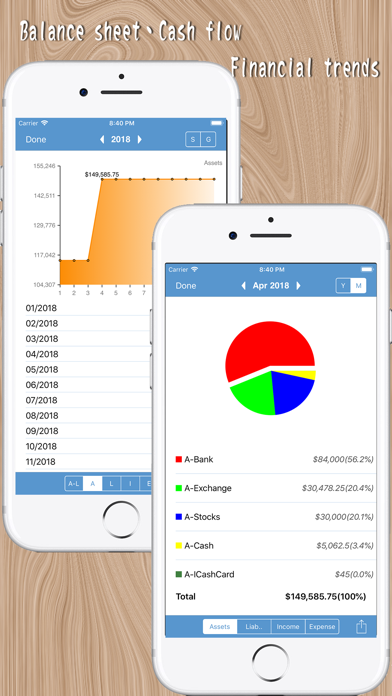
By organizing transactions into assets, liabilities, income, and expenses, MyAsset helps you clearly track where your money goes. Monthly cash flow, assets, liabilities, and net worth summaries give you a clear overview of your financial situation.
【Shared Accounting Books in V3】
V3 introduces Shared Accounting Books, allowing you to sync data across multiple devices and invite family members, friends, or colleagues to manage finances together.
Shared Accounting Books can synchronize accounts, transactions, summaries, recurring settings, budgets, and other related data. They are suitable for household budgeting, shared expenses, and managing finances together.
Shared Accounting Books require a separate subscription.
Your existing personal accounting books and all existing features remain available without a subscription. Existing data will not be affected by the V3 update.
【Key Features】
・Track daily income, expenses, and transfers
・Manage assets, liabilities, income, and expenses
・Manage and quickly switch between multiple accounting books
・Multi-currency account management
・Manage stocks, funds, foreign currencies, cryptocurrencies, and credit cards
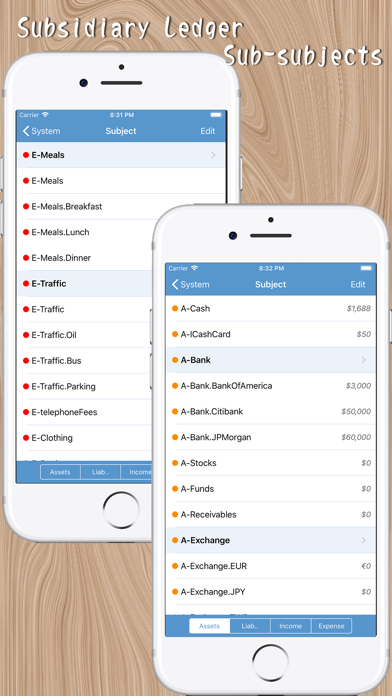
・Organize accounts with groups and multiple levels of subaccounts
・Summaries, notes, and advanced search
・Daily, weekly, and monthly income and expense statistics
・Assets, liabilities, and net worth summaries
・Budget management
・Recurring transactions and due-date reminders
・Account reconciliation
・Custom monthly starting date
・Financial reports and PDF export
・iCloud and Dropbox backup and restore
・Password and biometric protection
・Traditional Chinese, Simplified Chinese, English, and Japanese interfaces
・Multiple interface styles
【Shared Accounting Books】
・Create and manage shared accounting books
・Invite family members, friends, or colleagues
・Sync financial data across multiple devices
・Manage accounts and transactions together
・Sync summaries, recurring settings, budgets, and other data
Shared Accounting Books require a separate subscription. Personal accounting books and all existing features remain available without a subscription.
Whether you are tracking everyday expenses, managing personal assets, or handling household finances together with your family, MyAsset helps you keep a clear view of your money and overall financial situation.
Terms of Use: https://myasset.lusoft.idv.tw/terms-en.html
Apple Standard EULA:
https://www.apple.com/legal/internet-services/itunes/dev/stdeula/